You might wonder if a filament dryer worth it for your 3D printer in 2026. Many users experience failed prints or weak parts due to wet filament, making the question of a filament dryer worth it even more important. Using a filament dryer worth it can make a big difference, especially with materials like nylon and PETG. Dry nylon produces shiny, strong prints, while wet nylon results in rough and weak prints. PETG also loses its smooth finish when it absorbs moisture. If you work with hygroscopic filaments, a filament dryer worth it can help prevent common printing issues. Consider your printing habits, the materials you use, and your workspace to decide if a filament dryer worth it for you.
Key Takeaways
- A filament dryer can help make prints better. It keeps filament dry. This gives you smoother and stronger prints.
- If filament has moisture, prints can fail. Parts can be weak. Surfaces can look rough. Drying filament stops these problems.
- Some filaments take in water faster than others. Nylon and TPU are very sensitive. Drying is important for good prints with them.
- Think about how you print and what filaments you use. This helps you decide if a filament dryer is a good buy.
- Storing filament well also helps keep it good. Use airtight containers and desiccants to protect filament without a dryer.
Problems Caused by Wet Filament
Print Failures from Moisture
When your filament absorbs moisture, you might notice your prints start to fail in strange ways. Moisture-absorbed filament can cause all sorts of headaches during printing. You may hear popping sounds as the water inside the filament turns to steam. This steam creates tiny bubbles in your print, which weakens the part and ruins the surface finish. Here are some common problems you might see when moisture sneaks into your filament:
- Rough or fuzzy surfaces on your prints
- Small bubbles trapped inside the printed part
- Popping or hissing noises from the nozzle
- Weak parts that break easily or do not bond well
- Hairy or stringy finishes that look messy
If you have ever seen these issues, moisture could be the culprit.
Identifying Wet Filament
You do not need fancy tools to spot wet filament. Sometimes, you can feel the difference. Wet filament often feels sticky or soft. You might also notice the spool looks cloudy or has white patches. During printing, listen for those popping sounds. Watch for steam or extra stringing as the filament moves through the hotend. If your prints look rough or have bubbles, you probably have a moisture problem.
Tip: Store your filament in a dry box or sealed bag to keep it from absorbing moisture.
Impact on Print Quality
Moisture has an adverse effect of moisture on both the look and strength of your prints. When filament absorbs moisture, it loses its ability to bond layers tightly. This means your parts can break more easily. For example, wet nylon prints can lose up to 40% of their stiffness and only keep about 60% of their normal strength. Even if your print looks okay, it might not hold up under stress. Moisture can also mess with the size and shape of your parts, making them less accurate.
If you want strong, smooth, and reliable prints, keeping your filament dry is a must.
Filament Drying and Material Performance
You probably know that not all filaments react the same way to moisture. Some materials soak up water fast, while others stay dry longer. This can change how your prints look and feel. Take a look at this table to see how different filaments absorb moisture over time:
|
Filament |
Moisture Absorption Rate at 12h |
Moisture Absorption Rate at 60h |
|---|---|---|
|
Nylon |
≈10% |
≈12.7% |
|
PETG |
≈5.8% |
≈9.3% |
|
PLA |
≈1.5% |
≈9.8% |
|
TPU |
≈0.9% |
≈1.3% |
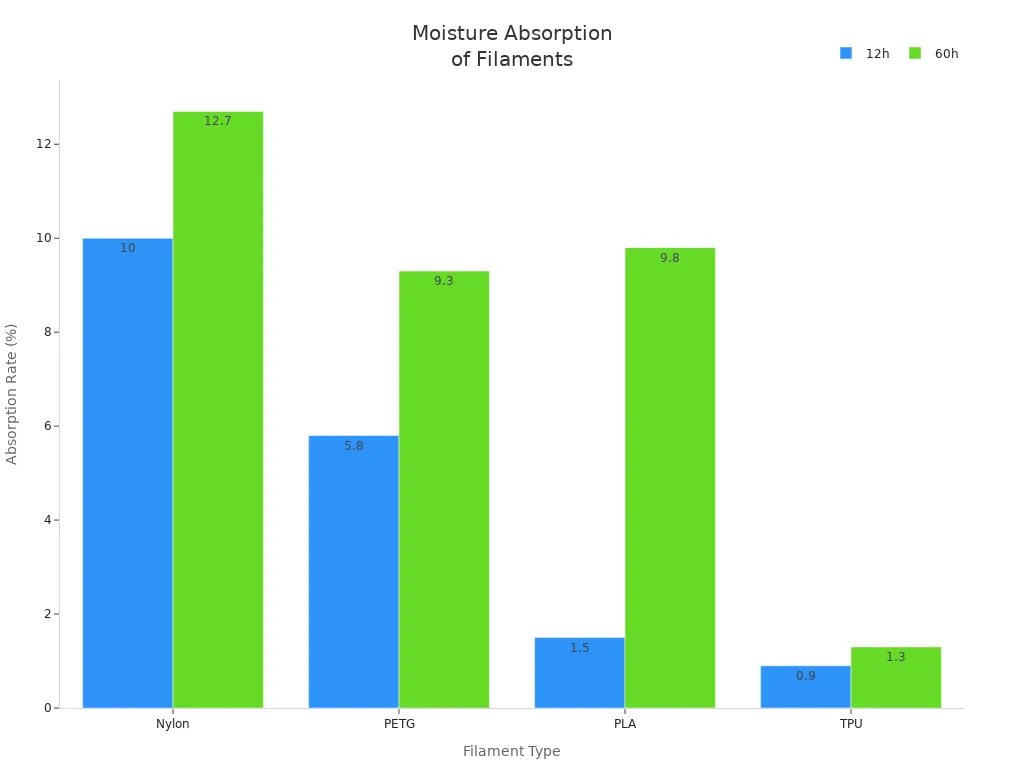
PLA: Minor Effects
PLA is popular because it’s easy to print and doesn’t absorb much moisture at first. You might notice small changes in surface finish or a little extra stringing if your filament gets wet. Most of the time, you can still get decent prints. If you want the best material quality, keep PLA dry, especially for detailed models.
PETG: Stringing Issues
PETG absorbs more moisture than PLA. You’ll see more stringing and blobs on your prints if the filament isn’t dry. Sometimes, the surface looks cloudy or rough. Drying PETG helps you get smoother finishes and stronger parts.
TPU: Flexibility Loss
TPU is flexible, but moisture can make it less stretchy. Wet filament may cause prints to feel sticky or soft. You might also see bubbles or weak spots. If you want flexible and tough prints, dry your TPU before printing.
Nylon: Severe Absorption
Nylon is the most sensitive to moisture. It absorbs water quickly and loses strength fast. Wet nylon prints can turn brittle and rough. You’ll see big drops in material quality and print reliability. Always dry nylon filament before you start a print.
Tip: If you print with nylon, use a filament dryer or dry box to keep your material in top shape.
Filament Dryer Solutions
DIY Filament Drying Methods
You might want to dry filaments at home. Some people use ovens, food dehydrators, or rice with desiccant packs. These DIY ways cost less and are good for small amounts. If you want to try drying filaments yourself, set your oven to a low heat and watch the filament closely. Food dehydrators can help, but big spools may not fit inside. Desiccant packs in sealed containers slow down moisture, but heat removes water faster.
|
Type of Dryer |
Pros |
Cons |
|---|---|---|
|
Accurate temperature and humidity control |
Higher price |
|
|
|
Large capacity for multiple spools |
May take up more space |
|
|
User-friendly interfaces |
|
|
DIY Options |
Low cost |
Limited temperature control |
|
|
Easy to customize |
Less effective for advanced materials |
Professional Filament Dryer Features
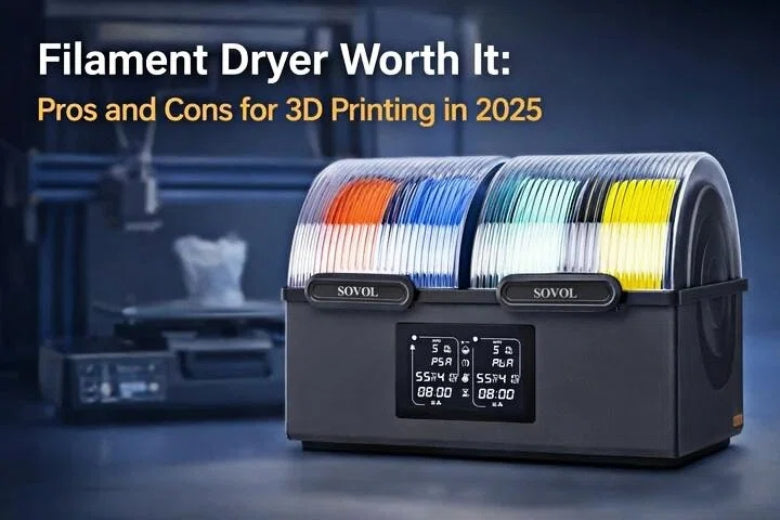
A special dryer gives you better control when drying filament. You can set the temperature and check humidity with sensors. Machines like Sovol SH01 and SH02 dry many spools at the same time. These dryers keep filament at the right heat for hours. You do not have to guess how to dry filaments. Just set the controls and let the dryer work.
Safety and Consistency
It is important to be safe when heating plastic. Professional filament dryers have smart features to keep you and your prints safe. Many 2026 models have overheat protection, auto shut-off, and fireproof parts. They also have double-layer insulation, so the outside stays cool. Here are some safety features:
|
Safety Feature |
Description |
|---|---|
|
Intelligent protection system |
Automatically disconnects in case of over-temperature, restoring cooling. |
|
Two-level temperature control |
Allows for better management of heat levels. |
|
Double-layer heat insulation |
Keeps external touch temperature below 60℃ even when internal exceeds 100℃. |
|
Fireproof materials |
Ensures safety against fire hazards. |
DIY ways do not have these safety features. You must watch your oven or dehydrator to stop accidents.
Storage Alternatives
Drying filament is important, but good storage helps too. Airtight containers and vacuum bags keep filament dry for most people. Open shelves let moisture get to your filament. Here is a quick look:
|
Storage Method |
Protection Level |
Ease of Use |
|---|---|---|
|
High |
Easy |
|
|
Vacuum Bag |
High |
Moderate |
|
Open Shelf |
Low |
Easy |
If you print a lot or use special materials, a filament dryer works best. If you print sometimes, good storage might be enough.
Filament Dryer Worth It: Pros and Cons
Pros: Print Quality and Reliability
You want your 3D prints to look nice and be strong. A filament dryer worth it can help you do this. Dry filament means you see fewer bubbles or rough spots. Your models look shiny and clean. The layers stick together better, so parts do not break as easily. If you use different materials like PLA, ABS, or TPU, a filament dryer worth it helps each one work well. You do not waste as much filament on bad prints. This saves you money and time.
Here are the main good things about drying filament:
- Better print quality: Dry filament gives smoother, shinier prints with fewer problems.
- More reliable results: Prints come out the same each time, with less stringing or weak spots.
- Works with many materials: Drying helps PLA, ABS, TPU, and others stay strong and look good.
- Less waste: You do not throw away as much filament from failed prints, so you save money.
Tip: For the best 3D printing, always dry your filament before you start.
Cons: Cost and Maintenance
You might think a filament dryer worth it costs too much or is hard to take care of. A good dryer in 2026 costs between $50 and $150. This can seem expensive if you do not print often. You also need space for the dryer, which can be hard in a small room.
Taking care of the dryer is important too. You must use the right drying method, like forced-air convection, so you do not hurt your filament. After drying, keep filament in sealed boxes with desiccants. You should check the humidity with a hygrometer to keep filament good.
Here are the main problems with filament dryers:
- Cost: Filament dryers cost $50 to $150 or more.
- Maintenance: You must dry, store, and check filament the right way.
- Space: Some dryers take up space on your desk or shelf.
|
Maintenance Requirement |
Description |
|---|---|
|
Proper Drying Techniques |
Use a forced-air convection oven to dry evenly and avoid damage. |
|
Storage Conditions |
Keep dried filament in a sealed box with desiccants. |
|
Monitoring Humidity |
Use a hygrometer to check humidity and keep filament ready to use. |
If you do not dry your filament, you may see more stringing, popping, bubbles, and weak layers. These problems can waste more filament and money than the cost of a dryer.
2026 Filament Dryer Features
Filament dryer worth it models in 2026 have many smart features. You get more control and better prints with these new options. Many dryers can dry two spools at once. You can change the temperature for each type of filament. Humidity sensors watch for moisture and change the dryer settings for you. Some dryers let you pick from six filament profiles, so you can choose the best one for your material.
You can use an app to control the dryer from your phone. Wi-Fi lets you check and change settings without getting up. Countdown timers let you set drying times up to 24 hours. The dryer turns off by itself to save energy.
|
Feature |
Description |
|---|---|
|
Checks and changes moisture for better prints. |
|
|
Customizable Settings |
Six filament profiles with settings you can change. |
|
Countdown Timer |
Runs up to 24 hours, then turns off to save power. |
|
Companion App |
Lets you control and watch the dryer from your phone. |
|
Wi-Fi Connectivity |
Makes it easy to use the dryer from your mobile device. |
Note: These features make drying filament easier and safer, so you have more time for printing.
If you want strong, good-looking prints every time, a filament dryer worth it with these new features can help you do that.
Alternatives to Filament Dryers
Storage Techniques
There are many ways to keep filament dry without a dryer. Lots of people use airtight containers or vacuum bags. These keep water out and help filament last longer. You can put desiccant packs, like silica gel, inside to soak up extra water. Some people use stronger desiccants, such as phosphorus pentoxide, for better drying. If you want to see how well your storage works, put a small hygrometer in the container. This tool shows if the air inside stays dry.
Here are some common ways to store filament:
- Airtight containers with rubber seals
- Vacuum-sealed bags with desiccant packs
- Silica gel packets that change color to show wetness
- Digital humidity monitors to check moisture
Tip: Keep your filament in a cool, dark spot to stop heat and sunlight from causing problems.
Environmental Factors
Where you store filament matters a lot. High humidity can make filament wet very fast. If you live where it is humid, filament can get wet in just one day. Changes in temperature can also hurt your prints. Some materials, like ABS and nylon, can get bubbles or lose strength if they get too wet. PVA can turn soft and jam your printer. Even carbon fiber blends can get weak when they take in water.
Try these steps to protect your filament:
- Use containers with desiccants inside
- Vacuum-seal filaments that are easy to damage
- Check humidity with a digital monitor
When Alternatives Work
You may not need a filament dryer if you print sometimes or use less sensitive filaments. Good storage keeps most filaments in good shape. For example, PLA and PETG usually stay dry in airtight containers with desiccant. If you use nylon or PVA, you might still want a dryer for the best prints. Always check your storage with a hygrometer. If you keep humidity under 20%, your filament will be ready to use. Storing filament the right way makes it last longer and helps you get good prints every time.
|
Storage Method |
Best For |
Extra Tips |
|---|---|---|
|
Airtight Container |
Most filaments |
Add color-changing silica gel |
|
Vacuum Bag |
Sensitive materials |
Use a strong desiccant |
|
Cool, Dark Location |
All filaments |
Avoid direct sunlight |
Note: If you print a lot or use filaments that soak up water, use both good storage and a dryer for the best results.
Filament Dryer Use-Case Recommendations
Beginners: Is It Necessary?
If you are new to 3D printing, you might ask if you need a filament dryer right away. You want tools that are easy to use and help you not make mistakes. Many new users do well with simple dryers. These dryers have buttons that are easy to press and programs that are already set. This makes things easier and helps you not mess up. You can also try drying filament yourself. Put your filament in a sealed box with desiccant packs. This works for most beginner projects and does not cost much money.
|
User Type |
Needs and Preferences |
|---|---|
|
Beginners |
Simple, reliable dryers with preset programs and user-friendly interfaces to avoid mistakes. |
|
Advanced Users |
Precise control over temperature and humidity, custom drying cycles, and the ability to handle multiple spools. |
|
Budget-Conscious |
Cost-effective solutions like DIY dryers or low-cost machines to protect filament from moisture. |
Hobbyists: Occasional vs Frequent Use
If you print for fun, what you need depends on how much you print. If you only print sometimes, you can use DIY dryers. You can dry filament in an oven or keep it with desiccant. These ways keep filament dry and save you money. If you print every week or like to try new materials, you may want a special dryer. Machines like Sovol SH01 or SH02 give you more control. They keep your filament ready for any project.
- DIY dryers are good for people who print sometimes.
- Special dryers help people who print a lot get better results.
Professionals and High-Volume Users
If you print a lot or have a business, you need great prints every time. Buying a good filament dryer is a smart idea. These dryers can dry more than one spool at once. You can pick how long and how hot to dry your filament. This gives you strong and reliable prints and saves you time. Good dryers also help you waste less filament and keep your work going smoothly.
Humid Environments
Humidity can ruin your prints. You might see weak spots, stringy lines, bubbles, or oozing. Your parts can break easily and look messy. Materials like PA, TPU, and PVA soak up water fast. Even PLA and PETG can get wet. You need to dry and store your filament the right way. Use a warm oven or a special dryer. Keep filament in sealed boxes with desiccant. This keeps your filament dry and your prints strong.
Tip: If you live where it is humid, always check your filament before you print. Drying and good storage help a lot.
Filament Dryer Decision Checklist
Key Questions Before Buying
Before you buy a filament dryer, you want to make sure it fits your printing style and materials. Ask yourself these questions:
- What types of filament do you use most? PLA, PETG, nylon, and TPU all need different drying temperatures.
- Does your dryer let you set the right temperature? PLA dries well at 50°C, but nylon needs up to 85°C.
- Can you keep humidity below 20% in your workspace?
- How big are your projects? If you print large or use multiple spools, you need a dryer with more capacity.
- How often do you print? Frequent printing means you need a dryer that can handle regular use.
- Will the dryer fit your filament spool size and diameter?
- Does the dryer have safety features like overheat protection and auto shut-off?
- Is the display easy to read and use?
Tip: Write down your answers. This helps you pick a dryer that matches your needs.
Assessing Your Needs
Think about your printing habits. If you print every week or use moisture-sensitive filaments like nylon, a filament dryer worth it can save you time and frustration. You might only need simple storage if you print once a month or stick to PLA. Your environment matters too. High humidity makes drying more important. If you want smoother prints and fewer failures, a dryer helps a lot.
- Frequent printing and large projects benefit from a dryer.
- Occasional printing or basic filaments may only need good storage.
- Humid rooms make drying and storage even more important.
Cost-Benefit Analysis
You want to know if a filament dryer worth it for your budget. Many users report saving money by reducing failed prints and wasted filament. Price matters to a lot of people when choosing 3D printing gear. Take a look at this table:
|
Benefit Type |
Description |
|---|---|
|
Cost Savings |
82% of users say they save money with better filament drying. |
|
Decision Factor |
33% of users put price first when picking 3D printing equipment. |
If you print often or use expensive filaments, a dryer pays for itself over time. You spend less on wasted filament and get more reliable results. For occasional users, weigh the cost against how much you print and the types of filament you use.
Note: A filament dryer worth it can be a smart investment if you want consistent print quality and lower costs.
Modern Filament Dryer Solutions
Dual-Spool Filament Dryers
You may want to dry two spools at once. Dual-spool filament dryers let you do this fast. These dryers help you change colors or materials quickly. You can keep two spools ready for printing. This saves time and helps you work faster. If you print a lot, dual-spool dryers make things easier. Some models let you dry each spool at its own temperature. This helps you get the best results for every filament.
Tip: Dual-spool dryers help you print without waiting and keep your prints looking good.
Adjustable Temperature Control
Different filaments need different drying temperatures. Adjustable temperature control lets you pick the right heat. This stops your filament from getting too hot or not dry enough. You get better prints and stronger parts. Look at this table to see the best drying temperatures for popular filaments:
|
Filament Type |
Optimal Drying Temperature |
|---|---|
|
PLA |
50°C |
|
Nylon |
85°C |
If you use many types of filament, adjustable temperature control makes your dryer work better.
Real-World Example
Here is an example. The Sovol SH03 filament dryer dries two spools at once. You can set the temperature for each spool. It works for PLA, nylon, and other filaments. This dryer has sensors that check humidity. Your filament stays dry and ready to use. You get smoother prints and fewer problems. The SH03 is good for busy makers and small businesses. It helps you spend less time fixing print issues.
Workflow Integration
Modern filament dryers fit into your 3D printing setup. You can connect them to your printer with USB or Wi-Fi. Some dryers let you plan drying times to match your print jobs. You get real-time humidity control and save energy. Here are some ways these dryers help you work:
- Humidity sensors keep filament dry all the time.
- Drying more spools at once makes you work faster.
- Automation lets you match drying cycles with your print schedule.
- Safety standards like CE and UL keep your workspace safe.
If you want strong prints and less waiting, a modern filament dryer makes your 3D printing easier and smarter.
You have learned that a filament dryer worth it can help you make better prints. It also saves you time and helps you waste less filament. Look at this table to see which dryer works best for different needs:
|
Model |
Best Use |
|---|---|
|
Sunlu S2 |
Multi-filament, careful setup |
|
EIBOS Easdry |
Single spool, adjustable |
|
PrintDry Pro |
Many types, multi-spool |
|
NutriChef Dehydrator |
Budget, multi-spool |
|
KS Dryer |
Specialty filaments |
Drying your filament helps you get good prints every time. It also saves you money over time. If you print a lot or use special materials, a dryer is a smart choice. Always check your filament before you print. Use the right settings and store it in a safe place. As more people start 3D printing, smart dryers will help keep prints strong and smooth.
FAQ
What is the main reason to use a filament dryer?
You want to stop moisture from ruining your prints. A filament dryer keeps your filament dry. This means you get stronger, smoother, and more reliable 3D prints every time.
Can I dry filament without a special machine?
Yes, you can use your oven or a food dehydrator. Just watch the temperature closely. For best results and safety, many users prefer dedicated dryers made for 3D printing.
How do I know if my filament is wet?
Look for stringy prints, popping sounds, or rough surfaces. Wet filament often feels sticky. You might see bubbles or hear hissing during printing. These signs mean your filament needs drying.
Do all filament types need drying?
No, not all filaments need drying. Nylon and TPU soak up water fast. PLA and PETG can also get wet but not as quickly. Always check the label and store your filament in a dry place.
Will a filament dryer save me money?
A filament dryer helps you waste less filament on failed prints. You spend less time fixing problems. Over time, you save money and get better results from your 3D printer.