You may notice some clear wet filament symptoms during your 3d print. Look for popping or hissing sounds, bubbling or stringy textures, and weak layers. Catching these signs early saves both your print quality and material. If you spot wet filament, you can act fast to prevent failed prints and wasted resources.
Key Takeaways
- Look for signs of wet filament like popping noises, bubbles, and weak layers when printing.
- Keep filament in airtight boxes to stop it from getting wet and to keep prints good.
- Try easy tests, like bending the filament, to see if it is wet before you print.
- Dry wet filament with a filament dryer or a food dehydrator to make prints stronger and look better.
- Different filament types get wet at different speeds; know your material to stop problems.
Why Filament Gets Wet
How Filament Absorbs Moisture
You may ask why filament gets wet so fast. Most 3d printing filaments soak up water from the air. This is called being hygroscopic. Nylon filament is very good at soaking up water. If you leave filament out, it tries to match the moisture in the room. Water goes into the filament and changes how it is inside. This can happen quickly if the air is humid. When filament gets wetter, prints look worse and break easier. Studies show nylon prints made with wet filament are weaker and change shape.
Tip: Always keep filament sealed when not in use to slow down moisture absorption.
Filament Types Prone to Moisture
Some filaments soak up more water than others. Here are the most common types that get wet:
- PLA takes in water from the air. This can make prints look bad and not print right.
- ABS gets wetter in humid air. This causes popping sounds and rough prints.
- Nylon soaks up water very fast. It changes the most in strength and shape.
- PETG and TPU also take in water, but not as fast as nylon.
|
Material |
Moisture Effect |
Findings |
|---|---|---|
|
Nylon |
Changes shape, gets weaker |
|
|
PLA |
Looks worse when wet |
Water makes finished parts lower quality |
|
ABS |
Pops, rough prints |
More water in humid air |
Environmental Factors
Humidity affects how wet filament gets. If you print in a humid room, filament gets wet faster. Even a little water can mess up prints. Filament left in rooms with over 50% humidity can get wet in hours. Temperature matters too. Warm, wet air makes filament soak up water faster. Makers test how much water filament takes in at different humidity levels. They find that more humidity means wetter filament and worse prints.
- Filament left out in humid rooms gets wet and weak.
- Keeping filament in dry places helps prints turn out better.
- Filament stored badly gets wet and fails more often.
Wet Filament Symptoms
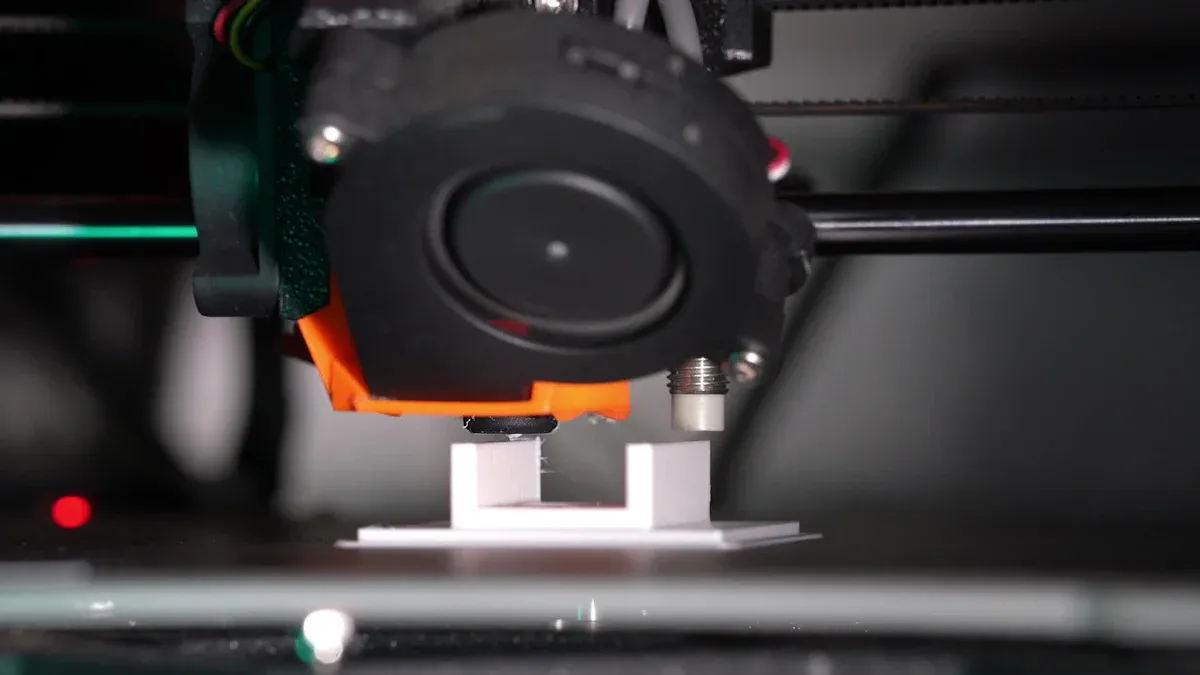
When you use filament that has taken in water, you will notice some clear signs. These wet filament symptoms can be sounds, things you see, or problems with how strong or nice your print looks. If you learn to spot these problems early, you can save time and material.
Common Wet Filament Symptoms
You might see or hear a few main wet filament symptoms while printing. These are:
- Popping or hissing noises from the nozzle
- Bubbles or pinholes on the print’s surface
- Stringing and oozing between parts of the print
- Rough or blotchy spots on the print
- Weak layers that break or peel off
- Poor layer bonding and warping
- Under extrusion or uneven flow
Note: These symptoms can show up while printing or after you finish. Always look at both the print as it is made and when it is done.
Auditory Signs (Popping, Hissing)
Your ears can help you find wet filament before your eyes do. When water inside the filament gets hot, it turns into steam. The steam comes out as the filament melts, making popping, hissing, or sizzling sounds from the nozzle. You might hear these sounds even if you do not see any other problems yet.
- Popping sounds often mean water is boiling inside the filament.
- Hissing or sizzling can mean steam is coming out fast.
- These sounds happen more with ABS or nylon, but you can hear them with PLA and PETG too.
If you hear these sounds, stop your print and look for other wet filament symptoms.
Visual Signs (Bubbles, Pinholes, Texture)
You can see many wet filament symptoms just by looking at your print. Water in the filament makes steam bubbles as it melts. These bubbles get stuck in the plastic and leave marks on the print.
- Bubbles: Small or big bubbles can show up on the outside or inside the print.
- Pinholes: Tiny holes or pits, made by steam, can dot the surface.
- Stringing: Thin, hair-like lines stretch between parts of the print.
- Rough or blotchy surface quality: The print may look uneven, with rough spots or a dull finish instead of shiny.
- Blistering: Raised bumps or blisters can form where steam gathers under the surface.
A table can help you spot these visual signs fast:
|
Symptom |
What You See |
What It Means |
|---|---|---|
|
Bubbles |
Small round marks |
Steam trapped in filament |
|
Pinholes |
Tiny holes or pits |
Moisture escaping |
|
Stringing |
Fine threads between parts |
Excess moisture in filament |
|
Rough Texture |
Uneven, matte, or blotchy |
Poor surface quality |
|
Blistering |
Raised bumps or blisters |
Severe moisture problem |
Tip: Compare your print’s surface to a good print you made before. If you see new bubbles, pinholes, or rough spots, your filament might be wet.
Print Quality Issues (Stringing, Underextrusion, Weakness)
Wet filament does more than just change how your print looks. It can also cause big printing problems that make your print weak or not work right.
- Stringing and oozing: Water makes melted plastic runnier, so it oozes out and forms strings between parts.
- Under-extrusion: Steam bubbles can block the nozzle, causing gaps or missing layers. This leads to under extrusion and weak spots.
- Weak layers: Bad layer bonding happens when steam makes empty spaces inside the print. The layers do not stick together well, so the print breaks or peels apart easily.
- Warping and poor adhesion: Wet filament can make the print lift from the bed or bend out of shape.
You might notice your print feels brittle or snaps easily. Some people say certain colors or brands of filament have more problems, especially after being kept in humid rooms. Even different 3d printers can act differently with wet filament, with some showing more stringing or jamming.
If you see weak layers, poor layer bonding, or under extrusion, check your filament for water. These printing problems often mean your filament is wet.
By learning to spot these wet filament symptoms, you can fix the problem fast. Watch and listen for changes in surface quality, layer bonding, and extrusion. Finding these signs early helps you avoid failed prints and keeps your 3d projects strong and working well.
How to Confirm Wet Filament
Visual and Auditory Checks
You can often spot wet filament symptoms with your eyes and ears. Before you start printing, look at your filament. A sticky surface, tiny water droplets, or brittle texture can signal moisture. During printing, listen for cracking, popping, or hissing sounds from the nozzle. These noises mean steam is escaping as the filament melts. Watch for white vapor, gaps between layers, or a rough finish on your print. If you see pinhole bubbles, severe burrs, or extra stringing, your filament may have absorbed water.
Tip: Check how long your filament has been out of its package. Humid rooms make filament wet faster.
Simple Moisture Tests
You can try a few easy tests at home to detect moisture in your filament:
- Bend Test: Gently bend a piece of filament. If it snaps easily, it may be too brittle from moisture.
- Surface Check: Feel the filament. A sticky or soft surface can mean water is present.
- Odor Test: Some materials, like nylon, smell stronger when wet during printing.
- Print Observation: Start a small test print. Look for bubbles, pinholes, or a matte finish (especially with PETG).
These steps help you find wet filament before it ruins a big project.
Comparing with Dry Filament
You can compare prints made with wet filament and dry filament to see the difference. Prints from wet filament often show more stringing and a lighter, bleached color. The texture feels softer and less solid. Air bubbles and voids inside the print make it weaker and more brittle. Dry filament gives you smooth, strong prints with clear details and a glossy finish. If you notice a drop in print quality, especially in slow areas, moisture could be the cause.
Comparing results helps you confirm if moisture is the problem or if you need to check other settings on your 3d printer.
Troubleshooting Wet Filament Issues
Misdiagnosis and Common Mistakes
Sometimes, people think wet filament causes every print problem. Many users blame wet filament symptoms when something else is wrong. A clogged nozzle or wrong temperature can make similar issues. You might see stringing or weak layers and think moisture is the reason. Always check your printer’s hardware and settings first.
Common mistakes include:
- Not cleaning the nozzle
- Forgetting about print speed and temperature
- Thinking moisture causes all print flaws
Tip: Do a quick maintenance check before drying your filament. This saves time and helps you find the real problem.
Overlooking Humidity and Storage
Humidity can make filament wet very fast. Leaving filament out lets it soak up water quickly. Some people keep filament in cardboard boxes or open bins. These ways do not keep out moisture. You should use sealed bags or dry boxes for storage.
|
Storage Method |
Moisture Protection |
Recommended? |
|---|---|---|
|
Open bin |
Low |
❌ |
|
Cardboard box |
Low |
❌ |
|
Sealed bag |
High |
✅ |
|
Dry box |
Very High |
✅ |
Note: Always check how humid your storage area is. High humidity makes filament wet and causes bad 3d prints.
Ignoring Filament Type Differences
Different filaments react to moisture in different ways. You may use nylon, PLA, or ABS and expect the same results. Nylon absorbs water very fast, but PLA and PETG take longer. If you forget these differences, you might guess the problem wrong. Always check what type of filament you have before fixing issues.
- Nylon: Needs extra care and drying
- PLA: Absorbs moisture slowly
- ABS: Shows popping and rough spots
- PETG: May show stringing but less severe
If you see weak layers or bubbles, check your filament type and storage. This helps you fix moisture problems faster.
Fixing and Preventing Wet Filament
Quick Fixes During Printing
If you see wet filament signs while printing, you can act fast. Try these quick fixes:
- Pause your print and dry the filament with a filament dryer or dehydrator. Each filament type needs its own temperature.
- If you do not have a filament dryer, use a food dehydrator. It gives steady, low heat to help remove water.
- You can put the filament in an oven, but watch the temperature so it does not melt.
- After drying, keep the filament in an airtight container or vacuum-sealed bag. This keeps it dry for the rest of your print.
Tip: Quick fixes help you finish your print, but drying the filament all the way works best.
Drying Methods
There are different ways to dry filament and make prints better. The table below shows common drying methods:
|
Drying Method |
Effectiveness |
Notes |
|---|---|---|
|
AMS 2 Pro |
Good for filaments up to 65°C |
May not fully dry all types |
|
AMS HT |
Works for all filaments |
Some high-temp materials may need more time |
|
Food Dehydrator |
Great for PLA, PETG, ABS |
Not ideal for advanced polymers |
|
Vacuum Drying |
Less effective than heat drying |
Desiccant can help a little |
Dry filament gives you fewer problems, like weak layers or bubbles. Always dry filament before printing high-quality 3d models.
Storage Best Practices
Good storage keeps filament dry and ready to use. Follow these tips:
- Put filament in airtight containers to block water and dust.
- Use vacuum-sealed bags to keep air out and stop water from getting in.
- Add silica gel packs to soak up any extra water.
- Keep storage temperatures between 15°C and 25°C.
- Protect filament from UV light.
- Try to keep humidity below 20% for most filaments. For PLA, keep it under 50%.
Note: Good storage stops weak layers and helps your prints stay strong.
Using a Filament Dryer
A filament dryer gives you the best way to dry filament. These machines use hot air to take out water and keep filament at the right temperature and humidity. Filament dryers work better than desiccant packs because they give steady results. You can use a dual-spool dryer to dry more than one spool at once. This helps if you print a lot. Using a filament dryer helps you avoid weak layers and keeps your 3d prints looking great.
You can notice wet filament by listening for popping sounds. Look for stringing and rough spots on your print. Weak layers are another sign of wet filament. If you find these problems early, you can save your print. You will not waste filament or time. Drying and storing filament the right way helps a lot. Your prints will be strong and work well. A filament dryer is easy to use and keeps filament dry. It helps stop common printing problems. Taking care of filament gives you better prints and fewer issues.
FAQ
What causes filament to get wet?
Filament absorbs water from the air. Humid rooms make this happen faster. Some materials, like nylon, soak up moisture quickly. You can prevent this by storing filament in airtight containers with silica gel packs.
Can I still use filament if it feels wet?
You can use wet filament, but your 3d prints may show problems. Wet filament symptoms include popping sounds, bubbles, and weak layers. Drying the filament before printing gives you better results.
How long does it take for filament to get wet?
Filament can get wet in just a few hours if left out in high humidity. Some types, like nylon, absorb water faster than others. Always store filament properly to avoid moisture problems.
What is the best way to dry wet filament?
You can dry filament using a filament dryer, food dehydrator, or an oven set to a low temperature. Always check the recommended drying temperature for your filament type to avoid melting it.
How do I know if my print failed because of wet filament?
Look for wet filament symptoms like stringing, bubbles, or rough spots on your print. Listen for popping or hissing sounds during printing. These signs help you tell if moisture caused the problem.