When you consider what is the 3D filament dryer you choose, it's important to look at various features. These include temperature control, capacity, and compatibility with different materials. Make sure to match these features to your printing needs. In 2024, there are numerous types available. Some of these include desiccant-based, vacuum-assisted, hybrid, portable mini-dryers, and in-line moisture feeders:
|
Type |
Description |
|---|---|
|
Desiccant-based dryers |
Use desiccants to soak up moisture from filament. |
|
Vacuum-assisted dryers |
Use a vacuum to effectively remove moisture. |
|
Hybrid dryers |
Combine both desiccant and vacuum features. |
|
Portable mini-dryers |
Compact and convenient dryers for personal use. |
|
In-line moisture feeders |
Integrated systems for consistent moisture control. |
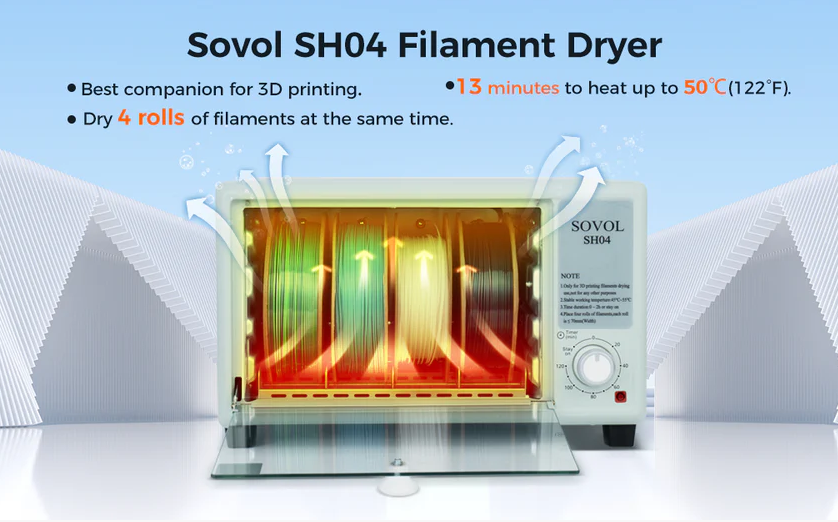
By selecting the right dryer, you can achieve better prints and maintain dry filament. Consider options like the Sovol SH02 Dryer Box for optimal results. Reflect on your specific needs, the volume of your printing, and which 3D filament dryer best suits your setup. Understanding how to choose the right dryer is essential for getting the best prints from your 3D printer.

Key Takeaways
- Find out which filament types you use the most. Different materials like PLA, Nylon, and PVA need different ways to stay dry. Each one reacts to moisture in its own way.
- Pick a dryer that lets you change the temperature. This helps you set the right heat for each filament type.
- Think about how much the dryer can hold. A bigger dryer can fit more spools at once. This saves you time and gives you enough dry filament for large projects.
- Choose dryers that control humidity well. Good moisture control keeps your filament dry. This also makes your prints look better.
- Look for dryers that are easy to use. Simple buttons and safety features like auto shut-off make drying easier and safer.
Choosing a 3D Filament Dryer: Key Factors

Understanding Your Filament Needs
Before picking a 3d filament dryer, think about what filaments you use most. Each filament reacts to water in its own way. Some, like PLA, do not take in much water. Others, like Nylon and PVA, soak up water fast and need extra care. If you use many types, you must watch their drying needs closely.
Here is a table that shows how much water common filaments can absorb:
|
Filament Type |
Moisture Sensitivity |
Notes |
|---|---|---|
|
PLA |
Low |
Easy to print, less prone to warping. |
|
ABS |
Medium |
Requires careful handling to avoid warping. |
|
PETG |
Medium |
Good layer adhesion, less warping than ABS. |
|
Nylon |
High |
Hygroscopic, requires careful storage. |
|
PVA |
High |
Sensitive to moisture, needs specific storage. |
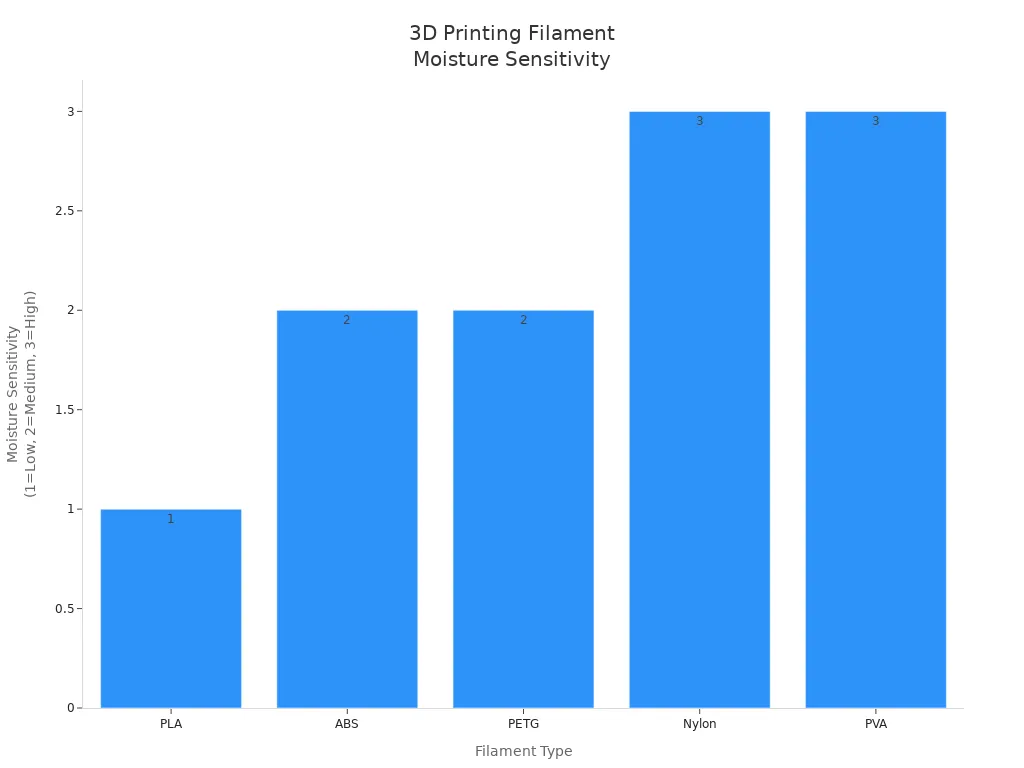
If you print with Nylon or PVA, you need a dryer that works for high moisture. If you mostly use PLA, you may not need as many features. But keeping your filament dry still helps your prints look better.
Tip: Drier filament gives you better print quality.
Matching Dryer Features to Filament Types
You should pick a dryer with features that fit your filaments. The most important things are temperature control, size, and support for different materials. Each filament needs a certain drying heat and time. If you use many types, you need a dryer with settings you can change.
Here is a table that shows the best drying heat and time for popular filaments:
|
Filament |
Drying Temperature |
Typical Drying Time |
|---|---|---|
|
ASA |
80–90°C |
4–8 hours |
|
PLA |
40–45°C |
4–6 hours |
|
ABS |
80°C |
4–8 hours |
|
PETG |
65–70°C |
4–6 hours |
|
Nylon |
80°C |
6–8 hours |

When shopping for a 3d filament dryer, check if it has these things:
- Temperature settings you can change for different filaments.
- Enough room for your biggest spool.
- A closed chamber to keep the heat steady.
- Support for the filaments you use most.
Think about how much you print. If you print a lot, you may want a dryer that holds more than one spool. This saves time and keeps your work going.
Here are some easy steps to get the best from your dryer:
- Flip the spool halfway through so it heats evenly.
- Wear gloves when flipping to protect your hands from heat.
By picking a dryer that fits your needs and filaments, you help your 3d prints turn out great every time.
Why a Filament Dryer Matters
Effects of Moisture on Filament
Moisture can get into your filament fast, even in days. You might not notice it at first. Wet filament can make your prints weak and rough. When you print, the water inside turns into steam. This steam makes bubbles and holes in your print. These bubbles cause the plastic to come out uneven. The layers do not stick together well. Your parts can break easier and look less smooth.
A filament dryer keeps your filament dry and ready to use. Studies show in-line drying helps prints look better and stay strong. You get smoother prints and stronger parts. Your shapes also come out more accurate. Drying filament can make it 15% stronger and 11.5% more bend-proof. The table below shows how moisture changes print quality and strength:
|
Metric |
Relationship with Moisture |
Effect of Wet Filament |
|---|---|---|
|
Tensile Strength |
Decreases as moisture rises |
Lower strength, more breakage |
|
Surface Finish Quality |
Gets rougher with moisture |
Visible lines, rough texture |
|
Flexural Strength |
Drops with more moisture |
Weaker, bends more easily |
|
Inconsistent Extrusion |
Increases with moisture |
Uneven, bubbly lines |
Tip: Drying your filament helps you stop failed prints and saves material.
Signs Your Filament Needs Drying
You can spot wet filament if you know what to check. Sometimes, you hear popping or cracking while printing. This sound means water is boiling out. You may see stringy or fuzzy spots on your print. The lines may look bubbly or uneven. Layers may not stick well. Your parts can be weak or break easily.
Look for these signs:
- Popping or cracking sounds when printing
- Strings or oozing between print parts
- Rough or fuzzy print surfaces
- Uneven or bubbly lines
- Weak or brittle finished parts
- Longer print times from failed prints
If you see these signs, your filament needs drying. Using a filament dryer can fix these problems. It helps your prints look better and stay strong. Keeping filament dry is one of the best ways to get good prints every time.
Assessing Your Needs Before Buying
Filament Types and Material Compatibility
First, think about which filament you use the most. Each material needs its own drying time and heat. PLA, ABS, PETG, and Nylon all act differently with water. Nylon and PVA soak up water fast. PLA stays dry for a longer time. If you use many types, you need a dryer with different settings. Picking the right dryer helps you keep filament dry for every project. This also stops clogs and weak layers. Your prints look better and fit together right.
- Each filament type needs its own drying method.
- The right dryer gives your filament the best drying.
- Dry filament makes prints strong and layers stick well.
Print Volume and Spool Capacity
Think about how much you print and how big your spools are. If you print a lot, you need a dryer that fits big or many spools. This lets you keep more dry filament ready. A bigger dryer saves you time. You do not have to dry each spool one at a time. For small jobs, a small dryer is fine. Always check how much the dryer can hold before you buy. This way, you will not run out of dry filament during a big print.
Environmental Factors (Humidity, Storage)
Where you live can make it hard to keep filament dry. High humidity makes it tough to store filament for 3d printing. Many materials like PA, TPU, PVA, PETG, and ABS take in water from the air. This can make your prints weak and layers not stick well. If you live where it is humid, get a dryer with strong drying and storage. Studies show that more humidity means filaments like polycarbonate soak up more water. This extra water changes how the plastic melts and can make prints weaker. To get the best prints, keep filament in a dry place and use a dryer that fits your needs. Dry filament helps you get strong layers and smooth prints every time.
Tip: Always check if your storage area is humid. Use a dryer that fits your space to keep filament safe and get better 3d prints.
Comparing 3D Filament Dryer Features

Temperature Control and Settings
Temperature control is very important when picking a filament dryer. You need to set the right heat for each filament type. Many good dryers use PTC heating parts. These parts heat up quickly and keep the heat steady. Some dryers, like the SUNLU S4, keep the heat close to your setting. This stops your filament from getting too hot.
Check if the dryer lets you change the temperature. Most dryers work from 40°C to 70°C. This covers most filaments you use. Avoid dryers with only one button and no way to adjust. These can heat unevenly and hurt your print quality. Dryers with 360° heated drying and many hot air outlets are better. They spread heat everywhere and dry your filament well.
|
Feature |
Description |
|---|---|
|
PTC Heating Components |
Fast, self-regulating heating to prevent overheating |
|
360° Rotating Heated Drying |
Even temperature for all filament surfaces |
|
Multiple Hot Air Outlets |
Spreads heat evenly |
|
Adjustable Exhaust Vent |
Lets you control inside humidity and temperature |
|
Multi-material Drying Parameters |
Presets for common filaments and custom settings |
Tip: Being able to change heat and humidity helps you match the dryer to your filament and get better prints.
Capacity and Multi-Spool Support
How much the dryer can hold is important. If you print a lot or use big spools, you need a dryer that fits more than one spool. Some dryers let you dry two or more spools at once. This saves time and keeps you printing.
A good dryer should fit your biggest spool. Some dryers have racks you can move or extra space for large spools. Dryers that hold many spools are great if you use different colors or materials. You can dry all your filament at once and keep them ready.
- Big dryers help you get ready for large print jobs.
- Dryers that hold many spools keep your filament dry longer.
Supported Materials (PLA, ABS, PETG, TPU, PC)
Not every dryer works with every filament. You want a dryer that works with the filaments you use most. Some dryers, like the Sovol SH02, work with PLA, PETG, PC, ASA, ABS, and TPU. Others, like the SUNLU S2 and S4, also work with many types. The Polymaker PolyBox works with PLA, ABS, PETG, TPU, and PC.
|
Filament Dryer |
Supported Materials |
|---|---|
|
Sovol SH02 |
PLA, PETG, PC, ASA, ABS, TPU |
|
SUNLU S2 and S4 |
PLA, ABS, PETG, and more |
|
Polymaker PolyBox |
PLA, ABS, PETG, TPU, PC |
Always check what filaments the dryer supports. This helps you pick the best dryer for your needs and keeps your prints looking good.
Humidity Maintenance and Storage
Keeping moisture out is just as important as heat. The best dryers use things like automatic humidity control and desiccant boxes. These keep the air inside dry and safe for your filament. Some dryers, like the eDry Ultra Low Humidity 128L Dry Cabinet, can make the air very dry. They bring back low humidity fast after you open the door.
- Automatic humidity control keeps your filament dry while stored.
- Desiccant boxes help keep moisture low.
- Dryers that use less energy and are quiet are good for long use.
Note: Good humidity control makes your filament last longer and keeps your prints strong.
User Interface and Safety
Easy controls and safety are very important. You want a dryer that is simple to use. Look for clear buttons and displays that are easy to read. Some dryers use fireproof shells for extra safety. Overheat protection turns off the dryer if it gets too hot.
- Easy controls help you dry filament fast.
- Fireproof shells and overheat protection keep you safe.
- A good display lets you check heat and humidity quickly.
Price and Value
Prices for dryers can be very different. You want to get the most for your money. Some dryers cost less but have fewer features. Others cost more but give you better control and quality.
|
Product Name |
|
|---|---|
|
Creality Space Pi |
$65 - $119 |
|
PolyDryer |
$80 - $109 |
|
EIBOS Polyphemus |
$209 |
|
Sunlu S2 |
$69 - $99 |
|
Sunlu Filadryer S4 |
$169 - $239 |
|
GratKit Firefly |
$79 - $99 |
|
EIBOS Polyphemus |
$129 - $199 |
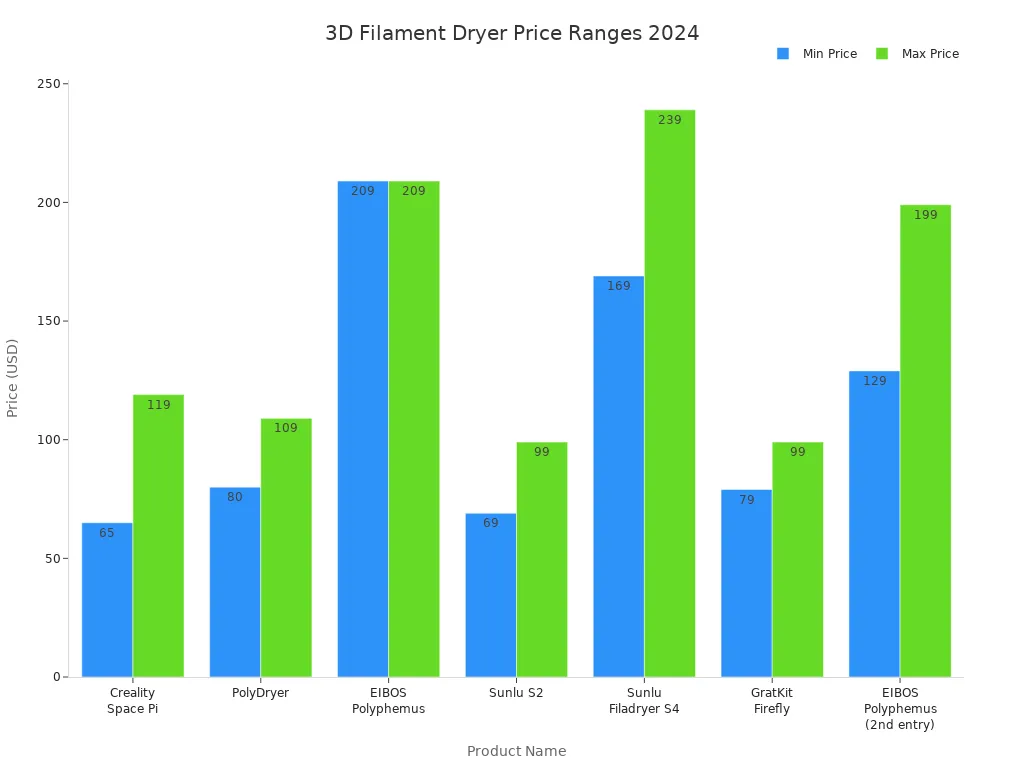
When you look at prices, think about which features you need most. Higher prices often mean better heat and humidity control, more space, and stronger safety. The best dryer gives you dry filament, protects your prints, and fits your budget.
Remember: The right dryer helps you get better prints, keeps your filament dry, and makes your 3d printing easier.
Expert Tips for Choosing a 3D Filament Dryer
Pro Recommendations
When picking a 3d filament dryer, look for features you need. Experts say a wide temperature range is helpful. This lets you dry many filament types safely. Humidity control is important too. It keeps your filament dry and safe from water in the air. Check the size so you can dry enough spools at once. Make sure the dryer works with all your filament types. Safety features like auto shut-off and overheat protection help keep you safe. A simple user interface makes it easy to set the heat and time.
- Wide temperature range for many filaments
- Humidity control keeps filament safe
- Enough space for your spools
- Works with all your filament types
- Safety features for a safer workspace
- Simple controls make it easy to use
Professionals say to use special filament dryers or temperature-controlled dehydrators. These give steady heat and work better than kitchen ovens. After drying, put your filament in airtight containers with desiccants. This keeps it dry and ready for your next print.
Tip: Using a filament dryer helps your prints look better and stops failed prints.
Common Mistakes to Avoid
Many people make mistakes with filament dryers. Drying filament too long can hurt it. Not drying long enough leaves water inside. Too much heat can melt or bend your spool. Leaving the lid open lets water get in again. If you do not store dry filament in a sealed box, it can get wet again.
- Do not dry filament too long or too short
- Do not overheat your filament
- Always close the lid when drying
- Store dry filament in airtight containers
You should check the humidity in your storage box. Keep humidity below 30% for best results. Take care of your dryer with regular cleaning. These steps help you get strong and smooth prints every time. Good care of your filament dryer makes your 3d printing easier and better.
What Is the 3D Filament Dryer You Choose? (User Scenarios)
For Beginners
If you are just starting with 3D printing, you might not know which 3D filament dryer to pick. You probably want something simple and easy to use. It should also be reliable and not cost too much. Many new users like dryers with easy buttons and screens that show what is happening. Here are some good choices for beginners:
|
Model |
Price Range |
Features |
|---|---|---|
|
SUNLU S2 Filament Dryer |
$69-79 |
Small size, touchscreen, changeable heat, works with many materials. |
|
SUNLU FilaDryer SP2 |
$69.99-99.99 |
Seals tight, fits many spool sizes, good for drying and storage. |
|
Sovol SH01 |
$37-59 |
Holds two spools, shows heat and humidity, simple to use. |
You can pick any of these to start. They help keep your filament dry and make your prints look nice.
For Advanced Users
If you print hard parts or use lots of filament types, you need a better dryer. You should look for dryers with special features. These include automatic humidity control, big storage, and the ability to print while drying. These things help you with big projects and special filaments.
|
Feature |
Description |
|---|---|
|
Humidity Control |
Keeps filament safe from water in the air. |
|
Storage Capacity |
|
|
Direct Printing |
Lets you print while filament stays inside the dryer. |
|
Enclosed Design |
Keeps dust and water away from filament. |
|
Adjustable Temperature Control |
Lets you pick the best heat for each filament. |
|
No Consumable Parts |
No need for extra tanks or supplies. |
These features make your work easier and your prints turn out better.
For Budget-Conscious Buyers
If you want to spend less money, you can still find a good dryer. Some people use food dehydrators because they are cheap and work well for drying filament. Others buy low-cost dryers with good reviews.
|
Filament Dryer |
Description |
Price Range |
|---|---|---|
|
PrintDry |
Well-liked, but costs more than others. |
Higher |
|
Food Dehydrator |
Cheap, many people use these for filament. |
Lowest |
|
Creality Space Pi |
Has good features and a fair price. |
Moderate |
|
Sovol SH02 |
Gets good reviews and does not cost much. |
Moderate |
|
Sunlu S4 |
Good reviews, check the price before buying. |
Moderate |
You can find a dryer that fits your budget and keeps your filament ready.
For Multi-Material Printing
If you use many kinds of filament, you need a dryer that works for all of them. Sometimes you need to dry more than one spool at once.
|
Filament Dryer Model |
Key Features and Suitability for Multi-Material Printing |
|---|---|
|
Sunlu S2 |
Dries up to 70°C, works for many filaments, needs careful setup. |
|
EIBOS 3D Series X: Easdry |
Has a heater and fan, stops overheating, good for one spool. |
|
PrintDry Pro |
Dries many types, can dry more than one spool. |
|
NutriChef Electric Food Dehydrator |
Can dry several spools, not made for filament but works well. |
|
KS Filament Dryer |
Good for tough filaments like carbon fiber and nylon. |
When you choose a 3D filament dryer, think about what filaments you use and how much you print. The right dryer keeps every spool dry and ready for your next project. 😊
Final Checklist for Choosing a 3D Filament Dryer
Before you buy a filament dryer, use this checklist to make sure you pick the right one for your needs. This list helps you get the best results and avoid common mistakes.
-
Know Your Filament Types
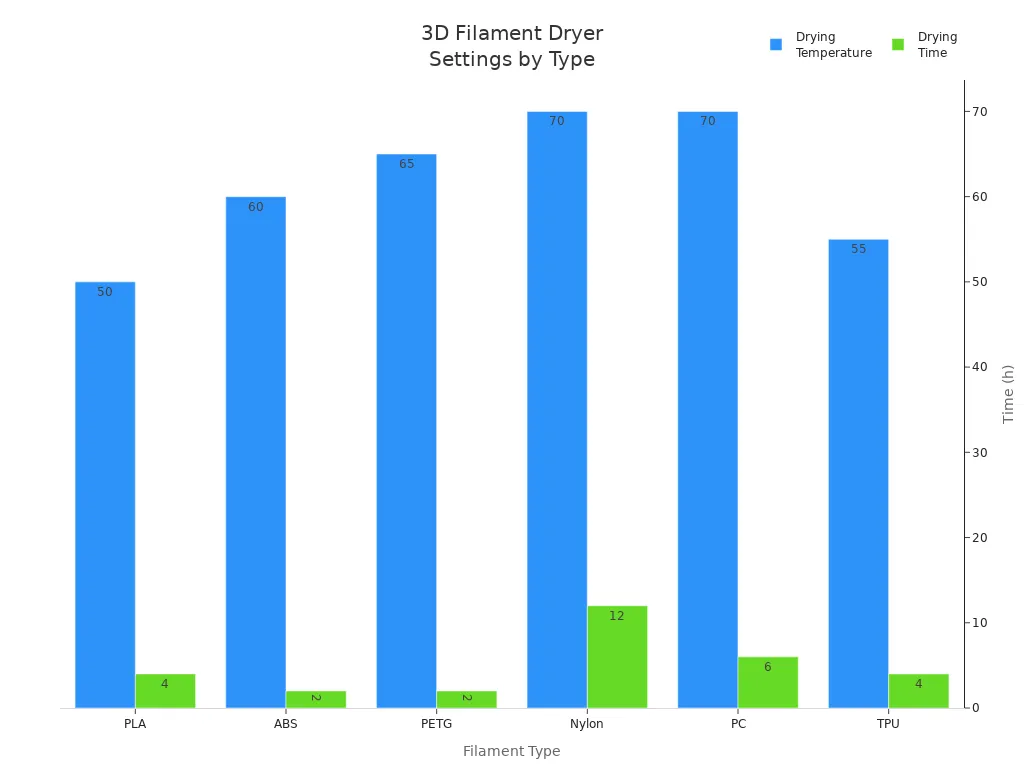
Check which filaments you use most. Each type needs a different temperature and drying time. Use the table below to match your filament with the right settings.
|
Filament Type |
Temperature |
Time |
|---|---|---|
|
PLA |
50°C |
4h |
|
ABS |
60°C |
2h |
|
PETG |
65°C |
2h |
|
Nylon |
70°C |
12h |
|
PC |
70°C |
6h |
|
TPU |
55°C |
4h |
-
Check Temperature Control
Make sure the dryer lets you set the right heat for your filament. Some filaments need higher temperatures to bring water to the surface. Others need lower heat to avoid damage. -
Look for Good Capacity
Choose a dryer that fits your largest spool. If you print a lot, pick one that holds more than one spool. -
Humidity and Storage
The second stage of drying needs a dry space around the filament. A good dryer keeps the air inside dry and safe. -
Easy to Use and Safe
Pick a dryer with simple controls and safety features like auto shut-off.
Tip: Always store your filament in a dry place after drying. This keeps it ready for your next print.
Use this checklist every time you shop for a new dryer. You will get better prints and save time.
Picking the best 3d filament dryer means you need to know what you want. You should match the dryer's features to the materials you use most. If your dryer fits your printing style, you will have fewer problems. You will not get stringy prints or popping noises. Your layers will not be weak. Dry filament helps your prints look better and saves you time. Always look for signs of moisture in your filament. Keep your filament dryer in a safe and dry spot. Use the checklist to help you pick the right dryer. This way, your prints will be stronger and smoother every time.
- Drying filament helps you:
-
- Make layers stick together and look smooth
- Stop bubbles or rough spots from showing up
- Make your prints better and more reliable
FAQ
How do you know if your filament needs drying?
You can listen for popping sounds during printing. You may see bubbles or rough surfaces on your prints. Wet filament often causes weak or brittle parts. If you notice these signs, you should dry your filament.
Can you use a food dehydrator as a filament dryer?
Yes, you can use a food dehydrator for drying filament. Make sure you set the right temperature for your material. Always check that the dehydrator fits your spool size.
How long should you dry your filament?
Drying time depends on the filament type. For example, PLA needs about 4 hours at 50°C. Nylon may need up to 12 hours at 70°C. Always check the recommended settings for your material.
Is it safe to leave a filament dryer running overnight?
Most modern filament dryers have safety features like auto shut-off. You should still check the user manual. Place the dryer on a stable surface and keep it away from flammable items.
What is the best way to store filament after drying?
Store your dried filament in an airtight container with desiccant packs. This keeps moisture out and protects your filament until your next print.