You want the best corexy 3d printers for 2026. Top picks like the Bambu Lab P2S, Prusa Core One+, and Tronxy X5SA-500-2E stand out for both home and professional users. Corexy 3d printer models shine because they combine high printing quality, fast speed, and a large build volume. You care about price, ease of use, and special features like multi-color printing. You’ll find a handy comparison table and in-depth review for each 3d printer. This guide helps you pick the right corexy 3d printer for your needs.
Key Takeaways
- Pick the Bambu Lab P2S if you want speed and good prints. It works well for both experts and people who print for fun.
- The Prusa Core One+ is best for work use. It is steady and has smart features like automatic bed leveling. This helps you get good prints every time.
- The Tronxy X5SA-500-2E is great for home use. It has a big space for printing large things or many items at once.
- If you want to save money, look at the Qidi Q1 Pro. It is easy to use and still makes nice prints.
- Always pick a 3D printer that fits what you need. Think about speed, size, or how easy it is to use.
Best CoreXY 3D Printers 2026
When you look for the best corexy 3d printers, you want models that fit your needs. Some work better for professionals. Others shine in home workshops. You might want a budget 3d printer or a premium 3d printer with all the bells and whistles. Let’s break down the top picks for 2026.
Best Overall CoreXY 3D Printer
Bambu Lab P2S
You want a 3d printer that does it all. The Bambu Lab P2S stands out as the best overall corexy 3d printer for 2026. This model uses a unique corexy motion system. You get fast and accurate prints. The frame is compact, but the build volume is large. You can print big models without taking up much space.
- Print Speed: The P2S prints fast. You can finish prototypes or production parts quickly.
- Build Volume: You get a generous build volume, so you can print large objects or many small ones at once.
- Target Users: This 3d printer works for both professionals and hobbyists.
- Strengths: The P2S offers high print quality, low vibration, and open-source options for upgrades. You can experiment and customize.
- Limitations: The price is higher than basic models, but you get more features.
Tip: If you want a 3d printer that balances speed, quality, and flexibility, the Bambu Lab P2S is a smart choice.
Best Professional CoreXY 3D Printer
Prusa Core One+
You need a 3d printer for your business or studio. The Prusa Core One+ leads the pack for professionals in the 3d printing market. This corexy 3d printer uses a rigid metal frame. You get stable prints and less layer shifting.
- Motion System: The corexy design gives you smooth and precise movement.
- Print Speed: You can print fast without losing detail.
- Build Volume: The large build volume lets you print big prototypes or multiple parts.
- Target Users: This 3d printer is for engineers, designers, and anyone who needs reliable results.
- Strengths: You get advanced features like automatic bed leveling and dual extrusion. The review scores are high for print quality and reliability.
- Limitations: The price is premium, and the setup can take time.
Note: If you want a 3d printer for demanding jobs, the Prusa Core One+ delivers professional results.
Best Home CoreXY 3D Printer
You want a 3d printer for your home workshop. The Tronxy X5SA-500-2E is a top pick for home use. This corexy 3d printer gives you a big build volume, so you can print large models or cosplay props.
- Motion System: The corexy setup means quick and accurate prints.
- Print Speed: You get good speed for home projects.
- Build Volume: The 500mm x 500mm x 600mm build volume is huge for a home 3d printer.
- Target Users: This model is great for hobbyists, makers, and families.
- Strengths: You get automatic leveling, power loss recovery, and dual extrusion. The review scores praise its value and features.
- Limitations: The assembly can be tricky, and the size needs more space.
Best Budget CoreXY 3D Printer
Let’s look at the top budget 3d printer options for 2026. You want value, but you don’t want to lose important features. Here’s a quick table to compare:
|
Printer Model |
Price Range |
Features |
|---|---|---|
|
Qidi Q1 Pro 3D Printer |
Auto bed leveling, high-temp nozzles, easy use |
|
|
Creality Ender 5 Max |
$699 |
Auto bed leveling, high-temp nozzles, easy use |
|
Bambu Lab A1 Mini |
$359 |
Auto calibration, quiet, one-click nozzle swap |
The best corexy 3d printers in this range give you auto bed leveling and user-friendly controls. You get high-temperature nozzles for more material choices. The Bambu Lab A1 Mini stands out for quiet operation and easy nozzle swaps. The Qidi Q1 Pro 3d printer is a favorite for beginners because it’s simple to use and has a great review score.
- Motion System: These printers use the corexy design for speed and accuracy.
- Print Speed: You get good speed for the price.
- Build Volume: The build volume is smaller than premium models, but enough for most home projects.
- Target Users: These 3d printers are perfect for students, beginners, and anyone on a budget.
- Strengths: Low price, easy setup, and reliable prints.
- Limitations: You get fewer advanced features and a smaller build volume.
If you want to start 3d printing without spending a lot, these budget 3d printer models are a smart pick.
Best Premium CoreXY 3D Printer
Voron 2.4
You want the best of the best. The Voron 2.4 is the top premium 3d printer for 2026. This corexy 3d printer is famous for its open-source design and high-end parts.
- Motion System: The corexy motion system gives you fast, smooth, and accurate prints.
- Print Speed: You can print at high speeds without losing detail.
- Build Volume: The build volume is large, so you can print big projects or many parts at once.
- Target Users: This 3d printer is for advanced users, pros, and anyone who wants to customize.
- Strengths: You get top-quality parts, open-source upgrades, and a strong community for support. The review scores are high for print quality and speed.
- Limitations: The price is high, and the assembly can be complex.
If you want a premium 3d printer that you can upgrade and tweak, the Voron 2.4 is the best corexy 3d printer for you.
You have many choices in the corexy 3d printers world. Each 3d printer on this list stands out for a reason. Some give you speed and accuracy. Others focus on price or build volume. You can find a model that fits your needs, whether you want a budget 3d printer or a premium 3d printer. Always check the review scores and think about what features matter most to you.
CoreXY 3D Printer Comparison
Speed and Build Volume
When you look at corexy 3d printers, you want to know how fast they print and how big you can go with your projects. Some models focus on high printing speed, while others give you a massive build volume for large creations. Here’s a quick table to help you compare the top corexy 3d printer models for 2026:
|
Model |
Printing Speed (mm/s) |
Build Volume (mm) |
Precision (microns) |
Price Range |
|---|---|---|---|---|
|
Bambu Lab P2S |
500 |
256 x 256 x 256 |
50 |
$1,200-$1,400 |
|
Prusa Core One+ |
400 |
300 x 300 x 300 |
40 |
$1,800-$2,000 |
|
Tronxy X5SA-500-2E |
200 |
500 x 500 x 600 |
100 |
$700-$900 |
|
Voron 2.4 |
350 |
350 x 350 x 350 |
30 |
$2,000+ |
|
Sovol Zero |
1200 |
152.4x152.4x152.5 |
60 |
$399 |
You can see that the Tronxy X5SA-500-2E gives you the largest build volume, perfect for big prints. If you want the fastest printing speed, the Sovol Zero leads the pack. The Voron 2.4 and Prusa Core One+ offer high precision for detailed work.
Motion System and Acceleration
The corexy motion system makes these 3d printer models stand out. You get smooth, fast movement with less vibration. This means better printing quality and fewer mistakes. Acceleration matters too. It tells you how quickly your 3d printer can change direction. Here’s how some top corexy 3d printers compare:
|
Model |
|
|---|---|
|
Sovol Zero |
40,000 |
|
Bambu Lab P2S |
25,000 |
|
Creality K1 Max |
20,000 |
You get blazing-fast acceleration with the Sovol Zero. The Bambu Lab P2S and Creality K1 Max also offer strong performance. High acceleration helps you finish prints faster without losing detail.
Target Users
Each corexy 3d printer fits a different type of user. You might want a 3d printer for home projects, or maybe you need one for your business. Here’s a quick guide:
- Bambu Lab P2S: Great for both professionals and hobbyists who want speed and flexibility.
- Prusa Core One+: Perfect for engineers and designers who need reliable results.
- Tronxy X5SA-500-2E: Best for makers and families who want a huge build volume.
- Voron 2.4: Ideal for advanced users who love to customize and upgrade.
- Sovol Zero: Awesome for anyone who wants top printing speed in a compact package.
Tip: Think about what matters most to you—speed, build volume, or precision—before you pick your corexy 3d printer.
High-Speed CoreXY Printing
Fastest CoreXY 3D Printers
If you want to print fast, you need to know which corexy 3d printers lead the pack. Some 3d printer models stand out for high-speed printing. You can see the top performers in the table below:
|
Printer Model |
Print Speed (mm/s) |
Features |
|---|---|---|
|
Flashforge Adventurer 5M Pro |
High-speed |
Direct drive extruder |
|
Flashforge AD5X |
Up to XX |
Multi-color printing, auto leveling |
|
Bambu Lab X1E |
Professional speed |
Designed for engineering and manufacturing |
|
Creality K1 |
Up to 60 |
Compact, enclosed design |
|
Voron 2.4 |
High-speed |
Popular among hobbyists for speed and accuracy |
|
Hevort |
High-speed |
Customizable open-frame design |
You get a lot of choices with corexy 3d printers. The Flashforge Adventurer 5M Pro gives you high-speed printing with a direct drive extruder. The Bambu Lab X1E is built for professionals who want fast results. The Voron 2.4 is a favorite for hobbyists who want both speed and accuracy. The Creality K1 fits well in small spaces and still delivers good speed. Each 3d printer in this list uses the corexy motion system to boost speed and keep prints smooth.
Speed vs. Print Quality
You might wonder if faster always means better. When you push your corexy 3d printer to its limits, you can run into some problems. High-speed printing can affect printing quality in a few ways:
- Ringing or ghosting can show up as ripples on the surface. This happens when the 3d printer vibrates too much at high speeds.
- Poor layer adhesion can make your prints weak. Fast speeds sometimes stop the layers from sticking together well.
- Under-extrusion can cause gaps or missing layers. If the 3d printer moves faster than the filament can flow, you lose detail.
You want high-quality prints, so you need to balance speed and detail. Many corexy 3d printers let you adjust settings for the best results. If you care about printing quality, try slower speeds for detailed models. For quick drafts, high-speed printing works well.
Large Build Volume CoreXY Printers
Top Picks for Large Prints
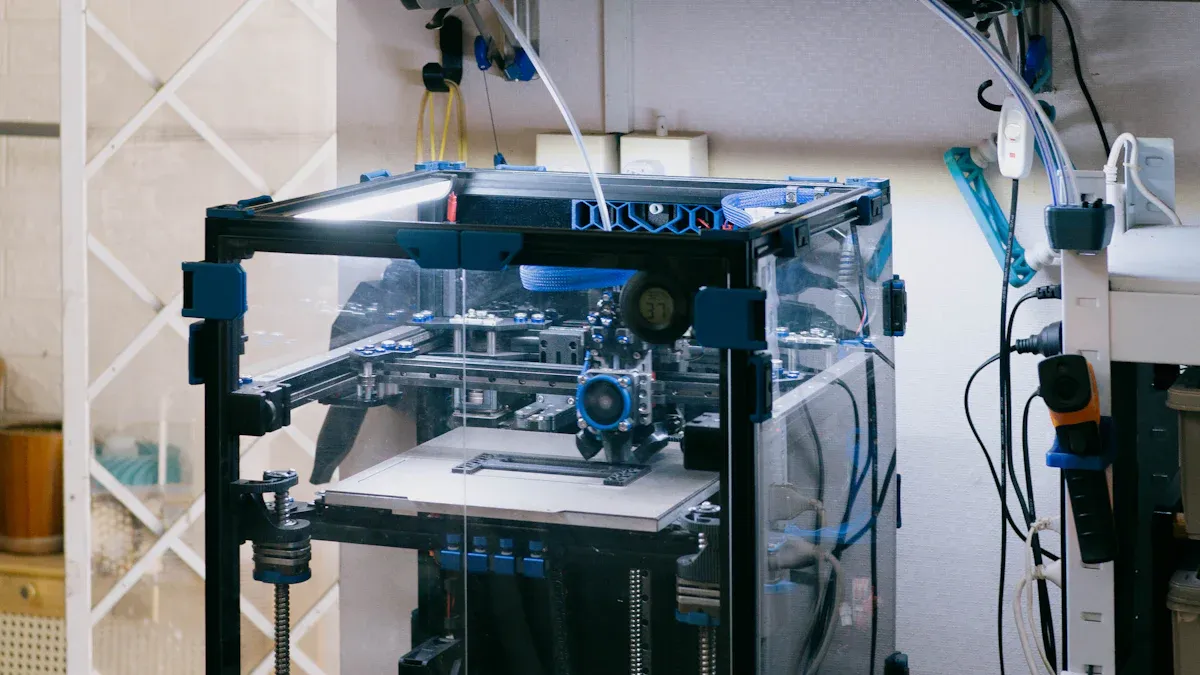
If you want to print big, you need a 3d printer with a large build volume. Many corexy 3d printers in 2026 give you the space to create huge models, cosplay props, or even functional parts for your projects. You can see some of the top choices for large-format corexy 3d printers in the table below:
|
Model |
Build Volume (mm) |
|---|---|
|
Sovol SV08 Max |
500×500×500 |
|
Creality K1 Max |
300×300×300 |
|
Creality K1 |
220×220×250 |
|
Bambu Lab H2D |
350×320×325 |
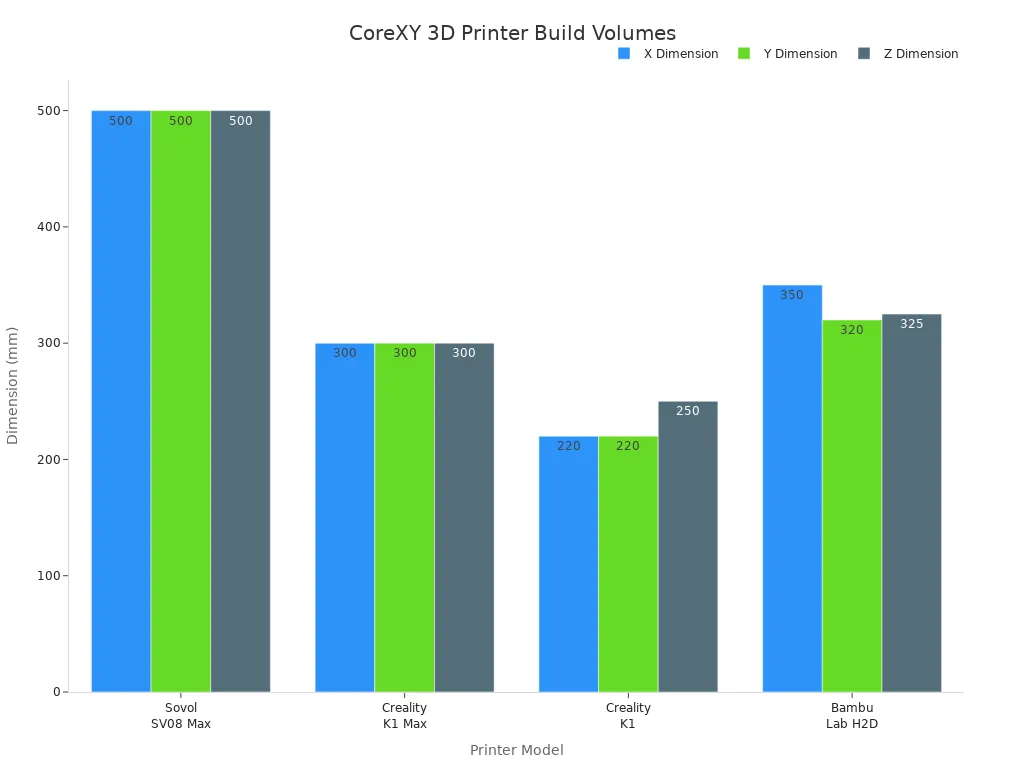
You might notice that the Sovol SV08 Max leads the pack with a massive 500×500×500 build volume. This 3d printer lets you print large objects in one piece, which saves you time and effort. The Bambu Lab H2D also gives you a generous build volume for big projects. If you want a corexy 3d printer that fits on your desk but still handles large prints, the Creality K1 Max is a smart pick.
Pros and Cons
When you choose a large build volume corexy 3d printer, you get some big advantages. You can print bigger models and finish projects faster. The corexy design keeps the frame compact, so you do not need a huge workspace. Here is a quick look at the main pros and cons:
|
Advantages |
Disadvantages |
|---|---|
|
Better print quality |
Higher initial cost |
|
Faster printing speeds |
Steeper learning curve |
|
Compact design |
More complex assembly and maintenance |
Tip: If you want to print large models, a corexy 3d printer with a big build volume gives you more options. Just remember, you may need to spend more time learning and setting up your 3d printer.
You get the best results when you match your 3d printer to your needs. Large build volume corexy 3d printers work great for makers, artists, and anyone who loves big projects. You can enjoy the speed and quality that corexy brings, but be ready for a bit more setup and care.
Precision and Print Quality
Best for Precision Users
You want your 3d printer to make smooth and sharp prints. If you care about details, you need a corexy machine that is very accurate. Many people pick corexy 3d printers because they have strong frames and move fast. You can check the best choices for precision in this table:
|
Printer Kit |
Key Features |
Print Quality |
|---|---|---|
|
Voron 2.4 |
High speed, open-source, strong community |
Excellent |
|
Hevort |
Modular, robust frame, fast motion |
High |
|
Ratrig V-Core 3 |
Modular, upgradeable, premium components |
High |
|
Tronxy X5SA Pro |
Affordable, large volume, touchscreen |
Good |
|
TwoTrees Sapphire Plus |
Dual Z-axis, silent drivers, glass bed |
Good |
|
Creality Ender 6 |
Enclosed design, easy setup, reliable |
Good |
You might like the Voron 2.4 if you want the best print quality. This 3d printer makes tiny parts and detailed models look great. The Hevort and Ratrig V-Core 3 also do a good job with accuracy. You can use these corexy printers for work or fun projects.
Features for Accuracy
You need to know what helps a corexy 3d printer be accurate. Many things make your prints better. Look for these features when you pick your next 3d printer:
- Linear rails help the printer move smoothly and stop shaking.
- Dual Z-axis systems keep the bed flat while printing.
- Silent stepper drivers lower noise and cut down on shaking.
- Enclosed frames keep out dust and drafts.
- Automatic bed leveling saves time and helps the first layer stick.
You get better accuracy when your corexy 3d printer has these features. Some printers, like the TwoTrees Sapphire Plus, use dual Z-axis and silent drivers for smoother prints. The Creality Ender 6 has an enclosed frame to keep the temperature steady. Each feature helps you get better print quality.
You want your prints to look neat and professional. With the right corexy 3d printer, you get sharp details and good results every time.
CoreXY 3D Printer Pros and Cons
Advantages
You want to know why so many people choose a corexy 3d printer. The design gives you some big benefits over other types of 3d printer motion systems. Here’s a quick look at what makes a corexy 3d printer stand out:
|
Advantage |
Explanation |
|---|---|
|
The stationary motors lower the moving weight. You get faster prints with less shaking. |
|
|
Better Print Quality |
Less vibration means your 3d printer makes smoother and more accurate models. |
|
Compact Design |
The corexy frame lets you have a large build area without taking up more space on your desk. |
You will notice that a corexy 3d printer can print faster and still keep the details sharp. The compact design also helps if you do not have much room. Many users love how a corexy 3d printer can handle big projects without needing a huge machine.
Tip: If you want speed, quality, and a smart use of space, a corexy 3d printer is a great pick.
Limitations
Every 3d printer has some downsides, and a corexy model is no different. You should know about these before you buy:
- You may pay a higher initial cost for a corexy 3d printer.
- You might find the learning curve steeper, especially if you are new to 3d printing.
- The assembly and maintenance can be more complex than with other 3d printer types.
- You will see fewer options compared to the popular Cartesian 3d printer models.
Some users feel a corexy 3d printer takes more time to set up and keep running smoothly. If you want something simple, you may want to look at other 3d printer designs. Still, many people think the benefits of a corexy 3d printer make the extra effort worth it.
How to Choose a CoreXY 3D Printer
Key Factors
You want to pick the right 3d printer for your projects. Start by looking at the most important things. Here’s a table to help you compare what matters when you shop for corexy models:
|
Factor |
Description |
|---|---|
|
Build Volume |
Bigger build volume lets you print large objects, but you need more space and materials. |
|
Frame Material |
Metal frames give your 3d printer more stability and better results than plastic or wood. |
|
Assembly Difficulty |
Some kits are easy to build. Others need more skill and time. |
|
Firmware Compatibility |
Open-source firmware means you can upgrade and control your 3d printer more easily. |
|
Hotend and Nozzle Type |
The right nozzle lets you use more materials. Hardened nozzles last longer with tough filaments. |
|
Motion System Quality |
Good belts and rails make your prints smoother and reduce repairs. |
|
Upgrade Support |
Some 3d printers let you add features like auto bed leveling later. |
You should also think about price. A budget 3d printer can save you money, but you might give up some features. If you want top printing quality, you may need to spend more.
Matching Printer to Needs
You have your own goals. Let’s match the right 3d printer to your needs:
- If you’re a professional, look for a corexy 3d printer with a metal frame, high print speed, and open-source firmware. You want reliable results and room to upgrade.
- Hobbyists love models that balance price and features. A budget 3d printer with good belts and rails works well for most projects.
- Beginners should pick a 3d printer that’s easy to assemble. Clear instructions and auto bed leveling make life easier.
You might want a big build volume for cosplay props or art. You might care more about price if you’re just starting out. Always check if your 3d printer can grow with you. Upgrade support means you can add new features as you learn.
You can find a 3d printer that matches your budget, your space, and your dreams. Take your time, compare your options, and enjoy your new corexy machine!
You now know the best corexy 3d printers for 2026. Each 3d printer fits a different need. Beginners can start with a budget 3d printer like the Tronxy X5SA Pro. Advanced users may want the Voron 2.4 for top print quality. If price matters, Creality Ender 6 gives you value. Review the features that matter most, like build volume and frame material. The comparison and buying guide help you match a corexy 3d printer to your goals. Check each review and price before you decide.
FAQ
What makes a corexy 3d printer different from other types?
You get a unique motion system with a corexy 3d printer. The belts move the print head fast and smooth. This design helps you print quicker and with less shaking than many other 3d printers.
Can beginners use a corexy 3d printer?
Yes! Many corexy models come with easy setup and guides. You can start with a simple 3d printer and learn as you go. Some kits need more time, but you will find lots of help online.
How do I choose the best corexy 3d printers for my needs?
Think about what you want to make. If you need big prints, pick a 3d printer with a large build area. For speed, look for a strong frame and good belts. The best corexy 3d printers match your goals.
Do corexy 3d printers need more maintenance?
You might spend a little more time on care. The belts and frame need to stay tight for the best results. Clean your 3d printer often. Check for loose parts to keep your corexy running well.
What materials can I use with a corexy 3d printer?
You can use many types of filament. Most corexy 3d printers work with PLA, PETG, and ABS. Some models let you print with flexible or high-temp materials. Always check your 3d printer’s specs before trying new filaments.