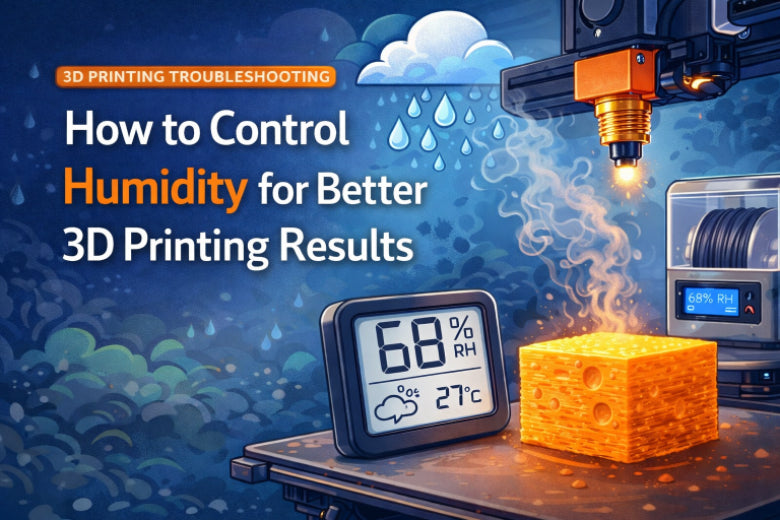
You need to control humidity for 3D printing to get good results. If you keep humidity under 45%, you stop filament from taking in water. High humidity can make prints stringy, weak, and rough. If humidity goes over 60%, print quality gets worse fast. At 75% or higher, prints might not work at all. Many people have trouble with these problems, but you can stop them with easy steps. No matter if you are new or have printed for years, you can make your prints better by learning about and controlling humidity for 3D printing.
Key Takeaways
- Keep humidity under 45% so filament does not soak up water. This stops prints from being weak or rough.
- Store filament in sealed containers with desiccants. This blocks water and keeps prints looking good.
- Use a hygrometer to check humidity in your storage area. This makes sure your filament stays dry.
- Dry filament before printing if it feels wet. This stops problems like stringing and bubbles in prints.
- Check and change desiccants often. This keeps storage working well and filament ready to use.
Why Humidity for 3D Printing Matters
How Humidity Affects 3D Printing Quality
Humidity changes how filament works in 3D printing. If you leave filament in a humid place, it soaks up water from the air. The water stays inside the filament. When you print, the hot nozzle turns water into steam. Steam makes bubbles and weak spots in your prints. Your 3D prints look bad when filament has too much water.
Scientific studies explain how humidity changes 3D printing. Here are some results:
|
Study Title |
Key Findings |
|---|---|
|
A Study of an Effect on Moisture from 3D Printer Filament Drying Processes |
This study looked at how PLA filaments lose water. It showed that water makes printed parts worse. Drying at 60°C for 5 hours lowers water in filament. |
|
Influence of Filament Moisture on 3D Printing Nylon |
This study checked how water affects nylon filaments. It found that water makes printed parts weaker and changes how they act with heat. The study showed a link between water and part quality. |
Common Print Issues from Moisture
You might see problems when humidity is high. These are the most common issues:
- Steam inside wet filament causes stringing and oozing
- Extra plastic strings form between printed areas
- Small blobs or drips show up on the surface
- The surface looks rough or blotchy
- Bubbling leaves tiny bubbles on or inside prints
- Layers have gaps or holes
- Prints peel off the bed or warp at corners
- Corners lift or curl while printing
These problems make your prints look messy and weak. Keeping filament dry helps you stop these issues.
Weak Parts and Surface Defects
Moisture makes prints less strong and tough. PLA kept in high humidity can lose 5-10% of its bend strength and impact resistance. This is important if you print parts that need to work well. ABS filaments also lose strength when they get wet. You get weak prints and bad surfaces if you do not control humidity. Keep filament dry to make prints strong and good.
Tip: Put filament in airtight containers with desiccants to keep out water and get better prints.
Filament Moisture Management by Material
PLA and PETG Sensitivity
You need to know how different filaments react to moisture. PLA absorbs water quickly. Over eight weeks, PLA can gain up to 2.5% in weight from moisture. This extra water makes prints weak and rough. PETG does much better. It only changes by 0.3% in weight after nine weeks. PETG keeps its shape and strength longer, even in humid air. If you want to store PLA and PETG, you should check the humidity in your storage area. Use the table below to see the best humidity levels for each type.
|
Filament Type |
Recommended Humidity Level |
|---|---|
|
PLA |
<= 50% |
|
PETG |
< 20% |
Tip: Store PETG in very dry places. PLA can handle a bit more humidity, but you still need to keep it dry for good results.
ABS, Nylon, and TPU Concerns
ABS, Nylon, and TPU each have their own moisture problems. Nylon absorbs much more water than PLA. If you leave Nylon in humid air, it loses up to 60% of its flex strength in just one week. TPU gets soft when it takes in moisture. This change happens because water breaks up the bonds inside the material. Sometimes, a little humidity can make Nylon and TPU more flexible, but too much makes them weak. ABS does not absorb much water, so it stays strong and prints well in most conditions.
- Nylon loses flex strength fast in humid air.
- TPU softens and changes when wet.
- ABS stays stable and strong, even with some moisture.
Specialty Filament Considerations
Specialty filaments like PVA and carbon fiber blends need extra care. PVA soaks up moisture quickly and can jam your printer if it gets wet. Carbon fiber blends lose strength when exposed to water. You should always store these filaments in closed containers with desiccant packs. Dry hygroscopic filaments before printing to avoid problems.
- Keep specialty filaments in dry, sealed spaces.
- Use desiccants to absorb extra moisture.
- Dry filaments before use if they feel damp.
Filament moisture management helps you avoid weak prints and jams. You get better results when you match your storage and drying methods to each filament type.
Detecting and Fixing Filament Moisture Problems
Signs of Moisture in Filament
You can find moisture in filament before printing. Look and listen for these clues:
- Popping or crackling sounds mean steam escapes the nozzle.
- Stringing, blobs, and extra oozing show uneven flow.
- Rough, bubbled, or pitted surfaces have tiny holes from steam.
- Weak, brittle, or cracked layer lines show poor bonding.
- Under extrusion and gaps in walls mean feeding is not steady.
If you see these problems, your filament needs drying.
Simple Moisture Tests
You can test for moisture with easy steps:
- Weigh the filament spool before and after drying. If it weighs less, it lost water.
- Use a simple humidity sensor in your dry box. This shows moisture levels.
- Put filament in a sealed container and check air moisture. High numbers mean the filament took in water.
These tests help you know when to dry filament and get better prints.
Filament Drying Methods
There are different ways to dry filament. Here are some common methods:
- Use a food dehydrator. It works well for PLA, PETG, and ABS.
- Try vacuum drying. It works but is slower than heat drying.
- Store filament with desiccants to keep it dry after drying.
Check this table for drying settings:
|
Material |
Recommended Temperature |
Recommended Time |
|---|---|---|
|
PETG |
65 °C |
3 hours minimum |
|
Nylon |
70-90 °C |
4-8 hours |
|
PVA |
50 °C |
2-4 hours |
Safety tip: Always use a spool that can handle heat. Make sure your drying area has good airflow. Do not use kitchen ovens for filament if you cook food in them.
Drying filament and managing moisture helps you avoid print problems and get strong, smooth prints.
Filament Storage and Humidity Control Solutions
Airtight Storage and Desiccants
You can keep filament safe from water by using sealed storage. Water causes lots of problems in 3D printing. Good storage helps you get better prints. Always put filament in a closed space to block water.
Here are some good ways to store filament:
- Use the box it came in if you can. Close it tight after each use and add desiccants.
- Put filament in sealed bins or vacuum bags. These keep water out and lower humidity.
- Add silica gel or desiccant packs to each container. Desiccants soak up water and keep things dry.
- Pick clear bins or special filament boxes with tight lids. You can see your filament and spot problems.
- Try to keep humidity under 20-30% for Nylon and TPU.
Tip: Look at your desiccant packs often. Change them when they stop soaking up water. This keeps filament dry and ready to use.
Sealed containers and desiccants work together to keep water out. You block water from getting in, and desiccants grab any water inside. This helps you control moisture for all filament types.
Using Hygrometers and Dehumidifiers
You need to watch humidity to keep filament working well. Hygrometers help you check humidity in your storage bins or room. Simple digital monitors show if your filament stays dry.
Some good hygrometers for filament are:
- AcuRite humidity monitors. These show humidity and are easy to use.
- Pro Digital Indoor Temperature and Humidity Monitor with Blacklight. This runs on batteries and fits in most bins.
Put a hygrometer in each bin or dry box. You can see when humidity goes up and fix it before filament gets wet.
Dehumidifiers help lower humidity in big rooms. You can use a mini dehumidifier in your filament room. Try to keep humidity between 30% and 50%. This works for most filaments. Dehumidifiers cannot make humidity super low. For best results, use a dehumidifier with sealed bins and desiccants.
Note: A dehumidifier helps with water in the air, but you still need sealed bins to keep filament safe.
Short-Term vs Long-Term Solutions
You have many ways to keep filament dry. Some work for short times, others protect filament for months or years. The table below shows common choices:
|
Storage Method |
Duration |
Effectiveness |
|---|---|---|
|
Original Packaging |
Short-term |
Keeps filament safe if unopened; moisture exposure increases once opened. |
|
Ziplock Bags with Desiccants |
Short to Medium |
Good for opened spools; requires regular desiccant rehabilitation. |
|
Airtight Containers |
Short to Medium |
Suitable for multiple spools; needs desiccants and hygrometer for monitoring. |
|
Filament Dry Boxes |
Long-term |
Maintains RH below 15%; can dry filament while printing; minimizes exposure. |
|
Vacuum Sealing |
Long-term |
Creates an oxygen-free environment; can last indefinitely if resealed after each use. |
|
Dry Cabinets or Dehumidifiers |
Long-term |
Quickly reduces RH; can hold many spools; ideal for serious hobbyists or professionals. |
Short-term ways like boxes and ziplock bags work if you use filament fast. You need to check desiccants often and close bags tight. For long-term storage, use a dry box, vacuum sealing, or a dry cabinet with a mini dehumidifier. These keep humidity low and protect filament for a long time.
Common mistake: Leaving filament out after printing. Always put spools back in storage when done.
You can use more than one method for best results. For example, put filament in sealed bins with desiccants and check humidity with a hygrometer. Use a dry box for spools you are printing with. This layered plan helps you control moisture and get good prints every time.
Humidity Management in Challenging Climates
Strategies for Humid or Rainy Seasons
Printing in humid or rainy weather is harder. Filaments soak up water from the air. This can cause steam bubbles and weak layers. Stringing happens when filament gets wet. Nylon can take in a lot of water, up to 7% of its weight. Wet nylon makes prints weak and not correct. You must keep your filament and printer safe from these problems.
Here are some easy ways to help:
- Put filament in airtight containers with silica gel packs. These containers stop water from getting in and keep filament dry.
- Use dry boxes or storage cabinets. Some have screens that show humidity, so you can check fast.
- Pick vacuum-sealed bags for long storage. These bags take out air and keep filament dry.
- Dry filament before printing if you think it is wet. Filament dryers can fix print problems.
Tip: Look at your filament often when it is humid. Change desiccant packs when they do not work anymore.
Room Isolation and Environmental Control
You can keep your printing room dry by closing it off and using good tools. A special room helps keep water out and keeps things steady.
Try these steps:
- Put a humidity monitor (hygrometer) in your printing space. This tool shows humidity and helps you act fast if it changes.
- Use a dehumidifier in the room. Dehumidifiers lower humidity and protect filament and machines.
- Keep windows and doors shut on rainy days. This stops wet air from coming in.
- Use weather strips or door seals to block leaks.
- Set up your printer away from wind or damp spots.
Note: A controlled room helps stop sudden humidity jumps and keeps filament ready to use.
You can make strong and accurate prints even in wet weather if you control moisture and humidity with these tips.
You can make your prints better if you control humidity. Put filament in sealed containers with silica gel packs. Use a dehumidifier to keep the air dry. Check the humidity with a hygrometer. Dry your filament before you print if it feels wet. Try to keep humidity between 40% and 45% for the best results.
Here is an easy checklist:
- Watch the humidity level often.
- Change out desiccants every month.
- Look at seals and dryers to make sure they work.
Keeping humidity steady helps you stop weak prints and get good, strong results each time.
FAQ
What humidity level is best for storing filament?
Keep filament between 15% and 30% humidity. This stops moisture problems. Use a hygrometer to check the humidity in your storage space.
How do I know if my filament has absorbed moisture?
Listen for popping sounds when printing. Look for bubbles in your prints. Stringing and rough spots mean there is moisture. If you see these signs, dry your filament first.
Can I use a regular oven to dry filament?
You can use an oven at a low temperature. Always check the drying temperature for your filament. Do not use an oven you cook food in. Plastic fumes can be dangerous.
What is the easiest way to keep filament dry?
Put filament in airtight containers with silica gel packs. Check the humidity often to make sure it stays low. Change desiccants when they stop working. This method is easy for most people.
Do I need a dehumidifier for my 3D printing room?
A dehumidifier helps if your area is very humid. It keeps the air dry and protects filament. Use it with sealed storage for the best results.