







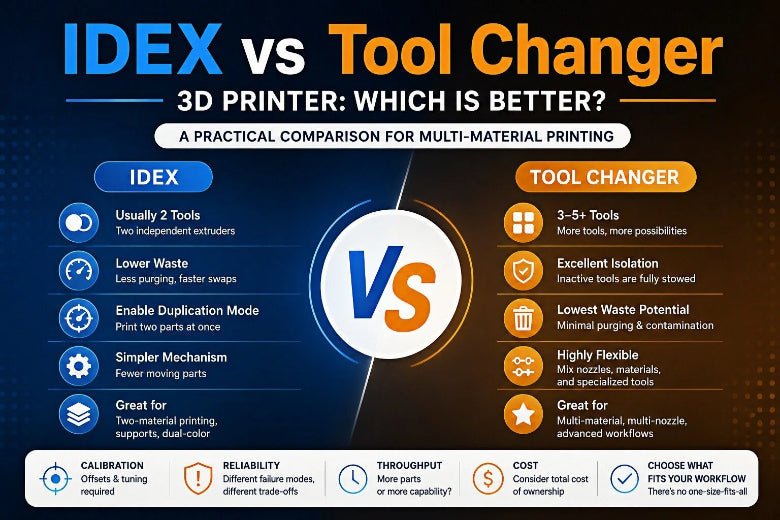
The real question isn’t whether multi-tool printing is worth it—it’s which architecture matches your workflow: IDEX (independent dual extruder (IDEX)) or a tool changer 3D printer.
Below is a practical, criteria-first comparison—no hype, no made-up performance numbers.
Key Takeaway: If you mainly need two materials (model + support, or two colors) and want throughput tricks like duplication mode, IDEX is often the sweet spot. If you want dedicated toolheads (different nozzles/materials) and potentially more than two tools with cleaner isolation, a tool changer usually wins.
IDEX vs tool changer 3D printer: quick comparison matrix
|
Criterion |
IDEX (independent dual extruder) |
Tool changer |
|---|---|---|
|
Tools supported |
Usually 2 tools |
Commonly 3–5 tools (varies by design) |
|
Material isolation |
Good (separate nozzles) |
Excellent (tools are fully stowed when inactive) |
|
Multi-material 3D printing waste |
Low–moderate (some priming/wiping still needed) |
Often lowest (less cross-contamination, less purging) |
|
Calibration burden |
Tool-to-tool X/Y offset + often Z differences |
Per-tool Z offset + dock repeatability/tuning |
|
Reliability risks |
Offset drift, ooze management, dual-head maintenance |
Dock/pickup repeatability, tool lock/engagement, crash recovery |
|
Best at |
Two-material printing + duplication/mirror throughput |
Dedicated tools, mixed nozzles/materials, many swaps |
Definitions: what “IDEX” and “tool changer” really mean
What is an IDEX 3D printer?
IDEX stands for Independent Dual Extrusion: two toolheads can move independently, so the inactive one can park away from the part.
A key benefit is that IDEX can enable duplication mode and mirror mode on compatible machines—printing two identical (or mirrored) parts at once. BCN3D explains these modes in their IDEX technology overview.
What is a tool changer 3D printer?
A tool changer swaps entire toolheads (the “tool”) in and out of a dock. Only one tool is active at a time; the rest are parked.
A good mechanical mental model is a kinematic coupling and a positive lock that helps the tool return to a repeatable position, plus per-tool offsets so you don’t have to physically “level” every nozzle to the same height. E3D’s engineering write-up is a solid explainer: Motion system and tool-changer R&D (2018).
The criteria that actually matter (and what to expect)
1) Are you solving a “two-material” problem—or building a tool rack?
Choose IDEX when your “multi-material” life mostly means two of something:
- model + support (including soluble supports)
- two colors
- rigid + flexible (where you want a dedicated nozzle per material)
Choose a tool changer when you want a tool rack, not just a second extruder:
- multiple colors/materials beyond two
- multiple nozzle sizes (e.g., one tool for detail, one for fast infill)
- dedicated tool for abrasives (so you don’t “share” wear across everything)
2) Waste and time overhead: where the real savings come from
In multi-material 3D printing, the big “hidden cost” is usually not motion speed—it’s what happens during a change:
- purging
- priming/wiping
- any failure that forces a restart
Both IDEX and tool changers avoid the shared-melt-zone purge cycle that single-nozzle switching systems rely on. In practice:
- IDEX reduces waste by keeping materials in separate nozzles, with smaller priming/wiping overhead.
- Tool changers often reduce waste further by stowing inactive tools away from the print area.
If you’re also weighing “single nozzle + swapping” approaches, SOVOL’s explainer on nozzle swapping vs single nozzle is a useful framework.
3) Print quality: the enemy is contamination, not theory
Most multi-material quality issues are mundane:
- a blob dropped at the wrong time
- a nozzle dragging across a wall
- a tiny alignment error that becomes obvious after 200 layers
IDEX helps because the idle head can park away from the part (instead of riding along and oozing).
Tool changers help even more when the stowed tool is completely out of the way, reducing accidental contact and cross-contamination.
4) Calibration and reliability: pick the failure mode you’d rather own
There’s no free lunch. You’re trading purge tuning for mechanical + offset tuning.
IDEX calibration: you’ll live with offsets
Common IDEX tasks:
- X/Y tool offsets so both nozzles land in the same coordinate system
- Z differences between toolheads (even a small mismatch shows up quickly)
- ooze control so calibration patterns aren’t corrupted
If you want a realistic view of how people do this in the field, this Klipper community thread on calibrating X/Y offsets on IDEX printers is a representative workflow.
Tool changer calibration: repeatability is the whole game
Common tool changer tasks:
- per-tool Z offsets (each tool can be slightly different)
- tuning docking approach and pickup behavior
- maintaining dock alignment so the tool returns to the same pose consistently
Pro Tip: If your current printer has inconsistent extrusion or frequent first-layer failures, solve that first. Adding tool swaps increases the number of state changes per print—and that’s exactly where small issues become big failures.
5) Soluble supports: which setup is more forgiving?
If you’re using soluble supports, the goal is simple: keep the support tool predictable and keep the model tool clean.
- IDEX is often very practical here: one nozzle prints the model, the other prints support, and the inactive head can park away when not needed.
- Tool changers are excellent when you want a dedicated support toolhead and clean isolation, but they’re more complex.
A community example (not a lab test, but useful reality) is this StackExchange discussion on PLA + PVA soluble support workflows (2020).
6) Throughput: more parts per day, or more capability per print?
This is where IDEX can be uniquely compelling.
If you print a lot of small functional parts—brackets, fixtures, enclosures—duplication mode and mirror mode can turn one job into two parts.
Tool changers don’t usually “duplicate” the same way (only one tool is active), but they can improve real throughput when:
- you’re constantly changing materials or nozzle setups
- purge overhead would otherwise dominate the job
So… which is better?
Choose IDEX if you want the best two-tool value
IDEX is usually the better choice when:
- you mainly need two materials/colors
- you want duplication mode / mirror mode for small-batch throughput
- you’re okay calibrating offsets and maintaining two heads
Choose a tool changer if you want a platform, not just a printer
A tool changer is usually the better choice when:
- you want dedicated toolheads for different jobs (nozzles, materials, wear profiles)
- you plan to use more than two tools
- you care about minimizing cross-contamination and reducing purge overhead
- you’re comfortable owning the complexity of docks, tool pickup, and per-tool tuning
A quick self-checklist (answer these before you buy/build)
- Do I need more than two materials/nozzles in a single job—or just two?
- Am I optimizing for throughput (more parts/day) or capability (more materials/nozzles per print)?
- Am I okay recalibrating after maintenance (nozzle swaps, toolhead work)?
- Which failure sounds easier to diagnose for me: offset drift (IDEX) or dock repeatability (tool changer)?
FAQ
Is IDEX the same as a “dual extruder” printer?
Not exactly. Many dual-extruder printers mount two hotends on the same carriage, which can create drag/ooze problems. IDEX is specifically about independent motion so the idle tool can park away.
Is a tool changer always “zero waste”?
No. Tool changing can reduce waste dramatically, but real prints still need priming, wiping, and process tuning—especially when switching between materials with different flow behavior. Treat “low waste” as the goal, not a guarantee.
Where do AMS/MMU-style systems fit in?
They’re often the lowest barrier to entry for multi-color, but they usually pay for it in purge waste and filament-path tuning.











