







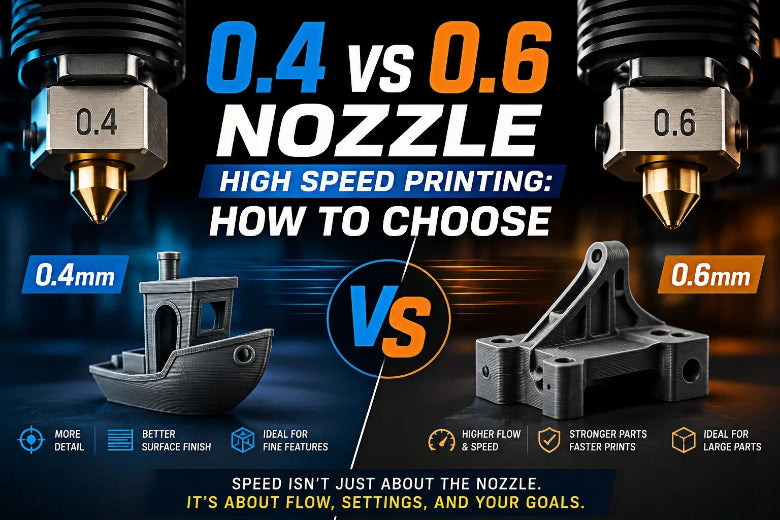
That’s why this decision is less about “0.6 is faster” and more about whether your parts, your slicer profile, and your flow cap can take advantage of it.
Quick verdict
- Choose 0.6mm if you mostly print functional parts, larger models, or small-batch runs where time matters more than cosmetic detail.
- Stick with 0.4mm if your models rely on small text, tight gaps, sharp corners, or you care a lot about surface finish.
0.4 vs 0.6 nozzle high speed printing: the comparison that matters
|
High-speed priority |
0.4mm nozzle |
0.6mm nozzle |
|---|---|---|
|
Throughput on big parts |
Often hits flow limits sooner |
Higher throughput potential, especially with thicker layers |
|
Surface finish |
Cleaner at fine layer heights |
Layer lines show more, and you’ll usually print thicker layers |
|
Tiny features |
Safer |
Easier to fill in narrow geometry |
|
Overhangs and edges |
Easier to keep crisp |
Needs more cooling and/or slower minimum layer time |
|
Reliability at speed |
More sensitive |
Often more forgiving |
|
Tuning effort |
Can be fast, but pickier |
Still needs tuning, but responds well to flow-limited profiles |
The real speed limit is volumetric flow
For high-speed tuning, the phrase you want in your head is: volumetric flow rate 3D printing.
SOVOL explains the definition and the core math in What Volumetric Flow Rate Means in 3D Printing (2026): you can think of flow demand as roughly line width × layer height × print speed.
That’s also why some people switch to 0.6mm and see no real speed gain. If you keep 0.4-style line widths and layer heights, your mm³/s demand barely changes.
Pro Tip: If you want speed, tune for mm³/s first. Headline mm/s numbers don’t matter if extrusion can’t keep up.
What you print decides most of this
When 0.4mm is the better tool
0.4mm is still the best default when your parts include:
- Embossed or engraved text you want to read
- Small holes, thin slots, fine lattice structures
- Tight tolerance assemblies where small geometry is the whole point
- Cosmetic models where finish is the product
- In other words, 0.4mm wins when “high speed” means “as fast as possible without losing detail.”
When 0.6mm is the better tool
0.6mm shines when you’re printing:
- Brackets, enclosures, jigs, fixtures, tool holders
- Larger prototypes where iteration speed matters
- Parts where strength and print time beat perfect skin quality
If you want a SOVOL-specific take, their guide on nozzle selection for functional parts and speed is a good starting point: Large nozzle vs small nozzle.
Layer height: how coarse can you go before quality drops too far?
Layer height controls “vertical” detail and how visible the steps will be on sloped surfaces.
A simple rule of thumb from Prusa is to keep layer height under about 80% of nozzle diameter (details in Prusa’s nozzle diameter guide (2025)).
Practical maxes:
- 0.4mm nozzle: up to about 0.32mm
- 0.6mm nozzle: up to about 0.48mm
For high-speed profiles, that translates into a clean decision:
- If you want to stay around 0.16 to 0.28mm layers for finish and detail, 0.4mm stays competitive.
- If you’re happy at 0.30 to 0.42mm layers for throughput, 0.6mm is usually the more comfortable tool.
Line width is where “0.6mm speed” comes from
If you only change nozzle diameter and never touch line width, you’ll wonder why the printer isn’t faster.
A practical way to keep your line widths sane is to follow feature-specific guidance, then test. SOVOL’s article on line width vs nozzle size gives a useful baseline for walls and top layers.
Typical starting ranges (high-speed friendly, not extreme):
|
Nozzle |
Layer height (typical range) |
Line width (typical range) |
Best for |
|---|---|---|---|
|
0.4mm |
0.16 to 0.28mm |
~0.42 to 0.48mm |
Balanced speed + detail |
|
0.6mm |
0.24 to 0.42mm |
~0.60 to 0.72mm |
Functional parts throughput |
Those ranges line up with SOVOL’s starter settings in their nozzle comparison guide.
How to tell you’re outrunning the hotend
When you push too far past your melt capacity, the printer doesn’t always fail loudly. Often it just gets worse.
Watch for:
- Under-extrusion that wasn’t there at lower speeds
- Rough surfaces that look dry or inconsistent
- Thin walls that measure undersize
- Weak layer bonding (parts split along layer lines more easily)
Fixes usually start with reducing flow demand (line width, layer height, or speed), and only then raising temperature within the filament’s recommended range.
A simple way to set a real speed cap
The clean way to do high-speed profiles is to measure your max volumetric flow and then let the slicer enforce it.
Ellis’ guide lays out a practical method in Determining Maximum Volumetric Flow Rate: increase extrusion speed until you see measurable flow drop-off, then back off and set a conservative limit.
Once you have a flow cap, you can estimate your speed ceiling:
max speed ≈ flow cap ÷ (line width × layer height)
This is where nozzle size matters. A 0.6mm nozzle gives you permission to use wider lines and taller layers, which can reduce the speed you need to hit a given mm³/s.
0.4 → 0.6 nozzle swap checklist (what usually changes)
If you want 0.6mm nozzle speed vs quality to land in a good place, don’t copy-paste your old profile.
Use this checklist:
- Update nozzle diameter in your printer profile
- Set new line widths (outer walls first, then infill and top layers)
- Increase layer height if your goal is throughput
- Set a conservative max volumetric speed until you validate your real flow ceiling
- Re-tune pressure advance or linear advance
- Re-tune retraction (watch for stringing and blobs)
- Re-check cooling (overhangs and sharp edges are where 0.6mm shows weakness)
⚠️ Warning: A 0.6mm nozzle can look worse than 0.4mm if you only change the nozzle and keep the old process. The slicer won’t “auto adapt” your flow demands.
FAQ
Will a 0.6mm nozzle always print faster than 0.4mm?
No. It can be faster, but only if you also change line width and or layer height, and your hotend can melt that extra plastic.
Can I get the speed benefit of 0.6mm while keeping a 0.4mm nozzle?
Sometimes. You can increase line width moderately and raise layer height, but you usually hit the extrusion ceiling sooner than a true 0.6mm setup.
Is 0.6mm worse for strength?
Often it’s better for many functional parts because thicker extrusions can improve bonding area and reduce seams for the same wall thickness. Strength still depends heavily on part orientation, wall count, and material.
Key takeaways
- In 0.4 vs 0.6 nozzle high speed printing, the real limit is volumetric flow (mm³/s), not headline mm/s.
- 0.6mm is the practical throughput upgrade for functional parts and bigger prints.
- 0.4mm stays the safer choice for tiny features and cleaner cosmetic surfaces.
- If you switch nozzle size, retune your profile: line width, layer height, flow cap, pressure advance, retraction, and cooling.
Next steps
If you want a quick refresher before you build new profiles, these two SOVOL posts are good references:
- What Volumetric Flow Rate Means in 3D Printing (SOVOL, 2026)
- Why line width does not always match nozzle size in 3D printing (SOVOL, 2026)











