







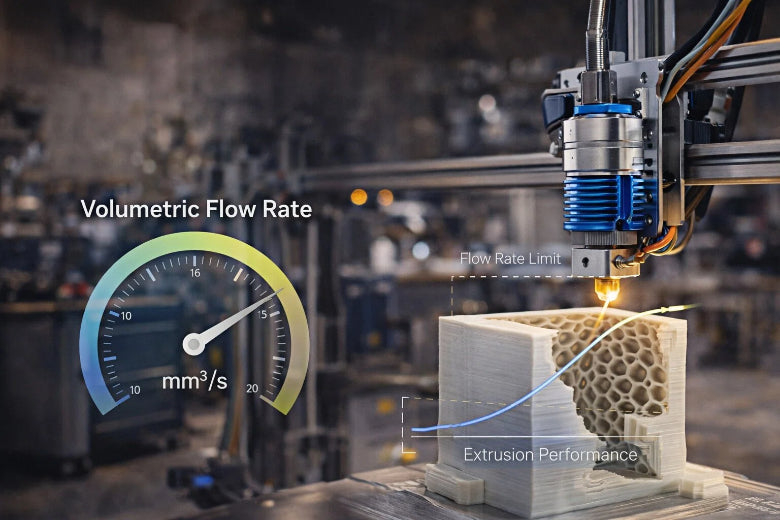
Think of volumetric flow rate 3D printing like the amount of toothpaste you squeeze out of a tube each second. In the 3D printing process, volumetric flow rate 3D printing measures how much melted filament is extruded from the nozzle every second, typically in cubic millimeters per second (mm³/s). This is different from print speed, which only indicates how fast the print head moves. Many people confuse these two, but dialing in the correct volumetric flow rate 3D printing is crucial for achieving strong, smooth prints. If you don’t calibrate the volumetric flow rate 3D printing properly, you might notice weak spots or messy lines on your models. Each filament type requires its own volumetric flow rate 3D printing setting, and every printer has a maximum volumetric flow rate 3D printing it can handle. By understanding and tuning the volumetric flow rate 3D printing, you’ll make your prints more reliable and achieve much better results.
Key Takeaways
- Volumetric flow rate shows how much filament comes out every second.
- Using the right flow rate stops weak spots and messy lines.
- Each filament type needs its own flow rate setting for good prints.
- Testing and adjusting your printer makes prints look better and work faster.
- Knowing about flow rate helps you use less material and finish quicker.
Volumetric Flow Rate 3D Printing Basics
What Is Volumetric Flow Rate?
Imagine you are filling a cup with water from a faucet. The amount of water that flows into the cup every second is similar to how much melted filament comes out of your 3D printer’s nozzle. In volumetric 3d printing, this measurement is called volumetric flow rate. You measure it in cubic millimeters per second (mm³/s). This tells you how much material your printer can push out reliably while printing.
- Volumetric flow rate 3d printing means the maximum volume of filament your hotend can melt and extrude each second.
- You use mm³/s to measure this, just like you might measure water flow in liters per minute.
- The flow rate shows how much molten filament leaves the nozzle during the printing process.
You need to know your printer’s volumetric flow rate so you can avoid problems like under-extrusion or weak prints. If you push your printer too fast, it cannot melt the filament quickly enough. This leads to gaps or rough surfaces on your model. Volumetric 3d printing helps you set the right pace for your machine and material.
Volumetric Flow Rate vs Print Speed
Many beginners mix up volumetric flow rate and print speed. These two ideas sound similar, but they are not the same. Print speed tells you how fast the print head moves across the build plate. Volumetric flow rate tells you how much filament comes out of the nozzle every second.
Let’s break down the difference:
|
Term |
What It Means |
How You Measure It |
|---|---|---|
|
Print Speed |
Movement speed of the print head |
mm/s |
|
Volumetric Flow Rate |
Amount of filament extruded per second |
mm³/s |
Tip: Think of print speed as the speed of a car, and volumetric flow rate as how much fuel the engine burns every second. Both matter, but they are not the same.
If you set your print speed too high without considering your volumetric flow rate, your printer may not melt enough filament in time. This causes problems like thin walls or missing layers. In volumetric 3d printing, you want to match your extrusion speed to your printer’s ability to melt and push out filament.
Experts suggest you:
- Test your extruder to find its maximum volumetric flow rate.
- Adjust the volumetric speed setting in your slicer software to match this rate.
- Try different print speeds for different parts of your model, but keep speeds for visible features below your safe limit.
- Print test pieces and change settings if you see problems. Watch for print quality, strength, and how long the print takes.
Units and Measurement
You measure volumetric flow rate in cubic millimeters per second (mm³/s). This unit tells you the volume of filament your printer extrudes every second. In volumetric 3d resin printing, you use the same unit to measure how much resin is cured each second.
Here’s a simple way to understand the measurement:
- If your printer extrudes 10 mm³ of filament every second, you have a volumetric flow rate of 10 mm³/s.
- In traditional layer-by-layer 3d printing, you calculate the flow rate by dividing the total volume of filament used by the time it takes to finish the print.
Note: High flow rates help you print faster, but only if your printer can handle the speed without losing quality.
Volumetric 3d printing relies on knowing your flow rate. You need to set your extrusion speed so your printer can keep up. In volumetric 3d resin printing, you also need to match the curing rate to the resin’s properties.
If you understand volumetric flow rate 3d printing, you can avoid common mistakes. You will get stronger, cleaner prints and make better use of your printer’s abilities.
Why Volumetric Flow Rate Matters
Print Quality and Precision
You want your 3D prints to look smooth and feel strong. The right flow rate helps you get there. When you set the optimal flow rate, your printer lays down each layer with the right amount of material. This prevents gaps, dots, and under-extrusion. If you use too little material, you see holes or weak spots. If you use too much, you get blobs or thick lines.
Think of volumetric 3d printing like icing a cake. If you squeeze the icing bag too slowly, the cake looks patchy. If you squeeze too fast, the icing piles up and makes a mess. The same idea applies to your extruder. It needs to push out just the right amount of melted filament for each layer.
Here are some common print defects caused by incorrect flow rate:
- Over-extrusion: You see blobs, zits, or thick layers on your print.
- Under-extrusion: You notice missing layers, weak infill, or gaps.
- Poor surface quality: The print feels rough or uneven.
- Weak structure: The print breaks easily or feels flimsy.
You can avoid these problems by tuning your flow rate. This helps your printer create strong, clean, and accurate models.
Speed and Efficiency in Volumetric 3D Printing
Volumetric 3d printing lets you print faster without losing quality. The flow rate sets the upper limit for your print speed. If you want to print quickly, you need to know how much material your extruder can handle each second. Maximizing the flow rate helps you find the fastest speed your printer can manage before problems start.
You can use this formula to find your maximum print speed:
Print Speed (mm/s) = Volumetric Flow Rate (mm³/s) / (Layer Height (mm) × Line Width (mm))
For example, if your hotend can extrude 24 mm³/s with a 0.4 mm line width and a 0.2 mm layer height, your maximum print speed is 300 mm/s. If you go faster, your extruder cannot melt and push out enough filament. This leads to under-extrusion and poor layer bonding.
Volumetric 3d printing also helps you save time and material. When you set the right flow rate, you reduce waste. You print only what you need, and you avoid failed prints. This boosts your efficiency and helps you finish projects faster.
Here is a table that shows how different flow rates affect your print quality and speed:
|
Impact on Print Quality |
|
|---|---|
|
10 |
Faster print speeds without losing quality |
|
High |
Increased efficiency, reducing print times |
|
Optimal |
Better material deposition for large prints |
You can see that tuning your flow rate in volumetric 3d printing gives you better results and saves you time.
Common Issues from Incorrect Flow Rate
If you set the flow rate too high or too low, you run into problems. Your extruder may not keep up, or it may push out too much material. Here are some issues you might see:
- Over-extrusion causes blobs and thick layers.
- Under-extrusion leads to missing layers and weak prints.
- Poor surface quality makes your print rough or uneven.
- Weak structure means your print breaks easily.
You also waste material when you do not set the flow rate correctly. Prints with gaps or blobs often end up in the trash. By understanding volumetric 3d printing, you can reduce waste and get more reliable results.
Volumetric additive manufacturing depends on the right flow rate. If you use volumetric 3d resin printing, you need to match the curing rate to the resin. This helps you avoid sticky or uncured spots. In filament-based volumetric additive manufacturing, you must balance the speed of your extruder with the melting rate of your filament. This keeps your prints strong and accurate.
You can also use design tricks to save material. For example, you can reduce supports or hollow out parts. These steps help you use less filament and make your volumetric additive manufacturing process more efficient.
Volumetric 3d printing is not just about speed. It is about getting the right amount of material deposition for every layer. When you tune your flow rate, you get better prints, save material, and finish jobs faster. You also avoid common mistakes that can ruin your work.
Measuring and Calibrating Volumetric Flow Rate
Calculating Volumetric Flow Rate
You can find the average volumetric flow rate of your 3D printer using a simple formula. This formula helps you know how much melted plastic your extruder pushes out every second. Think of it like measuring how much toothpaste comes out of the tube with each squeeze.
Here is a table that shows the parts of the formula:
|
Component |
Description |
|---|---|
|
Print Speed |
How fast the printer moves (e.g., 200 mm/s) |
|
Nozzle Diameter |
Size of the nozzle opening (e.g., 0.40 mm) |
|
Layer Height |
Thickness of each printed layer (e.g., 0.20 mm) |
|
Volumetric Flow Rate |
Print speed × nozzle diameter × layer height |
For example, if you set your print speed to 200 mm/s, use a 0.40 mm nozzle, and print with a 0.20 mm layer height, your flow rate is 16 mm³/s.
Testing and Calibration Methods
To get the best results, you need to test and calibrate your extruder. This helps you avoid problems like gaps or blobs in your prints. Here are some steps you can follow:
- Make sure the nozzle is clean and not worn out.
- Set the extrusion temperature to match the filament manufacturer’s advice.
- Level and calibrate the print bed for accurate layers.
- Print a test cube and measure the wall thickness.
- Adjust the flow rate based on your test results.
Regular calibration keeps your prints consistent. It also helps your printer last longer and work safely. You use less material and avoid waste when your flow rate is correct.
Factors Affecting Flow Rate
Many things can change how your extruder works. The nozzle size, layer height, and type of filament all play a part. The hotend temperature is also important. Higher temperatures make the melted plastic flow better. If you print faster, you may need to raise the temperature so the filament melts in time.
- A bigger nozzle or thicker layer height increases the flow rate.
- Different filaments melt at different temperatures. Always check the recommended range.
- If you print at high speeds, try raising the hotend temperature by 10–20°C to help the filament melt faster.
By checking these factors, you can keep your flow rate steady. This helps you get strong, clean prints every time.
Maximum Volumetric Flow Rate in Additive Manufacturing
What Is Maximum Volumetric Flow Rate?
You can think of maximum volumetric flow rate like the top speed of a car. In volumetric 3d printing, this is the highest amount of melted filament your printer can push out each second without problems. This value is measured in cubic millimeters per second (mm³/s). When you print at higher flow rates, your printer must melt and move more plastic quickly. If you go past the maximum volumetric flow rate, your printer cannot keep up, and your prints may look messy or weak.
- Maximum volumetric speed is key for high-speed and large-format printing.
- It shows how fast your hotend can melt and extrude filament.
- You can use this formula to find your print speed:
Print Speed (mm/s) = Volumetric Flow Rate (mm³/s) / (Layer Height (mm) × Line Width (mm))
If you want to print big objects or print faster, you need to know your maximum practical volumetric flow rate. This helps you avoid under-extrusion and keeps your prints strong.
Setting Maximum Volumetric Speed
You can set your maximum volumetric speed by testing your printer and filament. Each material and printer setup is different. Here is a simple way to find the best setting:
- Choose your printer and filament in your slicer software.
- Go to the calibration menu and select the 'Max Flowrate' test.
- Enter the starting and ending volumetric speeds and the step size.
- Print the test object.
- Look at the print and find where problems start. Use the height and speed values to calculate your best volumetric speed.
Many things affect your volumetric speed:
- Nozzle size: Bigger nozzles let more filament flow.
- Material: Some plastics melt and flow faster than others.
- Hotend: A better hotend melts filament more quickly.
- Printer setup: Smooth feeding and good mechanics help.
- Environment: Room temperature and humidity can change how filament behaves.
You should always test each new material and setup. This keeps your volumetric additive manufacturing process reliable.
Preventing Under-Extrusion in Volumetric Additive Manufacturing
Under-extrusion happens when your printer cannot push out enough melted filament. You can stop this by following a few steps:
- Fine-tune your extruder settings so the filament moves at the right rate.
- Set your max volumetric flow rate in your slicer. This stops the printer from trying to print faster than it can handle.
- Check your printer’s maximum volumetric flow rate and do not go over it.
- Watch for signs of under-extrusion, like gaps or weak layers.
- Adjust your settings to get the best balance between speed and quality.
In volumetric additive manufacturing, you want to print as fast as possible without losing quality. By knowing your flow rate limits, you can avoid problems and get strong, smooth prints every time.
Practical Volumetric 3D Printing Tips
Material Differences and Settings
You must change your settings for each filament in volumetric 3d printing. PLA, ABS, and PETG act differently when you heat them. PLA melts fast and moves through the extruder easily. PETG is thicker and needs more heat to flow well. In one test, PLA reached a flow rate of 72.34 mm³ per second at high heat. PETG only got to 44.75 mm³ per second with the same nozzle and layer settings. This means you can print faster with PLA than with PETG. You need to slow down for PETG to avoid problems. Always look at the temperature range for your filament. If you use a new material, do a test print to find the best flow rate.
Nozzle and Layer Adjustments
You can change the nozzle size and layer height to control flow rate in volumetric 3d printing. Bigger nozzles let you print faster but lose some detail. Thin layers give you better detail but slow down the print. Thin layers also need lower flow rates. Some printers use adaptive layers. This means the printer changes the layer height during the print. It helps balance speed and quality.
|
Parameter |
Description |
Impact on Flow Rate |
|---|---|---|
|
Nozzle Diameter |
Bigger diameters give higher flow rates but less detail. |
Higher flow rate for faster prints. |
|
Layer Height |
Thin layers give more detail but slow down printing. |
Lower flow rate because you need more layers. |
|
Adaptive Layers |
Changes layer height for better efficiency. |
Balances flow rate and print quality. |
Try different nozzle sizes and layer heights to see what works best for your project.
Real-World Volumetric Additive Manufacturing Examples
You can follow easy steps to tune your printer for volumetric 3d printing and volumetric additive manufacturing. First, measure your filament diameter with calipers. Put the exact number in your slicer to avoid mistakes. Print a single-wall test cube and change the extrusion multiplier by small amounts. If you see under-extrusion, raise the nozzle temperature by 5–10°C or increase the flow rate by 2–5%. If you see gaps after travel moves, lower the retraction length or speed. Always check the hot end for any debris that could block the material.
Tip: Many experienced users check the extrusion multiplier, lower the flow setting if needed, and measure the filament diameter for accuracy. They also clean the extruder to keep the flow steady.
You can use these tips for both filament-based and volumetric 3d resin printing. These steps help you get strong prints, save material, and make volumetric additive manufacturing more efficient.
You can make your 3D prints better by understanding flow rate. Adjusting the flow rate helps you avoid weak and messy layers. Calibrating your printer lets you use the right amount of filament. Volumetric additive manufacturing gets easier when you test different settings. Try new materials and see how changes affect your prints. Flow rate is like water from a faucet. Control it for the best results in volumetric additive manufacturing.
Tip: Write down your best filament and flow rate settings in a notebook for future prints.
FAQ
What is the difference between volumetric flow rate and print speed?
Volumetric flow rate measures how much filament your printer extrudes each second. Print speed shows how fast the print head moves. You need both for good prints, but they are not the same.
Why does my printer show under-extrusion at high speeds?
Your printer cannot melt filament fast enough when you increase speed. Think of trying to squeeze toothpaste too quickly. You get gaps or thin layers. Lower your speed or raise the temperature.
How do I find the best volumetric flow rate for my filament?
Print a test cube and check the walls. Adjust the flow rate until the walls look smooth and strong. Each filament needs its own setting. Write down your results for future prints.
Can I use the same flow rate for all materials?
No. Different filaments melt and flow at different rates. PLA flows faster than PETG or ABS. Always test new materials before starting a big project.
What happens if I set the flow rate too high?
You see blobs, thick lines, or rough surfaces. Your printer cannot keep up. Lower the flow rate for cleaner, stronger prints.











