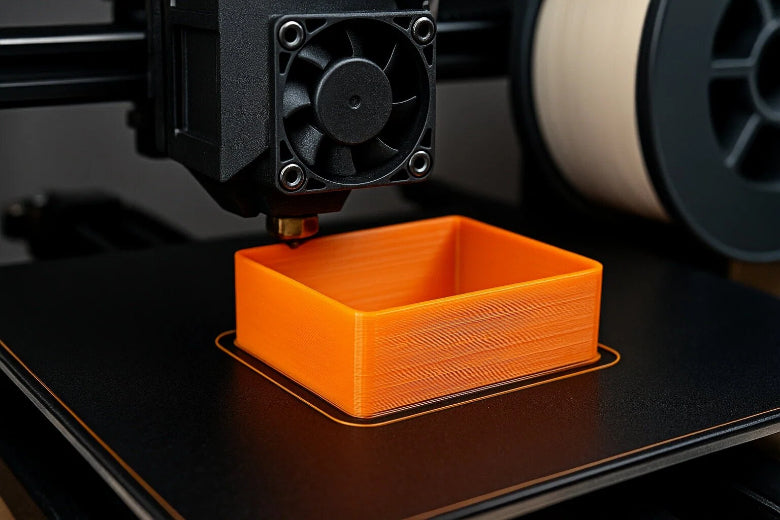
If your PETG prints just won’t stick, you’re not alone. Bed adhesion means how well your first layer grabs onto the print surface. Strong bed adhesion is critical for PETG and ABS because it prevents warping and failed prints. You can improve bed adhesion with a few quick fixes:
- Clean your bed with isopropyl alcohol or dish soap and a sponge. Make sure it’s dry before you print.
- Adjust the bed temperature to 70–90°C for PETG.
- Set your nozzle temperature between 220°C and 260°C.
- Slow down your first layer speed.
- Try a glue stick, hairspray, or painter’s tape to improve bed adhesion.
- Use PEI sheets for an easy, reusable surface.
These Bed adhesion tips for PETG / ABS work for both materials. Most problems disappear with simple tweaks. You’ll see better results fast!
Key Takeaways
- Clean your print bed with isopropyl alcohol before each print. A clean surface ensures better adhesion and reduces failed prints.
- Set your bed temperature between 70°C and 90°C for optimal PETG adhesion. Adjust as needed based on print size and conditions.
- Use a thin layer of glue stick or hairspray on the bed to enhance grip. This helps prevent prints from sticking too much or not enough.
- Slow down the first layer speed to about 13.5 mm/sec. This allows the filament to bond better with the bed for a strong first layer.
- Check for drafts and maintain a stable room temperature. A consistent environment helps prevent warping and improves adhesion.
Causes of PETG Bed Adhesion Issues
Common Symptoms to Watch For
You might notice a few warning signs when your PETG print starts to fail. The first layer may not stick to the bed at all. Sometimes, you see the corners of your print lifting or curling up. Prints can even pop off the build plate halfway through the job. Warping is another big clue that something’s wrong with bed adhesion. If you spot under-extrusion or your nozzle seems clogged, that can also point to bed adhesion issues. On textured sheets, PETG sometimes struggles to grip, and you might see prints coming loose or corners lifting, especially on bigger parts.
Tip: Always check your first layer as soon as the print starts. If it isn’t smooth and even, stop and fix the problem before wasting more filament.
Why PETG and ABS Behave Differently
PETG and ABS both need good bed adhesion, but they act differently on the print bed. PETG likes smooth surfaces, such as glass or PEI sheets, but it can stick too well if you don’t use a light layer of glue stick or hairspray. ABS prefers textured surfaces and often needs special adhesives or tapes to keep it from warping. You’ll find that ABS requires higher bed temperatures to stay flat, while PETG works best between 60°C and 80°C. If you use the wrong temperature, PETG can either not stick or stick too much, making removal tough.
Here’s a quick look at the main causes of PETG bed adhesion issues:
|
Cause of Issue |
Explanation |
|---|---|
|
Improper bed preparation |
A dirty or oily surface keeps PETG from sticking. Clean your bed before each print. |
|
Incorrect bed temperature |
Too low or too high can cause poor adhesion or warping. PETG likes 60–80°C. |
|
Moisture in filament |
PETG absorbs water, which leads to stringing and weak first layers. |
|
Bad first layer calibration |
If your nozzle is too high or low, PETG won’t grip the bed properly. |
PETG bed adhesion issues often come from simple things like a dirty bed, wrong temperature, or a drafty room. You can fix most problems by cleaning your bed, drying your filament, and checking your first layer settings. If you switch between PETG and ABS, remember that each material has its own favorite surfaces and temperatures. Try a glue stick for PETG if you have trouble, but use special adhesives for ABS.
Bed Cleaning and Prep Tips
Cleaning Methods for PETG and ABS
A clean print bed makes all the difference for petg. Dust, grease, or leftover glue can ruin your first layer. You want your petg prints to stick just right, not too much or too little. Here’s how you can get your bed ready for petg and ABS:
- Wipe the bed with isopropyl alcohol (IPA): Use a paper towel and wipe the surface before every petg print. Higher concentrations, like 91%, work best to remove oils and dust.
- Wash with dish soap and hot water: For a deeper clean, wash the bed with dish soap and hot water. Dry it well to avoid rust or water spots.
- Try Windolene for petg: This cleaner helps create a thin separation layer, so petg does not stick too hard. Use it after IPA if you notice petg sticking too much.
- Use acetone (for ABS only): Acetone can clean ABS residue, but always follow up with IPA or Windolene.
- Apply adhesives as needed: Sometimes, a thin layer of glue stick or hairspray helps petg grip the bed, especially on glass or PEI.
Tip: Clean your bed every few prints. If you see petg not sticking or sticking too much, clean it again before starting a new job.
Here’s a quick look at common cleaning methods:
|
Cleaning Method |
Description |
|---|---|
|
Isopropyl Alcohol (IPA) |
Removes oils and dust for better petg adhesion. |
|
Windolene |
Cleans and prevents petg from sticking too much. |
|
Dish Soap & Hot Water |
Deep clean for stubborn residue. |
|
Acetone |
Removes ABS residue (not for petg). |
|
Adhesives |
Glue stick or hairspray for extra petg grip. |
Choosing the Right Bed Surface
Picking the right bed surface helps petg and ABS prints stick well. Some surfaces work better for petg, while others suit ABS. Here’s what you need to know:
- PEI sheets: Great for both petg and ABS. They offer strong grip and last a long time.
- Glass beds: Petg loves glass, especially with a thin glue stick layer. You get a smooth bottom finish.
- Blue painter’s tape: Works well for petg, but replace it often.
- Kapton tape and BuildTak: Best for ABS. These surfaces handle high heat and reduce warping.
- Adhesion aids: For petg, use glue stick or hairspray on glass or PEI. For ABS, try ABS slurry or special adhesives.
Here’s a table to help you choose:
|
Material |
Recommended Bed Surface |
Additional Adhesion Aids |
|---|---|---|
|
PETG |
PEI, glass, blue painter’s tape |
Glue stick, hairspray |
|
ABS |
Kapton, BuildTak, PEI |
Glue stick, hairspray, ABS slurry |
Checklist for Success:
- Wipe your bed with IPA before every petg print.
- Use Windolene if petg sticks too much.
- Pick the right surface for petg or ABS.
- Add glue stick or hairspray if needed.
- Clean your bed every 3–4 prints for best results.
You’ll see better petg adhesion and fewer failed prints with these simple steps. A clean bed and the right surface make all the difference.
Bed Adhesion Tips for PETG / ABS
Getting your first layer to stick can feel tricky, but you can master it with a few simple bed adhesion tips for petg / abs. Let’s break down the most important steps for dialing in your print bed, nozzle temperature, and adhesion aids.
Setting Bed and Nozzle Temperatures
The right print bed temperature and nozzle temperature make a huge difference for petg and ABS. If you set these too low, your print won’t stick. If you set them too high, you might get stringing or blobs. Here’s a quick guide to help you choose the best settings for strong petg adhesion and reliable ABS prints:
|
Material |
Nozzle Temperature (°C) |
|
|---|---|---|
|
PETG |
70–90 |
220–260 |
|
|
|
230 (first layer) |
|
|
|
240 (remainder) |
|
ABS |
100 |
230–250 |
- For petg, start with a print bed temperature of 80°C and a nozzle temperature of 245°C for the first layer. Adjust up or down in small steps if you see problems.
- ABS likes a hotter print bed, usually around 100°C, and a nozzle temperature between 230°C and 250°C.
- Always preheat your print bed and nozzle before starting. This helps the first layer stick better.
Tip: If your petg print curls at the corners or pops off, try raising the print bed temperature by 5°C. If you see blobs or stringing, lower the nozzle temperature by 5–10°C.
Adjusting Z-Offset and Leveling
Z-offset is the tiny gap between your nozzle and the print bed. Getting this right is one of the most important bed adhesion tips for petg / abs. If the nozzle sits too close, petg can squish and cause zits or blobs. If it’s too far, the filament won’t stick at all.
- Adjusting the Z-offset helps you get perfect petg bed adhesion.
- Increase your Z-offset by 0.02mm over what you use for PLA or ABS. If you still have trouble, go up to 0.06mm.
- A higher Z-offset gives petg more room to lay down smoothly and cool without getting squished.
- If the nozzle is too low, it will drag across the first layer and cause buildup or rough spots.
- Level your print bed before every big print. Use a piece of paper or a feeler gauge to check the gap at each corner.
Checklist for Z-Offset:
- Start with a small increase (0.02mm) for petg.
- Watch the first layer. If it looks rough or uneven, adjust the Z-offset up or down by 0.01mm.
- Make sure the nozzle does not dig into the print bed or float too high.
Using Adhesion Aids (Glue Stick, Hairspray)
Sometimes, even with the right print bed temperature and nozzle temperature, you need a little extra help. Adhesion aids like glue stick and hairspray can make a big difference, especially for petg. These products act as a build plate adhesive and help prevent over-adhesion or warping.
|
Method |
Compatible Materials |
Bed Surface |
Advantages |
Disadvantages |
Ease of Use |
Cost |
Reusable |
|---|---|---|---|---|---|---|---|
|
PVA Glue Stick |
PLA, PETG, ABS, TPU |
Glass, PEI, Metal |
Easy to find, water-soluble, easy to clean |
Needs reapplying, can build up |
★★★★☆ |
Low |
No |
|
Hairspray (AquaNet) |
PLA, PETG |
Glass, Metal |
Quick, improves grip |
Leaves residue, strong smell |
★★★★☆ |
Low |
No |
- Apply a thin, even layer of glue stick to your print bed before each petg print. Let it dry for a minute before starting.
- For hairspray, spray a light coat on the print bed from about 8 inches away. Wait until it dries before heating the bed.
- Clean off old glue or hairspray every few prints to keep your print bed in top shape.
- Both methods work well for petg and ABS, but glue stick is the best choice if you want easy cleanup.
Note: If your petg sticks too well and is hard to remove, use a little more glue stick. This creates a barrier and makes print removal easier.
With these bed adhesion tips for petg / abs, you can solve most first layer problems. Tweak your print bed temperature, nozzle temperature, and Z-offset until you see a smooth, even first layer. Use glue stick or hairspray as needed for extra grip. You’ll get better results and fewer failed prints every time.
First Layer and Print Settings
Slowing First Layer Speed
You want your petg print to stick right from the start. Slowing down the first layer speed gives the filament more time to melt and bond with the bed. This step helps you get better first layer adhesion and reduces the chance of warping or lifting. When you print too fast, the filament can drag or miss spots, which leads to weak bed adhesion.
- Set your first layer speed to about 13.5 mm/sec. This is around 33% of your normal print speed.
- For most petg prints, start with a print speed between 30–60 mm/s. Lower speeds, like 20–30 mm/s, work well for tricky shapes or small parts.
- If you want more detail, try slowing down to 40 mm/s for the whole print.
Tip: Watch the first layer as it prints. If you see gaps or lines not sticking, slow down the speed even more.
Fan Settings for Better Adhesion
Cooling fans help with overhangs and sharp details, but they can hurt first layer adhesion. You want the first layer to stay warm and soft so it bonds to the bed. Turning off or lowering the fan for the first few layers helps petg stick better.
- Turn off the part cooling fan for the first layer. This keeps the petg warm and sticky.
- After the first few layers, you can slowly turn the fan back on.
- If you see the edges lifting, keep the fan off for a few more layers.
Note: Too much cooling too soon can cause the corners to lift or the print to pop off the bed.
First Layer Height and Flow
Getting the right first layer height and flow is key for strong first layer adhesion. You want the petg to spread out just enough to grip the bed, but not so much that it squishes or blobs. Good first layer calibration makes your print look smooth and stick well.
Here’s a quick table to help you set up your printer for petg:
|
Adjustment Type |
Recommended Value |
|---|---|
|
First Layer Height |
0.2 mm for consistent adhesion |
|
Layer Height Range |
0.16–0.28 mm |
|
Nozzle Clearance |
+0.1 mm for better adhesion |
|
Print Speed |
20–30 mm/s |
|
First Layer Elevation |
Adjust in 0.02 mm increments |
- Start with a first layer height of 0.2 mm. This gives petg enough room to grip the bed.
- Adjust the Z-axis for a little more "squish" if you see the filament not sticking. Try small changes, like 0.02 mm at a time.
- Increase the flow rate slightly if you see gaps in the first layer. This helps fill in empty spots and boosts first layer adhesion.
Checklist for First Layer Success:
- Slow down the first layer speed.
- Turn off the fan for the first few layers.
- Set the first layer height to 0.2 mm.
- Adjust the Z-axis and flow as needed.
- Watch the first layer and make small tweaks for perfect petg bed adhesion.
With these settings, you’ll see better first layer adhesion and fewer failed prints. Take your time with first layer calibration, and your petg prints will stick every time.
Environmental Factors for Bed Adhesion
Avoiding Drafts and Temperature Swings
Room temperature and air movement can make or break your petg print. If you have a window open or a fan blowing, you might see the first layer peel up or corners curl. Sudden temperature swings cause the bed and petg to cool unevenly, which leads to warping or detachment. Try to print in a space where the temperature stays steady. Close doors and windows before you start. If you notice your petg print lifting, check for cold air drafts near your printer.
Tip: Keep your printer away from vents and open windows. A stable environment helps petg stick better and reduces failed prints.
Using Enclosures for ABS
ABS needs even more help than petg when it comes to temperature control. If you print with ABS, use an enclosure to trap heat and block drafts. This keeps the temperature around your print steady and prevents warping. While petg does not always need an enclosure, you might still see better results if you use one, especially in a cold room. An enclosure also helps keep dust and moisture away from your petg prints.
Here’s a quick comparison:
|
Material |
Needs Enclosure? |
Why Use One? |
|---|---|---|
|
PETG |
Optional |
Reduces drafts, keeps heat |
|
ABS |
Highly recommended |
Prevents warping, keeps heat |
Storing Filament Properly
Petg is hygroscopic, which means it absorbs moisture from the air. If you leave petg out, it can get wet and cause problems like bubbling, weak layers, and poor bed adhesion. Even after printing, petg parts can keep absorbing moisture, which affects their strength and stiffness. You need to store your petg filament the right way to avoid these issues.
- Store spools in airtight containers to keep out moisture.
- Use resealable plastic bags with silica gel packs for short-term storage.
- Try vacuum-sealed bags for long-term protection.
- Use color-changing silica gel packs to check for moisture.
- Keep humidity below 20% with a digital hygrometer.
- Dry cabinets work well for easy humidity control.
- Always keep spools in a cool, dry place away from sunlight.
If you store petg the right way, you will see better bed adhesion and stronger prints. When petg absorbs moisture, you get weak layers and prints that do not stick well. Always check your storage setup before you start a new print.
Troubleshooting PETG Bed Adhesion Problems
Quick Checklist for Common Issues
When your petg print won’t stick, you can run through this quick checklist to find the problem fast:
- Clean the bed with isopropyl alcohol to remove oils and fingerprints.
- For glass beds, scrub with a sponge and dish soap, then dry completely.
- Apply a thin layer of glue stick or hairspray if you need extra grip.
- Set the bed temperature between 60°C and 80°C. Use 60°C for small prints or with adhesives, and bump it up for larger prints.
- Adjust the Z-axis so the nozzle sits close enough to create a slightly squished first layer. This helps petg make good contact and improves bed adhesion.
If you follow these steps, you’ll solve most petg bed adhesion problems before they ruin your print.
Fixing Over-Adhesion and Stuck Prints
Sometimes petg sticks too well and you can’t get your print off the bed. Don’t panic! Try these steps to remove stuck petg safely:
- Let the build plate cool to room temperature. If the print is still stuck, place the plate in the fridge for 20 minutes. The petg will shrink and loosen its grip.
- If cooling doesn’t work, gently heat the bed to about 70°C. This softens the petg and makes removal easier.
- Use a thin plastic scraper to lift the print. Slide it under the edge and work slowly to avoid scratching the bed.
- Dental floss works great for stubborn prints. Slide it under the print and use a gentle sawing motion.
- For really tough cases, drip a little isopropyl alcohol around the base. Wait a minute, then try again.
Never force a stuck petg print. You could damage your bed or hurt yourself.
Preventing Bed Damage
You want your print bed to last a long time. Here are some simple ways to protect it when printing with petg:
|
Method |
Description |
|---|---|
|
Cleaning the bed |
Clean regularly to remove residue and keep petg prints sticking just right. |
|
Using appropriate adhesives |
Apply a thin layer of glue stick or hairspray to help with first layer adhesion and easy removal. |
|
Keep the bed at the right temperature to avoid sticking too much or too little. |
|
|
First layer calibration |
Calibrate the first layer height so petg bonds well but doesn’t fuse to the bed. |
- Always use a thin layer of glue stick or hairspray before printing petg.
- Check your first layer height and bed temperature before every print.
Taking these steps will help you avoid scratches, chips, and other bed damage while getting great petg results.
Best Practices and Common Mistakes
What to Avoid for PETG Bed Adhesion
You want your petg prints to stick well, but some mistakes can ruin your results. Many beginners run into the same problems. If you know what to avoid, you’ll get better bed adhesion and fewer failed prints.
- Don’t skip cleaning your print bed. Even a little dust or oil can stop petg from sticking.
- Avoid setting your nozzle too close to the bed. Too much squish makes petg hard to remove and can damage your surface.
- Don’t ignore your bed temperature. If you print petg on a cold bed, you’ll see warping and corners lifting.
- Never use too much glue stick or hairspray. Thick layers can cause uneven first layers and poor bed adhesion.
- Don’t forget to check your filament. Wet petg leads to bubbles and weak layers that won’t grip the bed.
Tip: Always watch the first layer. If you see petg not sticking or curling, pause and fix it right away.
Consistent Results Every Print
You can get reliable petg prints every time if you follow a few best practices. Makers who print petg often use these steps for strong bed adhesion and smooth first layers.
- Use a heated bed. This helps petg stick and keeps your prints flat.
- Make sure your nozzle sits at the right height. You want petg to touch the bed, not get squished.
- Level your bed before each big print. A flat bed gives petg the best chance to grip.
- Store petg in a dry place. Dry filament melts better and sticks well.
- Clean your bed with isopropyl alcohol before every print.
- Slow down your first layer speed. This gives petg time to bond with the bed.
- Turn off the cooling fan for the first few layers. Warm petg sticks better.
- Use a thin, even layer of glue stick if you need extra grip.
Here’s a quick checklist for perfect petg bed adhesion:
|
Step |
Why It Matters |
|---|---|
|
Clean the bed |
Removes dust and oils |
|
Use a heated bed |
Improves petg grip |
|
Prevents over-squish |
|
|
Dry your filament |
Stops weak layers |
|
Level the bed |
Ensures even first layer |
Remember: Small tweaks make a big difference. If you follow these tips, you’ll see better petg prints and less frustration.
You can get great petg bed adhesion if you follow a few simple steps. Start by cleaning your bed and setting the right temperature. Use these key tips for reliable petg first layers:
- Set your petg extruder between 230°C and 250°C.
- Slow your petg print speed to 30–50 mm/s.
- Adjust petg retraction for your setup.
- Keep the petg cooling fan low for the first layers.
Try each petg tip one at a time. Watch your petg first layer and make small changes. Keep the troubleshooting checklist close for every petg print. With these petg fixes, you will see strong adhesion and fewer failed prints. Get ready to print petg with confidence!
FAQ
Why does petg sometimes stick too well to the bed?
Petg can bond tightly to smooth surfaces like glass or PEI. You might find it hard to remove prints. Try using a thin layer of glue stick. This creates a barrier and makes petg easier to lift off after printing.
How do I stop petg from warping during printing?
You can prevent warping by keeping your print bed at the right temperature. Use 70–90°C for petg. Make sure your room has no drafts. Slow down the first layer speed. Store petg filament dry to avoid moisture problems.
What is the best way to clean my bed before printing petg?
Wipe your bed with isopropyl alcohol before every petg print. Use dish soap and water for deeper cleaning. Dry the surface well. A clean bed helps petg stick better and reduces failed prints.
Can I use the same settings for petg and PLA?
Petg needs higher temperatures than PLA. Set your bed to 70–90°C and nozzle to 230–250°C for petg. PLA works at lower temperatures. Always check your slicer settings before switching between petg and other filaments.
Why does petg sometimes not stick to the bed at all?
If petg does not stick, check your bed temperature and nozzle height. Clean the bed with alcohol. Try a glue stick or hairspray for extra grip. Make sure your petg filament is dry. Watch the first layer and adjust settings as needed.