
This guide compares small and large nozzles in the way functional-part users care about: throughput, fit, reliability, and real material constraints (ABS, PETG, nylon, CF-filled).
Large nozzle vs small nozzle: quick decision table (0.4 vs 0.6 vs 0.8+)
|
If you mostly print… |
Pick this nozzle first |
Why |
|---|---|---|
|
Small parts, fine holes, text, tight features, lots of overhangs |
0.4 mm (small) |
Best feature fidelity and more forgiving bridging/overhang tuning |
|
Functional jigs/fixtures, enclosures, brackets where time matters |
0.6 mm (mid/large) |
Best balance of speed, strength, and still-usable detail |
|
Large, simple functional parts with forgiving tolerances |
0.8 mm+ (large) |
Fewer layers/perimeters, high material deposition (if your hotend can keep up) |
Criteria 1: feature size, text, and small holes
The practical limit isn’t your CAD model, it’s the width of plastic you can place.
- With a 0.4 mm nozzle, you can place narrower lines and resolve small geometry more cleanly.
- With a 0.6 mm nozzle, small details are still possible, but you’ll feel it on tiny text, narrow slots, and tight internal corners.
- With 0.8 mm+, details blur fast. If your design relies on small holes or thin walls, you’ll end up redesigning, drilling/reaming holes, or accepting more clearance.
A simple rule that matches real prints: if a feature is close to a couple of nozzle-widths, it’s going to be fragile or inconsistent. Make small features bigger, or stay on the smaller nozzle.
Criteria 2: dimensional accuracy and tolerance reality (especially for engineering plastics)
For functional parts, “accuracy” is usually a mix of:
- your printer’s motion repeatability,
- your extrusion calibration,
- material shrink/warp, and
- how much post-processing you’re willing to do.
A smaller nozzle often makes it easier to hit small internal dimensions (like holes and slots). But nozzle diameter won’t save you from ABS/nylon shrink.
Practical reality for fit-critical parts:
- Expect holes to print undersized, especially small ones.
- Use slicer tools (horizontal expansion / hole compensation) and validate with a small test coupon.
- For precise holes, plan on drilling/reaming.
If you’re printing ABS or nylon for functional parts, dimensional control is more about consistent chamber temperature, bed adhesion, and part orientation than it is about chasing a smaller nozzle.
If you landed here for a specific comparison like 0.4 vs 0.6 nozzle or 0.6 vs 0.8 nozzle, this is the quick mental model: 0.6 is often the throughput default for functional parts, then you go smaller for tiny features or bigger for large, forgiving geometry.
Criteria 3: strength (what nozzle size really changes)
Nozzle size influences strength mainly by changing how plastic is laid down:
- Wider extrusion lines can improve bonding area.
- You often need fewer perimeters to reach a target wall thickness, which can reduce print time.
Prusa notes in its nozzle diameter guide that a 0.6 mm nozzle can reach the same wall thickness with one fewer perimeter compared to 0.4 mm (e.g., 3 perimeters vs 2) in common setups (“Everything about nozzles with a different diameter”, Prusa Research).
What matters more than nozzle size for functional parts:
- Wall/perimeter count (often more than infill)
- Part orientation (layer lines are the weak direction)
- Temperature and cooling balance (layer bonding vs deformation)
So yes, a larger nozzle can help strength in practice, but it’s not magic. It’s a different set of tradeoffs.
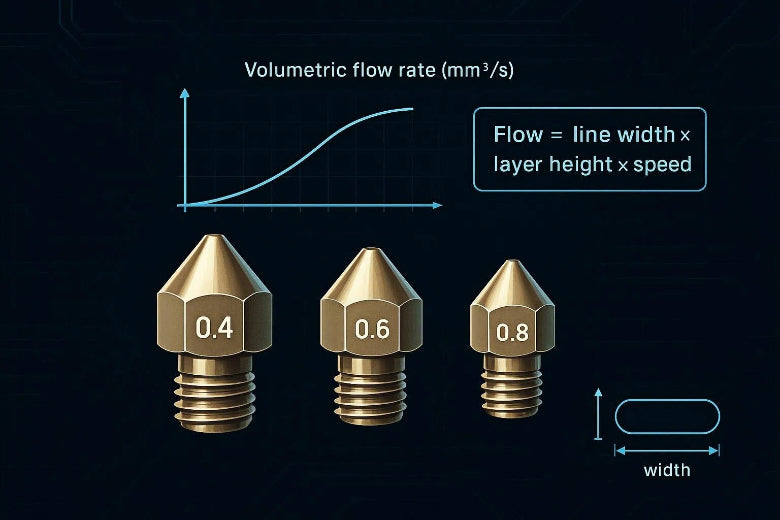
Criteria 4: high-speed printing is usually a volumetric flow problem
A bigger nozzle doesn’t guarantee faster prints. Your hotend still has to melt enough plastic per second.
Use this relationship:
- Volumetric flow (mm³/s) ≈ line width × layer height × print speed
If you’re looking for the keyword phrasing, this is the core of volumetric flow rate 3d printing.
Sovol’s explainer breaks this down and shows how to compute speed limits from flow (“What Volumetric Flow Rate Means in 3D Printing”).
Why this matters when you “go bigger”:
- A 0.6 or 0.8 nozzle usually implies wider lines and taller layers.
- That can push you into under-extrusion even at moderate head speeds.
A practical approach:
- Run a max-flow calibration for each material.
- Set a conservative max volumetric speed (leave headroom).
- Choose layer height/line width that stay under that limit.
If you want a step-by-step way to run this test, Obico’s guide to the OrcaSlicer max flow test is a good walkthrough (“Maximum Volumetric Speed Test in OrcaSlicer”).
Criteria 5: material compatibility (ABS, PETG, nylon, CF-filled)
ABS / ASA
- Big risk: warp and shrink.
- Nozzle size choice is secondary to heat management and bed adhesion.
- If you go larger, you may reduce print time, which can reduce warp risk on some geometries. But don’t assume it fixes it.
PETG
- Generally prints easily but can string; bridging is usually worse than PLA.
- A 0.6 mm nozzle is often a solid functional choice if your parts don’t need tiny features.
PA (nylon)
- Moisture sensitivity matters more than nozzle diameter. Wet nylon prints inconsistently and can weaken parts.
- Keep nylon dry and be conservative with speeds until flow is proven.
CF-filled (PETG-CF, PA-CF)
Two practical rules:
- Plan for abrasion. Carbon fiber and other filled filaments can wear nozzles fast.
- Prusa’s material guidance for composites explicitly calls out using a hardened nozzle for abrasive fibers (“Composite materials (filled with carbon, kevlar or glass)”, Prusa Knowledge Base).
- Give the filament room. Many filled filaments print more reliably with a larger nozzle (commonly 0.6 mm) because it reduces clog risk and pressure spikes.
Sovol’s nozzle selection guide also notes that fiber/particle-filled filaments typically want a larger nozzle and more wear-resistant nozzle materials.
Criteria 6: reliability, maintenance, and downtime
For small-batch functional parts, the fastest print is the one that doesn’t fail.
Large nozzles can help reliability by:
- reducing back-pressure,
- being less sensitive to minor contamination,
- coping better with filled materials.
But they can also create new failure modes:
- Overhangs sag more easily.
- Small mating features lose definition.
- You may run into hotend flow limits sooner and get under-extrusion.
If you’re optimizing for uptime, treat nozzle size as one lever in a bigger system: filament dryness, consistent first layer, and repeatable flow calibration.
Starter settings (safe ranges you can tune from)
These aren’t “best settings.” They’re reasonable starting windows for functional parts.
|
Nozzle |
Layer height (typical) |
Line width (typical) |
Best use |
|---|---|---|---|
|
0.4 |
0.16–0.28 mm |
~0.42–0.48 mm |
Fit, detail, complex geometry |
|
0.6 |
0.24–0.42 mm |
~0.60–0.72 mm |
Functional parts throughput |
|
0.8 |
0.28–0.56 mm |
~0.80–0.96 mm |
Large, simple strong parts |
For a rule of thumb on layer height limits, Prusa’s guidance is to keep maximum layer height below roughly ~80% of nozzle diameter (e.g., 0.32 mm max for 0.4), as explained earlier by Prusa Research.
Common mistakes when switching nozzle sizes
- Changing the nozzle, but not the process (line width, layer height, speeds, max volumetric speed). The printer won’t “auto adapt.”
- Chasing head speed numbers without checking volumetric flow. If the hotend can’t melt that fast, you get weak parts.
- Printing CF on a brass nozzle and wondering why quality drifts after a spool.
- Expecting perfect tolerances out of ABS/nylon without planning for shrink/warp and test coupons.
Key takeaways
- A 0.4 mm nozzle is still the easiest way to get small holes, text, and complex geometry to print cleanly.
- A 0.6 mm nozzle is often the best all-around option for functional parts because it balances throughput and feature fidelity.
- 0.8 mm+ makes sense when parts are large and simple, but only if your hotend can support the required volumetric flow.
- For “high speed,” focus on mm³/s, not just mm/s.
- If you print CF-filled filaments, plan for abrasion-resistant nozzles and more conservative, validated flow.
Next steps
If you want to go deeper into the tuning side, start with Sovol’s guide on nozzle size selection, then apply the flow limit to your slicer profile.
If you’re evaluating printers for reliable functional-part throughput, you can browse SOVOL and filter by the build volume and material support you actually need (especially if ABS/PA/CF are in your daily rotation).