








Wet filament causes big problems for 3d printing. You see stringing on your parts, bubbles in the layers, and rough surfaces. Filament absorbs moisture from the air. This leads to poor results and weak prints. Keeping filament dry stops these failures. The Sovol SH02 Dryer gives you an easy way to start keeping filament dry. When you focus on keeping filament dry, you get stronger parts and smoother finishes. All filament types need help with keeping filament dry. You get fewer failed prints by keeping filament dry. Good 3d printing results depend on keeping filament dry. You will see a difference in every filament spool by keeping filament dry. The Sovol SH02 Dryer makes keeping filament dry simple. You will enjoy better prints with every filament when you focus on keeping filament dry.
Key Takeaways
- Wet filament makes stringing and bubbles happen. This causes bad print quality. Keep filament dry for good results.
- The Sovol SH02 Dryer takes out moisture from many filament types. This helps prints become smoother and stronger.
- Use the SH02's temperature settings to fit different filament needs. This makes print quality better.
- Put dried filament in airtight containers with desiccants. This keeps filament dry and stops problems later.
- Drying filament often cuts down waste and makes prints work better. This saves time and resources.
Print Failures from Wet Filament
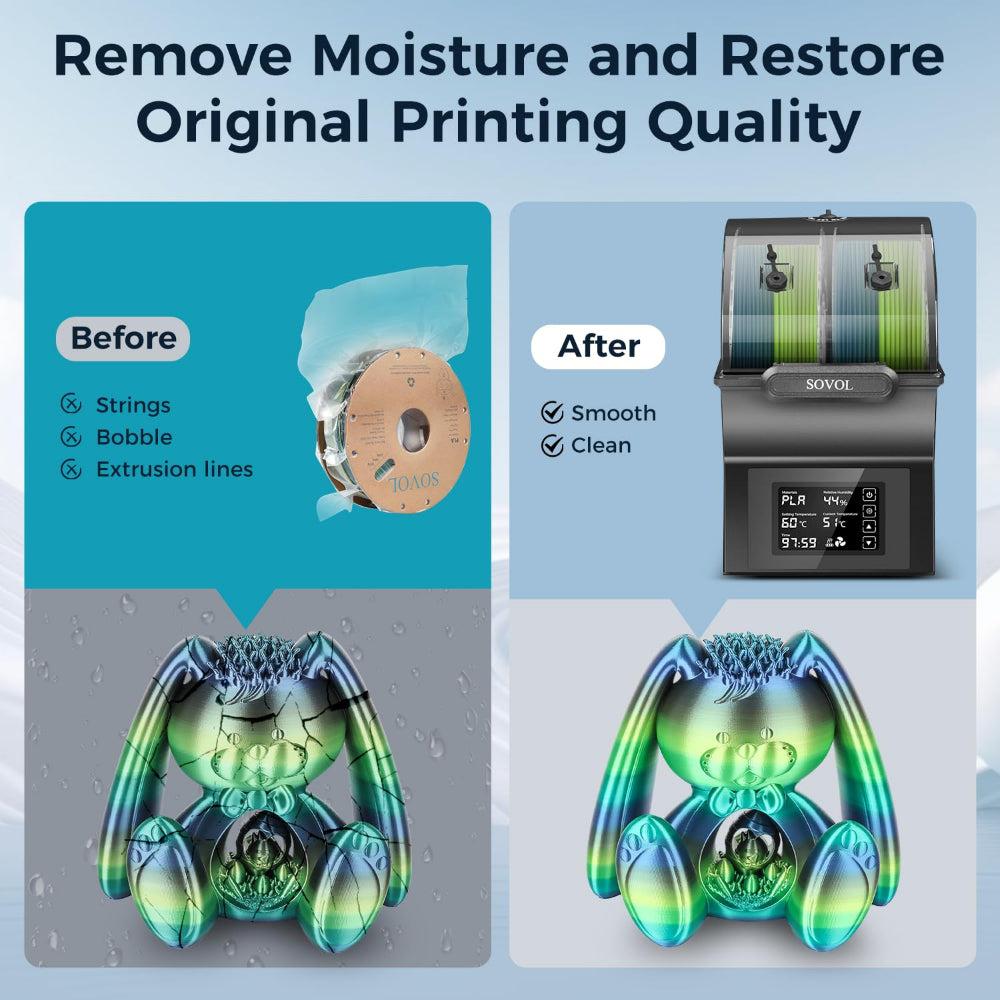
Signs of Wet Filament
At first, you might not see problems from wet filament. But wet filament can cause many issues when you 3d print. If your filament has taken in water, you might hear popping or crackling sounds as it goes through the hot end. Sometimes, you will notice white steam coming out of the nozzle tip. The filament that comes out can look bubbly or foamy, and it might feel rough. These things show your filament needs to be dried. You might also see rough or fuzzy spots on your finished prints. Sometimes, there are extra strings, blobs, or pits on your model. The layers might not stick well, so your prints can break easily. If you see any of these signs, your filament probably has water in it.
- Popping or crackling noises while printing
- Steam or vapor coming from the nozzle
- Bubbly or foamy filament as it comes out
- Rough or pitted spots on your prints
- Extra strings or blobs on your model
Common Issues: Stringing and Bubbles
Wet filament can make stringing and bubbles. These problems ruin how your prints look and how strong they are. Stringing happens when steam pushes melted plastic out of the nozzle. This leaves thin strings between parts of your model. You might see extra plastic strings and messy details. Bubbling happens when water in the filament turns into steam. This makes bubbles in the melted plastic. You might see tiny holes and uneven lines on your print. These problems make your prints look bad and feel weak.
Tip: If you see lots of strings or bubbles, check if your filament is wet before you print again.
Why Wet Filament Causes Problems
Moisture in filament changes how it melts and flows. When you heat wet filament, the water turns into steam. This steam builds up pressure inside the nozzle. It can cause under-extrusion, empty spots, and even cracks in your print. The plastic does not flow evenly, so layers do not stick well and surfaces look rough. You might also hear crackling and see cloudy spots on your print. The table below shows how moisture can hurt your print quality:
|
Evidence Description |
Impact on Print Quality |
|---|---|
|
Moisture absorption leads to steam formation during extrusion. |
Causes under-extrusion and voids in prints. |
|
Flaws in flow due to moisture result in lower quality prints. |
Creates critical cracks and reduces overall print integrity. |
|
Non-uniform flow observed after exposure to air. |
Results in opacity, crackling sounds, voids, and compromised adhesion. |
You can stop these problems by keeping your filament dry. Dry filament gives you smoother prints, stronger parts, and better results every time.
Impact of Moisture on Print Quality
How Moisture Affects Filament
Moisture is a big problem for 3d printing, even if you cannot see it. Filament takes in water from the air, even inside a box or bag. This is how moisture gets into your filament. When you print with wet filament, the water turns into steam in the hot end. The steam makes bubbles, popping noises, and the plastic does not flow right. This causes rough surfaces, weak layers, and prints that break easily.
When the air is more humid, filament changes. For example, PLA gets tiny holes and becomes weaker. It cannot bend as much and breaks under less weight. It also cannot handle hard hits, so your parts snap easier. You will see rough spots and pieces that do not fit together.
|
Condition |
Surface Finish |
Dimensional Accuracy |
Interlayer Adhesion |
|---|---|---|---|
|
Untreated Wet Filament |
Poor |
Inconsistent |
Compromised |
|
Dried Filament |
Superior |
Consistent |
Enhanced |
Filament Types Most at Risk
Some filaments soak up more water than others. Nylon (PA) and PVA take in the most water. Nylon can hold over ten times more water than PLA. PVA gets soft and can stop working as support. ABS and carbon fiber composites also take in water, but not as fast as nylon or PVA. PLA takes in less water, but still has problems if left out in humid air.
|
Filament Type |
Susceptibility to Moisture Absorption |
Effects of Moisture Absorption |
|---|---|---|
|
ABS |
Moderate |
Bubbles, decreased print quality |
|
Nylon (PA) |
High |
Bubbles, reduced strength and quality |
|
PVA |
Very High |
Softening, feeding issues, support failure |
|
Carbon Fiber Composites |
Moderate to High |
Decreased performance, bubbles, cracking |
Testing for Moisture in Filament
Testing your filament for moisture helps you avoid bad prints. You can weigh your filament before and after drying it. If it weighs less after drying, it had water inside. Humidity sensors in dry boxes can show you how wet your filament is. Many new spools lose 2-3% of their weight after drying, so they were not as dry as you thought.
- Weigh your filament before and after drying to check for water.
- Use humidity sensors in storage boxes for a quick check.
- Dry all new spools before you use them.
- Store filament with desiccants to keep it dry.
Moisture gets into the outside of the filament first, so even a little time in the air can cause problems. Most storage methods do not keep filament dry enough for good 3d printing. Drying your filament before you print is the best way to stop stringing, bubbles, and weak prints. You get smoother surfaces, stronger parts, and fewer failed prints when you keep your filament dry.
Sovol SH02 Dryer: The Solution
How the SH02 Dries Filament
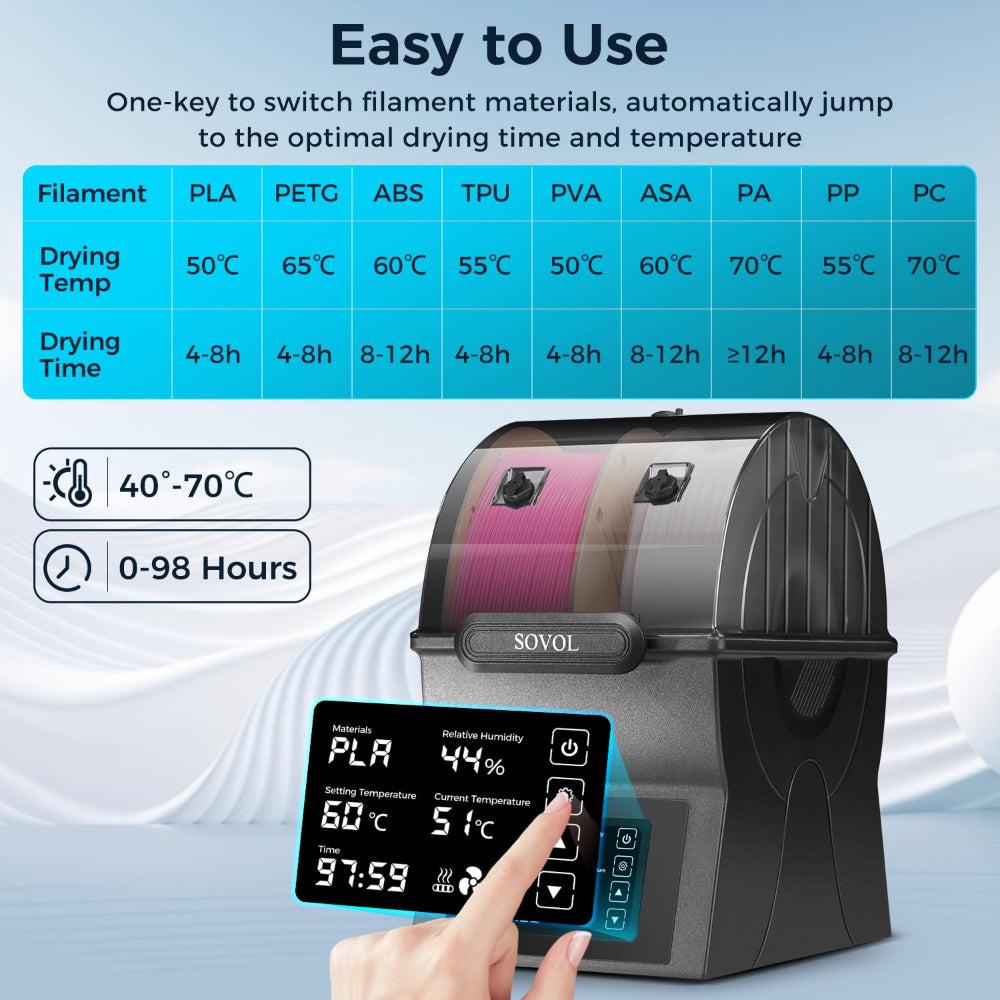
You want your 3d prints to work well every time. The Sovol SH02 Dryer helps keep your filament in good shape. It uses special heating to take water out of your filament. When you put your spool inside, the SH02 heats it evenly from all sides. The 150W PTC heater gets hot quickly and keeps the heat steady. You can pick a temperature from 40°C to 70°C to match your filament. The triple ring sealing blocks air and water, so your filament stays dry the whole time.
The Sovol SH02 Dryer works faster than many other dryers. It heats up to 50°C in just 7 minutes and reaches 70°C in only 25 minutes. You can dry two spools at once, which saves time and helps you get ready for big projects. The large LCD touchscreen lets you set the drying time from 0 to 98 hours. You can always see the temperature and settings on the screen.
|
Feature |
Description |
|---|---|
|
Heating Time |
Reaches 70°C in only 25 minutes |
|
Heating Technology |
150W PTC heater provides strong and even heat |
|
Heating System |
360° heating warms filament from all sides |
|
Sealing Mechanism |
Triple ring sealing keeps air and water out |
|
Temperature Control |
Adjustable between 40°C and 70°C with a big LCD touchscreen |
|
Drying Time Options |
Set drying time from 0 to 98 hours |
Key Features and Safety
You need a dryer that is safe, quick, and simple to use. The Sovol SH02 Dryer gives you all these things. It has preset temperatures for nine filament types, so you do not have to guess. The stronger sealing uses thick materials to keep out moisture. The dryer also has safety features. Overheat protection stops it from getting too hot. Fan monitoring checks that air moves right inside. High-temperature materials keep the dryer safe during long drying times.
|
Feature |
Description |
|---|---|
|
Heating Speed |
Heats to 50°C in 7 minutes and 70°C in 25 minutes. |
|
Temperature Presets |
One-key temperature setting for 9 filament types with default settings. |
|
Sealing Mechanism |
Enhanced sealing design with thicker materials to protect filaments from moisture. |
|
Overheat Protection |
Yes |
|
Fan Monitoring |
Yes |
|
High-Temp Materials |
Yes |
You can trust the Sovol SH02 Dryer to keep your filament safe and dry. The LCD touchscreen makes it easy to check and change settings. You will feel better knowing your filament is safe from water and heat problems.
|
Feature |
Sovol SH02 |
Sovol SH03 |
|---|---|---|
|
Overheat Protection |
Yes |
Yes |
|
Fan Monitoring |
Yes |
Yes |
|
High-Temp Materials |
Yes |
Yes |
|
Price |
$109.00 |
You use many kinds of filament for 3d printing. Each one needs special care to stay dry. The Sovol SH02 Dryer works with PLA, PETG, ABS, TPU, Nylon, and more. You can dry two spools at once, even if they are different types. This means you always have dry filament ready for your next print.
- The Sovol SH02 Dryer keeps humidity low, so your filament does not get brittle. This is very important for PETG, Nylon, and TPU.
- You get smoother and stronger prints because the dryer removes moisture before you start printing.
- You can dry different filament types at the same time, so you get the same high quality for every project.
|
Filament |
Temperature (°C) |
Time (Hours) |
|---|---|---|
|
PLA |
50-65 |
4-8 |
|
PETG |
55-70 |
4-8 |
|
ABS |
75-90 |
4-8 |
|
Nylon (PA) |
80-90 |
4-8 |
|
TPU |
65-75 |
4-8 |
|
PC |
85-120 |
4-8 |
|
PVB |
50-55 |
4-8 |
|
ASA |
75-85 |
4-8 |
You will see fewer failed prints, smoother surfaces, and stronger parts when you use the Sovol SH02 Dryer. Using a filament dryer means your prints work better, you waste less, and you can trust your results. If you want to stop problems from wet filament, this dryer is a smart choice for your 3d printer. You get help for all the main filament types, so you can focus on making cool things instead of fixing problems.
How to Dry Filament with SH02
Step-by-Step Operation
It is easy to dry filament with the Sovol SH02. First, plug in the dryer. Put your filament spool inside the machine. Use the LCD touchscreen to pick the right temperature and time. Each filament type needs a different setting. For example, PLA uses a lower temperature than nylon. The SH02 heats up fast, so you do not wait long. Press start to begin drying. Watch the display to see how it is going. When the timer ends, your filament is ready to use.
Tip: Check the filament’s drying temperature before you start. Watch the filament while drying so it does not get too hot.
|
Common User Errors |
How to Avoid |
|---|---|
|
Using wrong temperatures |
Look up the filament’s drying temperature first. |
|
Not watching the filament |
Keep an eye on it while drying. |
|
Using bad drying methods |
Do not use a microwave or toaster oven. |
|
Setting the temperature too high |
Pick the right temperature for your filament. |
|
Drying in sunlight |
Use a filament dryer or a convection oven with good controls. |
Best Drying Practices
You get better prints by following good drying steps. The Sovol SH02 has a triple-seal system to keep out water. This is very helpful for nylon and TPU. The dryer heats up quickly, so you can get ready to print fast. Use the preset settings for common filaments. Change the time and temperature for special filaments. Nylon needs higher heat, but PLA needs less. To keep filament good after drying, clean the dryer and check the seals often.
- Use the triple-seal system to keep moisture out.
- Print soon after drying for best results.
- Clean inside and check seals to keep the dryer working well.
Storing Filament After Drying
After drying, you must store filament so it stays dry. Put filament in airtight containers with desiccant packs like silica gel. Vacuum-sealed bags are good for long storage. Keep filament in a cool place between 59-77°F. Make sure humidity stays below 50%. Use dark containers to block UV light. Use the filament soon after drying so it does not get wet again.
- Store filament with desiccants in sealed containers.
- Use vacuum-sealed bags for long-term storage.
- Keep filament in a cool, dry, and dark place.
- Keep away from dust and sunlight.
Better Prints with Dry Filament
Before and After Results
You can see a big difference in your 3D prints when you use dry filament. Before drying, you might notice stringing, bubbles, and weak spots. Surfaces look rough, and parts break easily. After drying, your prints become smooth and strong. You get better prints with sharp details and clean lines. The Sovol SH02 helps you remove moisture, so your filament flows well and sticks together. You will notice fewer failed prints and less wasted material. Many users see that their models fit together better and last longer.
Tip: Take a photo of your print before and after drying your filament. You will see how much better prints look with dry filament.
When to Use a Filament Dryer
You need a filament dryer in many situations. Wet filament causes problems like brittle strands, bubbles, and poor adhesion. The Sovol SH02 makes it easy to keep your filament dry and ready for use. Check the table below to see when a dryer is most helpful:
|
Situation |
Description |
|---|---|
|
Brittle Filament |
Damp filaments break during printing. The dryer keeps moisture away and prevents breakage. |
|
Bubble Formation |
Moisture creates bubbles in the filament, ruining print quality. The dryer removes this risk. |
|
Poor Adhesion |
Wet filament does not stick to the bed, causing warping. The dryer improves adhesion. |
|
Layer Shift |
Moist filament leads to uneven layers and shifting. The dryer keeps layers even and smooth. |
You should use a dryer if your filament feels rough, snaps easily, or if you see bubbles and strings. Drying your filament before every big project helps you get better prints and saves time.
Long-Term Printing Benefits
Using dry filament gives you many long-term benefits. You will have fewer failed prints, which means you waste less material. Dry filament helps you get better prints every time, so you do not need to fix or reprint models. You also spend less time cleaning your printer, because dry filament does not clog the nozzle as much. This lowers your maintenance costs and lets you focus on creating new things.
- You reduce material waste by using all your filament for successful prints.
- You spend less time on post-processing, since dry filament gives you smooth surfaces.
- You help the environment by making less waste and using your filament more efficiently.
- You gain an advantage by producing better prints with less effort.
Note: Dry filament supports eco-friendly printing and helps you work smarter, not harder.
You can trust that keeping your filament dry with the Sovol SH02 will give you better prints, less frustration, and more reliable results for every project.
You want your filament spools to make strong and smooth prints. The Sovol SH02 Dryer keeps filament dry, so you do not get stringing or bubbles. Many people say dry filament makes prints look better and saves money. It also works with lots of filament types. Tests show that filament dries fast and humidity goes down quickly. Stores say they see fewer failed prints and smoother layers after drying filament. When you use the SH02, you waste less filament and your prints turn out better. Always pick dry filament for your projects.
- Dry filament helps stop bubbles, stringing, and rough spots.
- You save money because you can fix wet filament instead of throwing it away.
- The SH02 works with many filament types, so printing is easy and reliable.
|
Benefit |
Description |
|---|---|
|
Dry filament helps you get more good prints. |
|
|
Smoother surfaces |
Filament moves better when it is dry. |
|
Stronger parts |
Dry filament helps layers stick together. |
FAQ
How do I know if my filament needs drying?
You might hear popping sounds or see bubbles and stringing during printing. Surfaces may look rough or feel weak. If you notice these signs, your filament likely needs drying.
Can I dry any filament type with the Sovol SH02?
Yes, you can dry many filament types like PLA, PETG, ABS, TPU, and Nylon. The SH02 has presets for each type. Always check the recommended temperature for your filament.
How long should I dry my filament?
Drying time depends on the filament type and how wet it is. Most filaments need 4–8 hours. Use the SH02’s timer and presets for best results.
What should I do after drying filament?
Store your filament in an airtight container with desiccant packs. This keeps it dry and ready for your next print. Use vacuum-sealed bags for longer storage.











