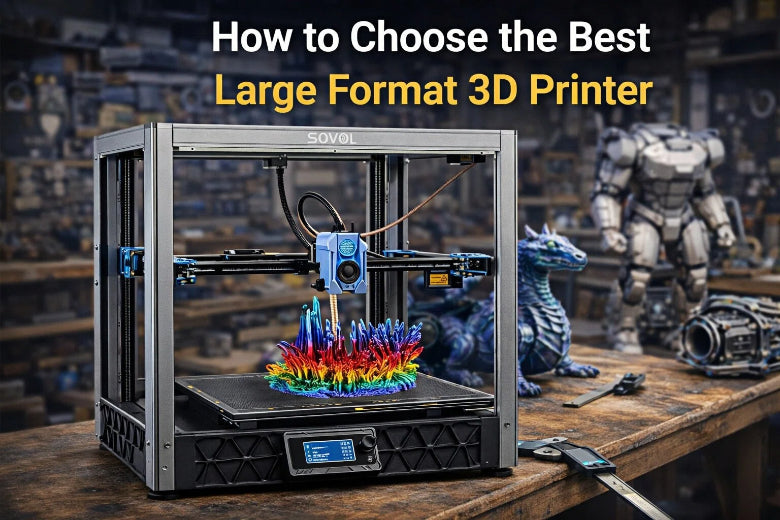
You should think about a few important things when picking the best large format 3D printer. A large format 3D printer helps you make bigger things. It also lets you finish big projects faster. Many people use these printers to waste less material. They also use them to make custom products or tricky shapes.
Before you look at choices, know what your project needs. Make sure the printer’s print size, quality, material compatibility, reliability, speed, and features fit your goals.
|
Description |
|
|---|---|
|
Print Quality |
How clear and detailed the prints look from the printer. |
|
Build Volume |
The biggest size of object you can print. |
|
Material Compatibility |
The types of materials the printer can use. |
|
Ease of Use |
How simple the printer is to set up and use. |
|
Maintenance |
How much work it takes to keep the printer working well. |
Use this large format 3D printer guide to help you pick the best model for you.
Key Takeaways
- Think about what you need for your project before picking a printer. Look at how big you want to print, how good you want the prints to look, and what materials you want to use.
- Learn about the three main types of large format 3D printers. FDM is cheaper. SLA gives more detail. SLS makes stronger prints.
- Check the biggest thing you can print with the printer. Make sure it is big enough for your largest project. A printer that can print bigger things saves you time and work.
- Look at how well the printer works and how much care it needs. A strong frame and a good leveling system help make better prints.
- Think about how much money you have to spend. Decide if you want to buy a printer or pay someone else to print for you. Having your own printer gives you more control. Letting someone else print can save you money.
What Is a Large Format 3D Printer
Definition and Main Features
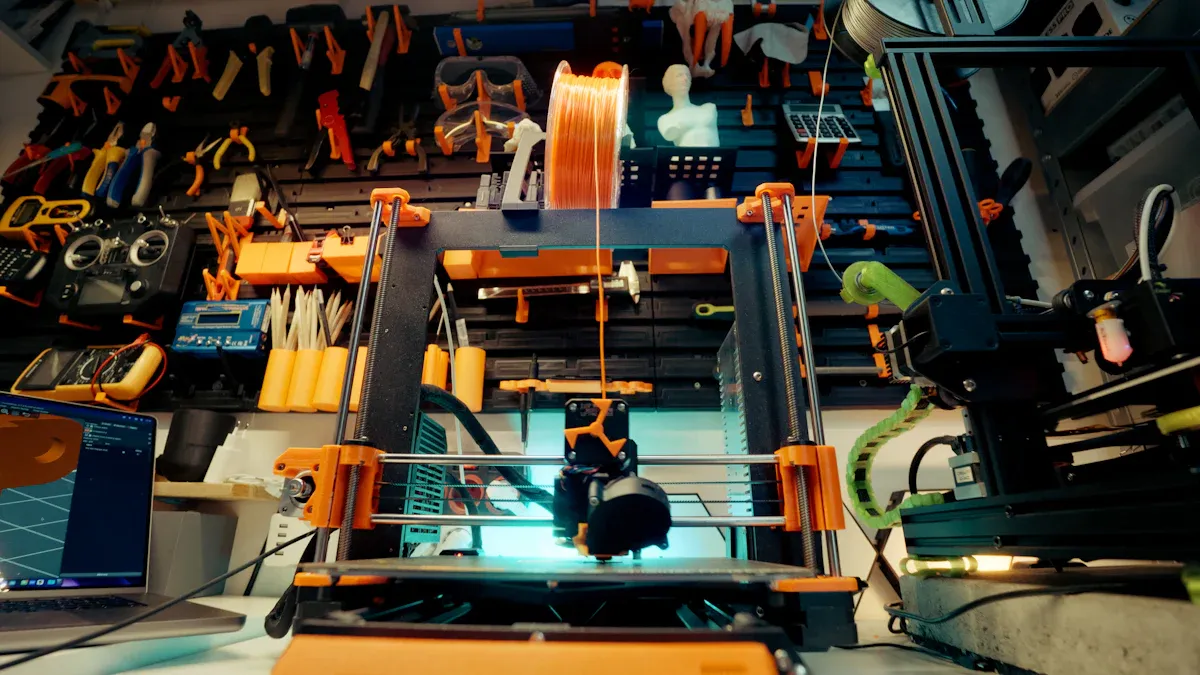
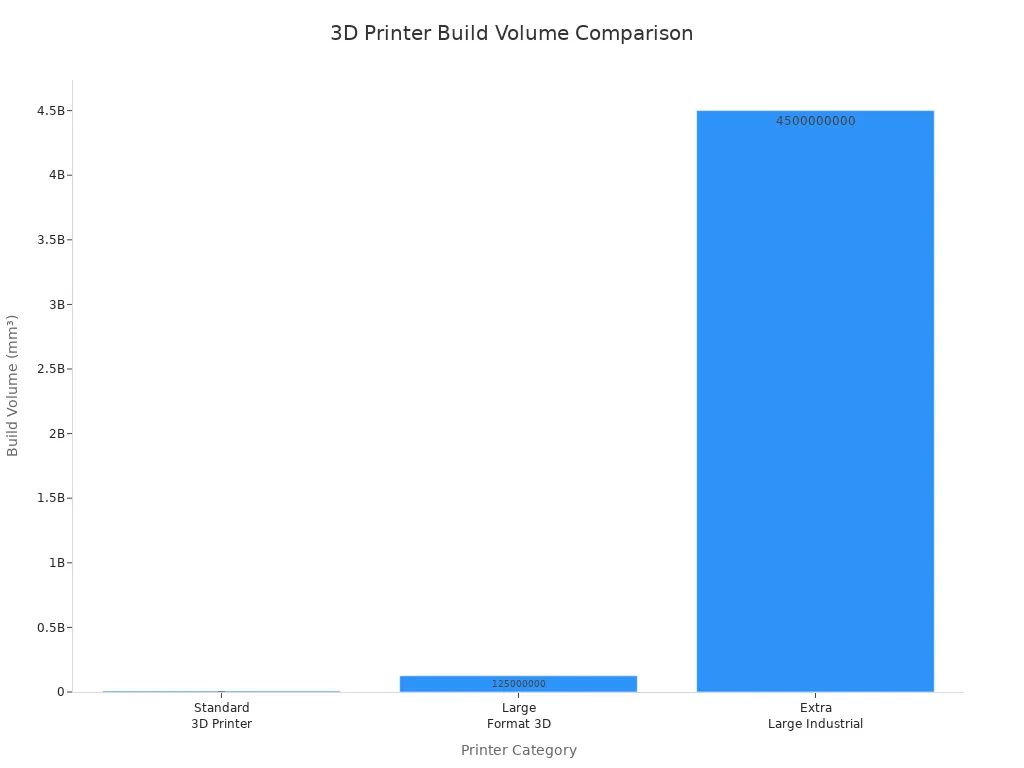
A large format 3D printer can make much bigger things than a regular printer. You can use it to print furniture, test models, or car parts. Most regular 3D printers have a build space of 200 x 200 x 200 mm. Large format printers can go up to 500 x 500 x 500 mm. Some very big ones can reach 1500 x 1500 x 2000 mm.
|
Printer Category |
Typical Build Volume (mm) |
Common Project Types |
|---|---|---|
|
Standard 3D Printer |
200 x 200 x 200 |
Small models, toys |
|
500 x 500 x 500 |
Furniture, prototypes, tools |
|
|
Extra Large Industrial |
1500 x 1500 x 2000 |
Industrial parts, automotive |
These printers have some special features:
- You can print big objects all at once.
- A heated print bed helps your prints stay flat.
- Strong parts inside the printer help it work well and last long.
You can look at a large format 3D printer guide to see which features you need.
|
Feature |
Description |
|---|---|
|
Build Volume |
Lets you make big models and tricky parts in one try. |
|
Material Compatibility |
Works with many materials like thermoplastics, metals, and composites. |
|
Print Quality |
High detail means your parts look and work great. |
|
User Experience |
Simple controls and auto setup make it easy to use. |
|
Maintenance |
Cleaning and updates help your printer keep working. |
|
Industry Applications |
Used in fields like aerospace, cars, and building for fast model making. |
Common Applications and Users
Large format 3D printers are used in lots of jobs. Builders use them to print walls and columns. People who work on planes use them for light and strong parts. Movie makers use them for props and sets. Car designers print dashboards and engine parts. Doctors use them to make custom implants and guides for surgery. Artists and furniture makers use them for cool projects.
|
Industry |
Applications |
|---|---|
|
Construction |
Making things like walls and columns |
|
Aerospace |
Light, strong parts for planes |
|
Entertainment |
Props, sets, and costumes for movies and plays |
|
Automotive |
Fast model making and small runs of car parts |
|
Healthcare |
Custom implants and guides for surgery |
|
Art, furniture, and special projects |
You can use these printers for work or fun. Many hobbyists and teachers use them to learn and teach about design and engineering.
Benefits of Large Format 3D Printing
Advantages Over Standard 3D Printers
Large format 3D printers have many good points. They let you make bigger and harder shapes than standard printers. You can print a cosplay helmet or a big prop in one piece. This makes your project stronger and saves time.
- You get to design cool shapes and add small details. You can put special features inside your parts that are hard to make with other tools.
- You can print big things all at once. You do not need to glue or connect small pieces together.
- Some printers are very fast and can print up to 700 mm/s. This helps you finish large projects quickly.
- You can use light materials. This makes your parts easy to carry and set up.
- You save money because you use less material. The printer only uses what you need, so there is not much waste.
- You can make parts as long as 100 feet. Old ways of making things cannot do this without special molds.
Tip: A large format 3D printer guide can help you pick the right features for your project.
Popular Use Cases
Large format 3D printers are used in many places. You can find them in factories, art studios, and homes. Here are some ways people use them:
|
Industry/Field |
Use Case Description |
|---|---|
|
Aerospace |
Printing rocket parts and satellite brackets |
|
Automotive |
Making custom tools and parts for better work |
|
Medical |
Making custom prosthetics and tools for surgery |
|
Architecture |
Printing houses, models, and molds for building |
|
Arts |
Quick design and making of art pieces |
|
Shipbuilding |
Making big valves and tricky parts |
|
Manufacturing |
Making machine parts and using less material |
|
Hobbyist Projects |
Making cosplay props, big models, and fun things |
You can use these printers for big cosplay helmets, large models, or even furniture. Many workers and hobbyists like large format 3D printers for their speed, size, and design choices.
Large Format 3D Printer Guide: Types Compared
Picking the right large format 3D printer can be tricky. There are three main types: FDM, SLA, and SLS. Each type works in a different way. Each one is good for certain projects. This large format 3d printer guide will show you how each type works. You will learn what you can make and what to think about before buying.
FDM Printers
FDM means Fused Deposition Modeling. Many people use FDM printers at home, school, or work. These printers melt plastic filament. They put it down in layers to make your object. This way is good for making big and strong parts.
How FDM Works:
- The printer heats up plastic filament.
- The melted plastic comes out of a nozzle.
- The nozzle moves and builds your object layer by layer.
What You Get:
- Large parts that are strong.
- Many material choices like PLA, ABS, or PETG.
- Lower price than other types.
Typical Uses:
- Prototyping
- Functional parts
- Tools and fixtures
|
Average Build Volume (cm) |
Price Range ($) |
|
|---|---|---|
|
FDM |
30 x 25 x 30 |
3,000 - 6,000 |
Pros and Cons of FDM:
|
Advantages |
Disadvantages |
|---|---|
|
Cost-effectiveness |
Lowest resolution compared to SLA or SLS |
|
Ease of use |
Not suitable for complex designs |
|
Material versatility |
Requires labor-intensive polishing for quality finishes |
|
Suitable for basic models and prototyping |
Slower printing speed for large parts compared to SLA or SLS |
Pick FDM if you want a large format 3D printer guide for simple models, prototypes, or strong parts at a lower price.
SLA Printers
SLA stands for Stereolithography. This type uses a laser to harden liquid resin into solid layers. SLA gives you very smooth and detailed prints.
How SLA Works:
- The printer has a tank of liquid resin.
- A laser shines into the resin and hardens it.
- The object forms as the printer adds each layer.
What You Get:
- Very smooth and detailed prints.
- Best for small and precise models.
- Fewer material choices than FDM.
Typical Uses:
- Jewelry models
- Dental parts
- Miniatures and art pieces
|
Feature |
SLA Printers |
FDM Printers |
|---|---|---|
|
Print Quality |
High detail and smooth surface finish |
Generally lower detail |
|
Material Options |
Limited selection |
Broader range of materials |
|
Ideal Use Cases |
Small, precise models |
Large applications in various industries |
|
Printer Type |
Average Build Volume (cm) |
Price Range ($) |
|---|---|---|
|
SLA |
N/A |
200 - 25,000 |
SLS Printers
SLS means Selective Laser Sintering. This type uses a laser to melt powdered plastic into shapes. SLS printers make strong parts for industry.
How SLS Works:
- The printer spreads a thin layer of powder.
- A laser draws the shape and melts the powder.
- The process repeats until your part is done.
What You Get:
- Strong parts with tricky shapes.
- No need for support structures.
- Good for fast prototyping and working parts.
Typical Uses:
- Aerospace and automotive parts
- Medical devices
- Complex engineering models
|
Process |
Material Usage |
Output Quality |
Applications |
|
|---|---|---|---|---|
|
SLS |
Laser sintering of powder |
Powdered thermoplastics |
Tough, industrial-grade parts |
Functional parts, rapid prototyping |
|
Printer Type |
Average Build Volume (cm) |
Price Range ($) |
|---|---|---|
|
SLS |
N/A |
10,000 - 650,000 |
Benefits of SLS:
- You do not need supports, so you can print tricky designs.
- Parts are strong like injection-molded items.
- You can make many parts quickly and save money per part.
Limitations of SLS:
- SLS costs the most to start.
- Fewer material choices than FDM and SLA.
- The surface is rough and may need extra work.
- Machines are big and use more energy.
SLS printers are best for people who need strong, tricky parts and can spend more money.
Pros and Cons Overview
This large format 3d printer guide helps you compare the main types. Each technology has good and bad points. Your choice depends on your project, budget, and quality needs.
|
Technology |
Pros |
Cons |
|---|---|---|
|
FDM |
Low-cost consumer machines, fast for simple parts |
Low accuracy, limited design freedom |
|
SLA |
High accuracy, smooth finish, versatile materials |
Sensitive materials, higher costs |
|
SLS |
Strong functional parts, no need for supports |
High entry price, limited material options |
A large format 3d printer guide can help you match the right technology to your needs. If you want low cost and easy use, FDM is a good choice. If you need high detail, try SLA. If you want strong, tricky parts, SLS may be best.
Large Format 3D Printer Guide: Key Features
When you pick a large format 3D printer, you should match its features to your project. This large format 3d printer guide shows you the most important features. You will see how each feature changes your prints. You will also learn what to check when looking at different printers.
Maximum Print Size
Print size is one of the first things to check. The maximum print size tells you how big you can make something in one piece. If you want to print furniture or car parts, you need a printer with a big build volume.
Here is a table that shows the biggest print sizes for some top models:
|
Model |
Maximum Print Size (mm) |
|---|---|
|
LF3DP |
1120 x 1120 x 1100 |
|
G12 Pellet 3D Printer |
1200 x 1000 x 1000 |
|
G40 Pellet 3D Printer |
3725 x 2500 x 1330 |
|
Typical Large Format |
500 x 500 x 500 |
Most large format printers start at 500 x 500 x 500 mm. Some big ones can print things over three meters long. Pick a printer that fits the largest thing you want to make. If your printer is too small, you will have to split your design and put it together later.
Tip: Always check the build volume before you buy. Make sure it fits your biggest project.
Print Quality and Resolution
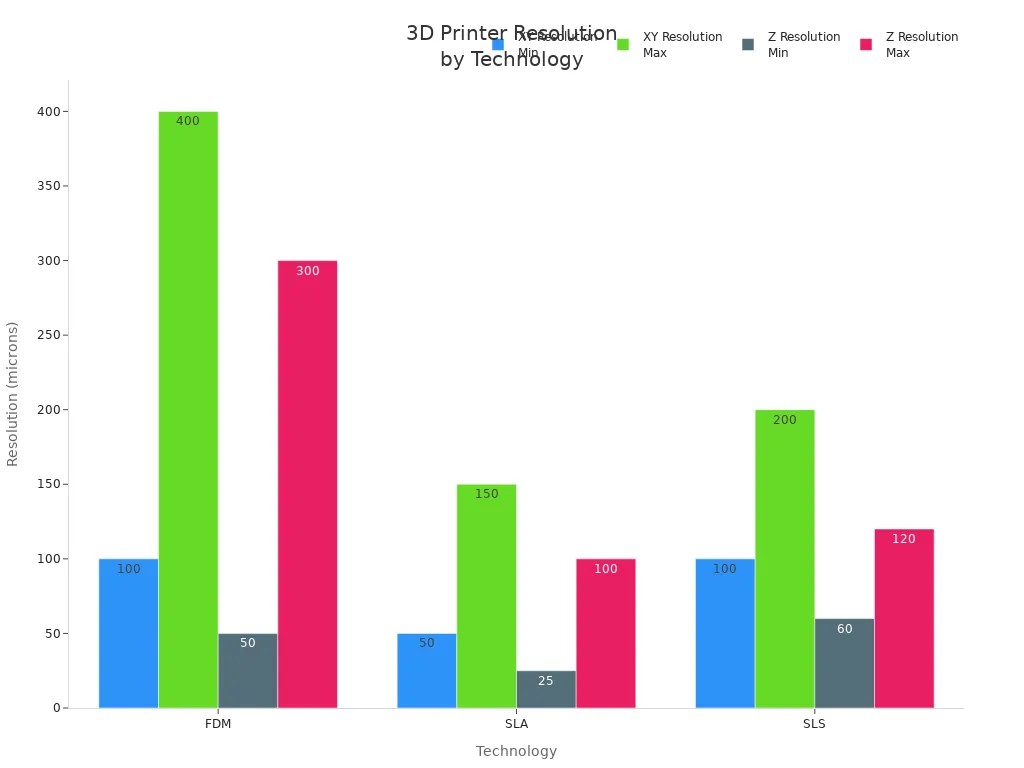
Print quality depends on the printer’s resolution. Resolution means how fine the details are on your finished part. There are two types: XY (side-to-side) and Z (up-and-down). Lower numbers mean better detail.
Here is a table that compares print quality and resolution for different technologies:
|
Technology |
Print Quality |
Resolution (XY) |
Resolution (Z) |
|---|---|---|---|
|
FDM |
Moderate |
100-500 microns |
50-300 microns |
|
SLA |
High |
10-150 microns |
10-100 microns |
|
SLS |
Good |
100-200 microns |
60-120 microns |
- SLA printers give you the smoothest and most detailed prints. You can use them for jewelry or dental models.
- FDM printers are good for strong, large parts but have less detail.
- SLS printers give good detail and strength for tricky shapes.
If you need fine details, pick a printer with high resolution. If you want to print big, strong parts, you can use a lower resolution.
Note: Higher resolution prints take longer. Think about what your project needs before you choose.
Material Compatibility
You should check what materials the printer can use. Some printers only work with one kind of plastic. Others can use many materials, like flexible or strong ones.
Here is a table of common materials and their good points:
|
Material Type |
Material Name |
Advantages |
|---|---|---|
|
Plastics |
Polylactic Acid (PLA) |
Biodegradable, easy to use, less warping |
|
|
Acrylonitrile Butadiene Styrene (ABS) |
Tough, impact-resistant, used in car parts |
|
|
Polyethylene Terephthalate Glycol (PETG) |
Durable, chemical-resistant, less warping |
|
|
Nylon (Polyamide) |
Strong, flexible, durable |
|
|
Thermoplastic Polyurethane (TPU) |
Flexible, durable, good for bendable parts |
|
Resins |
Standard Resin |
High detail, smooth finish, good for prototypes |
|
|
Tough Resin |
Withstands stress, used for working parts |
|
|
Flexible Resin |
Rubber-like, good for elastic parts |
|
Composites |
Carbon Fiber Reinforced Polymer |
Very strong, light, used in aerospace |
|
|
Glass Fiber Reinforced Polymer |
Strong, rigid, used in cars |
If you want to print strong or bendy parts, make sure your printer works with those materials. Some printers need special parts to use advanced materials.
Reliability and Consistency
You want your printer to work well every time. Reliability means the printer can finish long prints without problems. Consistency means you get the same quality each time you print.
Look for these features to help with reliability:
- A strong frame keeps the printer steady.
- Good bed leveling keeps the first layer flat.
- Good motors and rails help the printer move smoothly.
Some printers have automatic bed leveling. This uses sensors to check the print bed and move the nozzle. It helps you get better results, especially for big prints.
|
Feature Type |
Advantages |
Limitations |
|---|---|---|
|
Mesh Bed Leveling |
Accurate, good for large prints |
Needs setup, depends on sensors |
|
Precise, easy to use, works on many surfaces |
Higher cost, may break down |
|
|
Live Z Adjust |
Real-time control, adapts to changes |
Needs user attention |
Printing Speed
Printing speed tells you how fast the printer can build your object. Speed is measured in millimeters per hour. Faster printers save time, but speed can change quality.
- Industrial FDM printers can print at 100 to 500 mm per hour.
- Industrial SLA printers can reach 700 mm per hour.
- Home printers usually print at 40 to 70 mm per hour.
A big mold (1.5 meters) can take 36 to 48 hours to print. Hard parts for cars or planes may take days. If you need to finish projects fast, look for a printer with higher speed.
Note: Printing faster can lower the quality. You may need to balance speed and detail for your project.
Additional Features and Usability
Extra features can make printing easier and safer. Here are some features to look for:
- Mesh Bed Leveling: Helps you get a flat first layer, even on big beds.
- Automatic Leveling Sensors: Make setup easy and help prints succeed.
- Remote Monitoring: Lets you check your print from your phone or computer.
- Touchscreen Controls: Simple menus help you start prints and change settings.
- Filament Sensors: Pause the print if you run out of material.
- Enclosed Build Chamber: Keeps heat in and dust out, good for advanced materials.
- Software Compatibility: Works with popular slicer programs for easy setup.
|
Feature Type |
Advantages |
Limitations |
|---|---|---|
|
Remote Monitoring |
Watch prints from anywhere, get alerts |
Needs Wi-Fi, may cost more |
|
Touchscreen Controls |
Easy to use, quick setup |
Can break if not high quality |
|
Filament Sensors |
Prevent failed prints, save material |
May not work with all filaments |
|
Enclosed Chamber |
Better temperature control, safer for some materials |
Makes printer larger and heavier |
A large format 3d printer guide can help you compare these features. Pick the ones that fit your skills and project needs.
Remember: The best printer is the one that fits your projects, your space, and your budget.
Comparing Printer Types for Your Needs
Material Options
You have many choices for materials with a large format 3d printer. FDM printers use thermoplastics like PLA, ABS, PETG, nylon, and TPU. These materials help you make parts that are strong or flexible. They are also easy to print. SLA printers use special resins. Some are standard, tough, or flexible. There are even dental and medical resins. SLS printers mostly use nylon powder. Nylon is strong and can bend without breaking. It works well for engineering and industrial parts. Nylon does not wear out fast and can handle heat.
- PLA: Easy to use and good for testing ideas.
- ABS: Very tough and used for car parts.
- PETG: Strong and does not get damaged by chemicals.
- Nylon: Strong and flexible, good for tools.
- TPU: Bends easily, great for flexible parts.
Print Quality and Speed
Print quality and speed are different for each printer type. FDM printers give you okay detail. They take longer to finish big prints. SLA printers make very smooth and detailed parts. They finish faster than FDM. SLS printers are in the middle. They balance speed and quality. SLS is good for tricky shapes.
|
Technology |
Print Quality (Resolution) |
|
|---|---|---|
|
FDM |
42 hr 3 min |
100–400 microns |
|
SLA |
2 hr 37 min |
50–150 microns |
|
SLS |
N/A |
100–200 microns |
Pick SLA if you want very fine detail. FDM is best for big, strong parts. SLS is great for hard designs and making many parts at once.
Cost and Maintenance
The price and care for each large format 3d printer are not the same. FDM printers cost less to buy and use. You only need simple training and to clean them often. SLA printers cost more money. They need special care for the resin and parts. SLS printers are the most expensive. They need new parts often and more service.
|
Technology |
Equipment Costs |
Material Costs |
Labor Needs |
Maintenance Requirements |
|---|---|---|---|---|
|
FDM |
$200 - $200,000 |
$50 - $150/kg |
You remove supports by hand and do extra work after printing |
Regular care costs a few hundred dollars each year |
|
SLA |
$200 - $25,000 |
$100 - $500/L |
You must wash and cure the prints |
More money needed for tricky parts |
|
SLS |
$30,000 - $200,000 |
$100/kg for nylon, reusable unfused powder |
Some steps are easy and done by machine |
You need to replace parts and pay for service |
Application Suitability
Each printer type is good for different jobs. FDM printers are great for testing ideas and making strong parts you can use. SLA printers are best for models that need lots of detail. People use them for dental, jewelry, or art projects. SLS printers are used for big jobs. They are good for industrial parts, medical tools, and tricky shapes.
|
Technology |
Applications |
|---|---|
|
FDM |
Making models, testing ideas, working parts, and tools |
|
SLA |
Dental models, jewelry, medical tools, and detailed models |
|
SLS |
Industrial parts, engineering models, prosthetics, and making many parts |
Pick a large format 3d printer that fits your project. This helps you get the best results for your work or hobby.
Use Cases for Large Format 3D Printers
Cosplay Helmets and Props
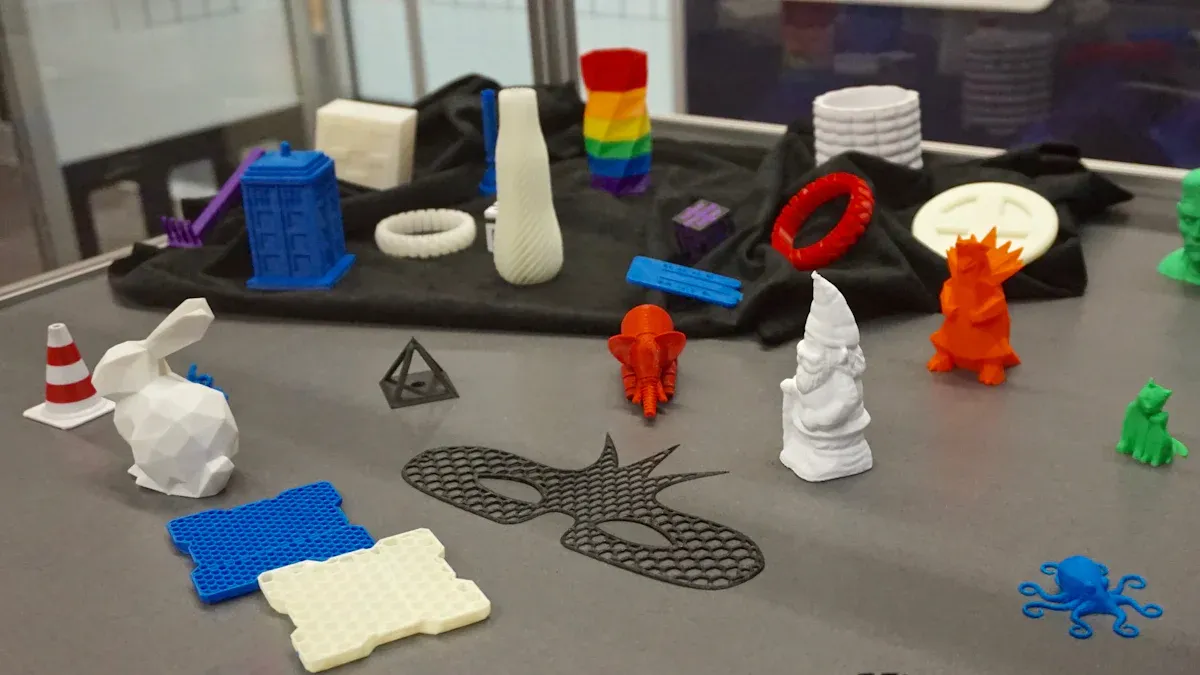
A large format 3d printer can make cool cosplay helmets and props. You can print full-size helmets and armor in one piece. You do not have to glue small parts together. This saves time and makes your project stronger. Many cosplayers like these printers because they can print big designs with lots of detail. You can make movie props, game weapons, or costumes for events.
Tip: A large format 3d printer lets you turn your creative ideas into real things. You do not have to worry about size or shape limits.
Large Prototypes and Engineering Parts
Engineers and designers use large format 3d printers for prototypes and working parts. You can print car bumpers, machine covers, or test models fast. This helps you check your ideas before making the final product. Large format 3d printers let you build strong, real-size parts you can use right away. You can also make tools and fixtures for your workshop.
- Print big prototypes for cars, planes, or machines.
- Test designs to see if they fit and work.
- Make tools and jigs for manufacturing.
Architectural Models
If you work in architecture or construction, a large format 3d printer can change how you build models. You can print detailed building models, walls, or even full-size construction parts. Builders and architects use these printers to make houses, molds, and building sections. This process saves time and cuts down on waste. Studies show that large-scale 3D printing helps projects go faster, cost less, and look better.
|
Application |
Benefit |
|---|---|
|
Building Models |
Show clients real designs |
|
Construction Parts |
Build faster |
|
Molds |
Use less material |
Art Installations and Furniture
Artists and designers use large format 3d printers to make special art pieces and furniture. You can print sculptures, chairs, or decorations that are hard to make by hand. Studios use these printers to design quickly and try new ideas. Large format 3d printers let you make items with tricky shapes and big sizes. This gives you more ways to be creative.
- Print big sculptures or art installations.
- Design custom furniture with cool shapes.
- Make projects that stand out in galleries or public spaces.
Note: Large format 3d printers help you make things that used to be too hard or expensive to build.
Recommended Large Format 3D Printers
Picking the right large format 3d printer depends on your money, project size, and what features you want. Here are some good choices for different needs.
Entry-Level Models
If you are just starting, entry-level printers are a good choice. These printers have smaller build areas and simple features. They are not hard to use and cost less money. You can make cosplay props, small furniture, or test models at home.
- Creality CR-10 Max: Great for beginners, with a build area of 450 x 450 x 470 mm.
- Anycubic Kobra Max: Has auto-leveling and a big print space for its price.
- Artillery Sidewinder X2: Runs quietly and is easy to set up.
Mid-Range Options
Mid-range large format 3d printers give you more room and better print detail. You get things like HIWIN rails, magnetic beds, and sometimes two nozzles. These printers are good for small businesses, schools, or people who know more about printing.
|
Feature |
Mid-Range Models |
Entry-Level Models |
Professional Models |
|---|---|---|---|
|
Build Volume |
Smaller than mid-range |
Up to 1200 x 600 x 640 mm |
|
|
Resolution |
High detail, nozzle options |
Basic resolution |
High detail, advanced features |
|
Additional Features |
HIWIN rails, magnetic bed, IDEX |
Limited features |
Multi-material, advanced control |
|
Price |
Around $8,960.00 |
Lower price range |
Higher price, premium parts |
Some popular mid-range printers are the Raise3D Pro3 Plus and Modix BIG-60. These printers help you make bigger models and parts with more detail.
Professional and Industrial Choices
Professional and industrial large format 3d printers are best for factories, design studios, and labs. You get very accurate prints, big build areas, and can use many types of materials. These machines are good for both test models and making lots of parts.
Some well-known models are:
- Bambu Lab X1 Carbon: Prints quickly and is good for fast jobs.
- Formlabs Form 3+: Makes very detailed resin prints.
- Ultimaker S5: Has two nozzles for printing with more than one material.
- Modix BIG-Meter: Can print very large and detailed parts.
- Creatbot F1000: Has two nozzles and smart controls.
Pick a professional large format 3d printer if you need strong results and special features for tough projects.
Practical Tips for Beginners
Assessing Needs and Budget
Start by thinking about what you want to print. Decide if you need a large format 3d printer for big models or detailed parts. Measure the biggest thing you want to make. Check if the printer’s build volume fits your project. Look at your workspace to see if you have enough room. Set your budget before you start shopping. Bigger printers and extra features cost more money.
Tip: Write down your main goals and the materials you want to use. This helps you pick the right printer and stops you from buying things you do not need.
Buy vs. Outsource Printing
You can buy a large format 3d printer or use a printing service. Buying gives you control and lets you try new ideas. Outsourcing saves money if you do not print often. Think about how much you will use the printer. If you print every week, owning a machine is smart. If you only need a few big parts each year, a service may be better.
|
Option |
Pros |
Cons |
|---|---|---|
|
Buy |
Full control, fast access |
Higher upfront cost, maintenance |
|
Outsource |
No maintenance, expert help |
Less control, longer wait |
Avoiding Common Mistakes
Many beginners make mistakes when picking a large format 3d printer. You can avoid these by checking a few important things:
- Pick the right print technology for your needs.
- Make sure the printer uses good parts.
- Choose a heated bed if you want to print ABS.
- Look for nozzles you can replace for more options.
- Check if the printer works with USB or SD cards.
- Decide if you need an enclosed chamber for temperature control.
Note: Always check material compatibility and print quality before buying.
Finding Reliable Reviews and Support
Read reviews from real users before you buy. Look for brands with good customer support and active communities. Join online forums or groups to ask questions and share tips. Compare features and prices using trusted websites. Make sure the printer works with your favorite software and lets you monitor prints from far away.
Tip: Good support and a helpful community make learning easier and help you fix problems fast.
When you choose a large format 3d printer, focus on print size, quality, material options, reliability, and speed. Match these features to your project goals. Use this guide to compare models and find what fits your needs.
Tip: Join online forums or user groups to ask questions and read reviews. You will make a smarter choice and get better results from your large format 3d printer.
FAQ
What is the main difference between a large format 3D printer and a standard 3D printer?
You can print much bigger objects with a large format 3D printer. Standard printers work for small models or toys. Large format printers help you make furniture, car parts, or big art pieces in one piece.
How do I know if I need a large format 3D printer?
You should look at your project size. If you want to print objects larger than 300 mm in any direction, you need a large format 3D printer. This type of printer saves time and gives you stronger parts.
What materials can I use with a large format 3D printer?
You can use many materials like PLA, ABS, PETG, nylon, and TPU. Some printers also work with resins or powders. Always check the printer’s manual to see which materials it supports.
How do I maintain a large format 3D printer?
You should clean the print bed after each job. Check the nozzles and moving parts often. Lubricate rails and tighten screws. Follow the maintenance tips in your large format 3d printer guide for best results.
Can beginners use a large format 3D printer?
Yes, beginners can use these printers. Many models have easy controls and auto-leveling. Start with simple projects and read the manual. Join online groups for help and tips.