








You want perfect 3D prints every time. The Sovol SH02 dryer helps you by taking water out of your filament. It uses special heating and sealing technology. Water in filament can make bubbles, stringing, and weak layers in your 3D prints. The Sovol SH02 dryer has a strong system to keep filament dry:
- Heats up to 70°C in 25 minutes for fast drying.
- Gives even heat with a 150W 360° PTC heater.
- Triple ring sealing keeps water out, even when stored.
You can trust this dryer to keep your filament safe and make your prints better.
Key Takeaways
The Sovol SH02 dryer takes moisture out of filament. This stops problems like bubbles and stringing when you print. Fast drying at 70°C takes only 25 minutes. You can start printing again quickly and easily. Using the right temperature for each filament type helps drying work best. This also makes your prints look better. Storing filament in airtight containers keeps it dry after drying. Using desiccants helps keep filament dry longer. Checking filament for moisture before printing is important. This helps you find problems early and makes printing work better.
Why Moisture Matters in 3D Printing
Common Print Defects from Moisture
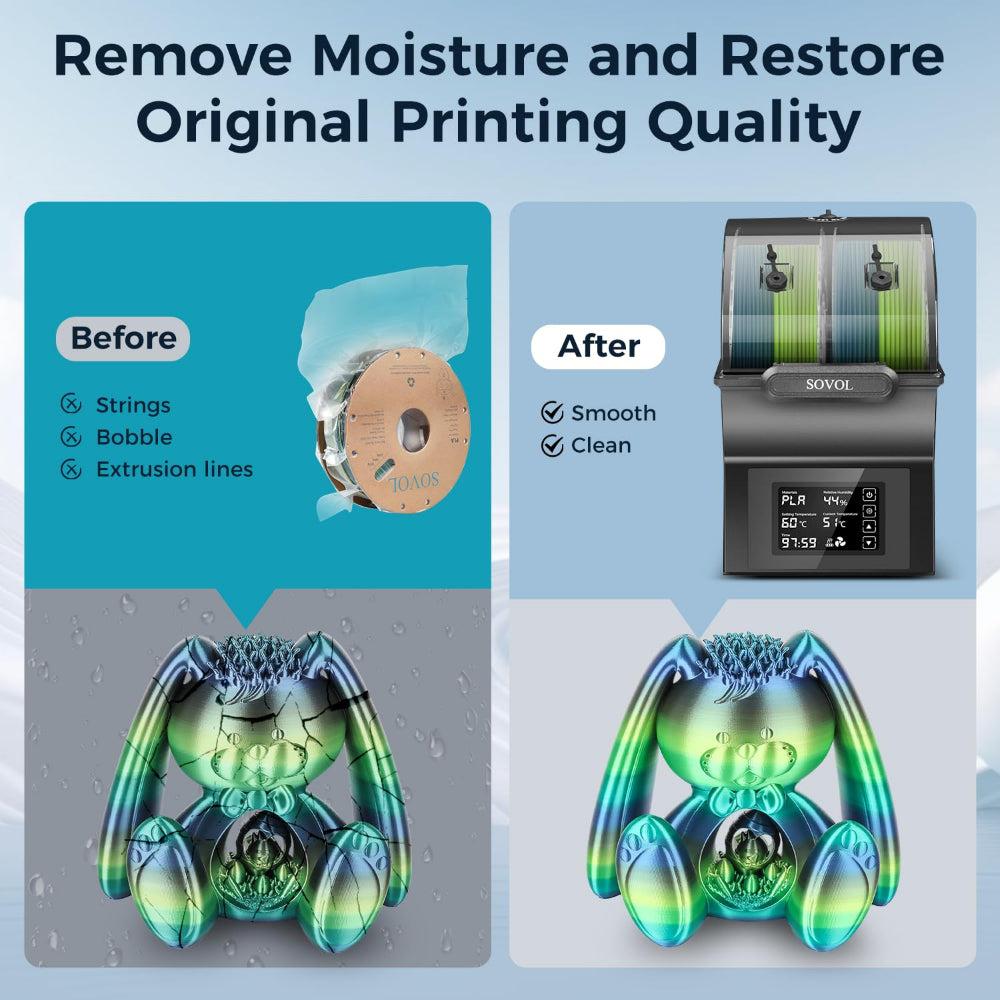
Sometimes, prints fail even if filament looks dry. Water inside filament causes problems when printing. When filament gets hot, water turns into steam. Steam messes up how the filament comes out. This can make prints fail. You might see thin strings, bubbles, or weak layers. These problems make prints look bad and not the right shape.
|
Defect Type |
Description |
|---|---|
|
Bubbling and Oozing |
Small bubbles pop up from steam, making the filament come out uneven. |
|
Weakened Layer Adhesion |
Layers do not stick well, so parts break easier. |
|
Stringing and Blobbing |
Filament acts strange, leaving strings and blobs you do not want. |
|
Increased Brittleness |
Some filaments, like nylon, snap more easily when wet. |
You might hear popping or hissing while printing. This means the filament is wet. Prints may look rough or have holes. Thin strings can show up between parts. Failed prints often have these signs.
The study shows that wet filament makes the flow uneven and causes crackling sounds. These are signs of print problems. Drying filament helps it flow better and makes prints stronger. It also helps layers stick together.
How Moisture Affects Filament Quality
Water changes how filament works. Prints get more holes and are weaker. Moisture makes prints less strong and look worse. Wet filament gets bigger, so prints turn out thicker and wider.
|
Impact of Moisture on Filament Properties |
Description |
|---|---|
|
Water makes more holes in prints, which makes them weaker. |
|
|
Reduced Tensile Strength |
More water means prints are not as strong and break easier. |
|
Altered Surface Quality |
Water makes bubbles, so prints look uneven and rough. |
|
Swelling of Material |
Wet filament makes prints about 6% thicker and 10% wider. |
Failed prints can look rough and break easily. Strings and bubbles happen more with wet filament. Even a little water can ruin prints.
Challenges for All Printing Enthusiasts
Everyone has trouble with wet filament, even experts. Humid air makes filament wet faster. You might hear popping and see strings, blobs, or rough prints. If the filament does not come out right, layers can be thin or have holes. This makes prints fail.
- Popping or hissing noises while printing
- Strings and blobs between parts
- Rough prints with bad surfaces
- Filament coming out uneven, making thin spots or holes
Some people think their filament is dry, but it still has water. Humidity over 50% makes filament wet and weak. Watch for signs of wet filament and failed prints, even if you store it well. Any filament can get wet, so always check to stop bad prints and strings.
Sovol SH02 Dryer Features and Benefits
Advanced Drying Mechanism
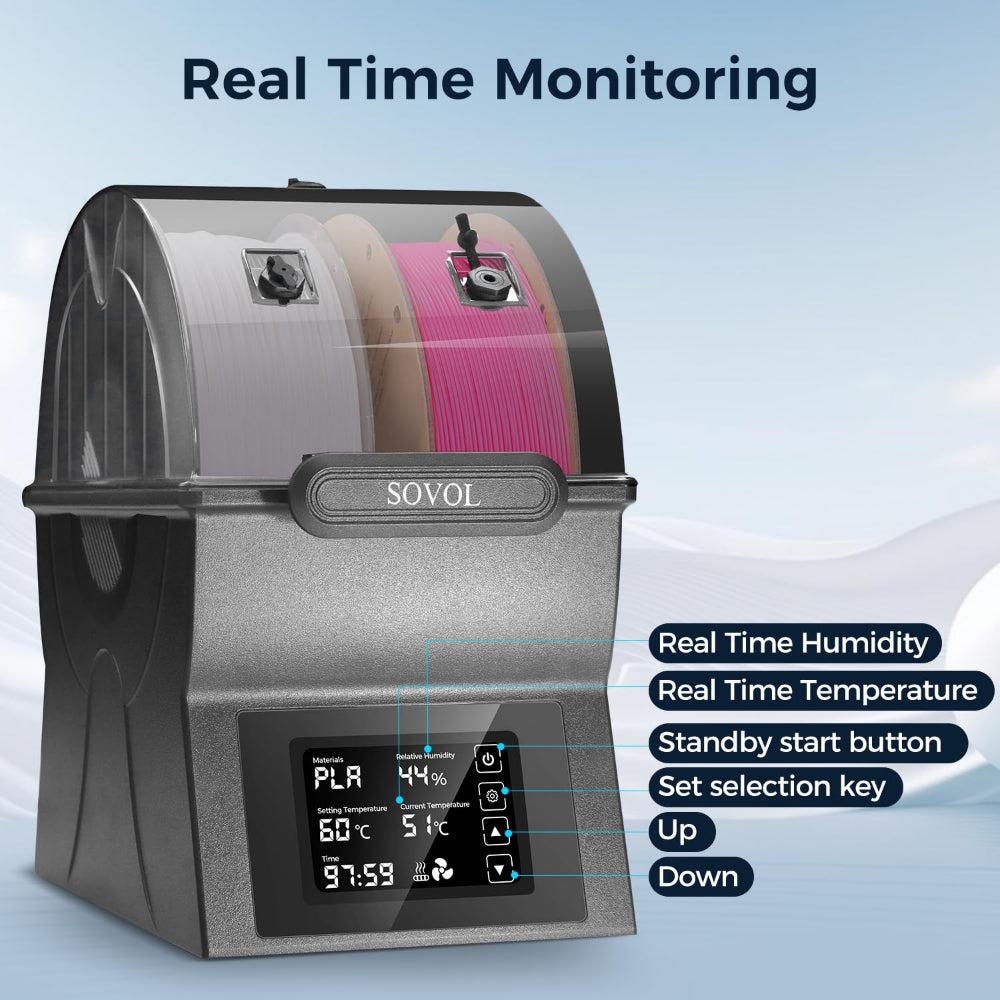
You need dry filament for good prints. The Sovol SH02 dryer helps take water out fast. It uses a 360° PTC heating system to heat all around the filament. This makes drying quick and safe. You can set the temperature from 40°C to 70°C. This lets you pick the right heat for your filament type. PLA needs less heat, but nylon or PC need more. The Sovol SH02 dryer heats to 50°C in 7 minutes. It can reach 70°C in 25 minutes. This means you wait less and print more.
Here is a table with the Sovol SH02 dryer's heating features:
|
Specification |
Details |
|---|---|
|
Temperature Range |
Adjustable between 40°C and 70°C |
|
Heating Speed |
50°C in 7 minutes; 70°C in 25 minutes |
|
Safety Features |
PTC thermistor overheat protection; auto shut-off above 130°C |
The one-key preset button makes it easy to use. You just press it to pick the best setting. Even beginners can use the Sovol SH02 dryer. Many people say their prints look better after drying filament. They see fewer bubbles and less stringing. Layers stick together better. The Sovol SH02 dryer keeps the heat steady and works fast.
Triple Ring Sealing and LCD Touch Screen
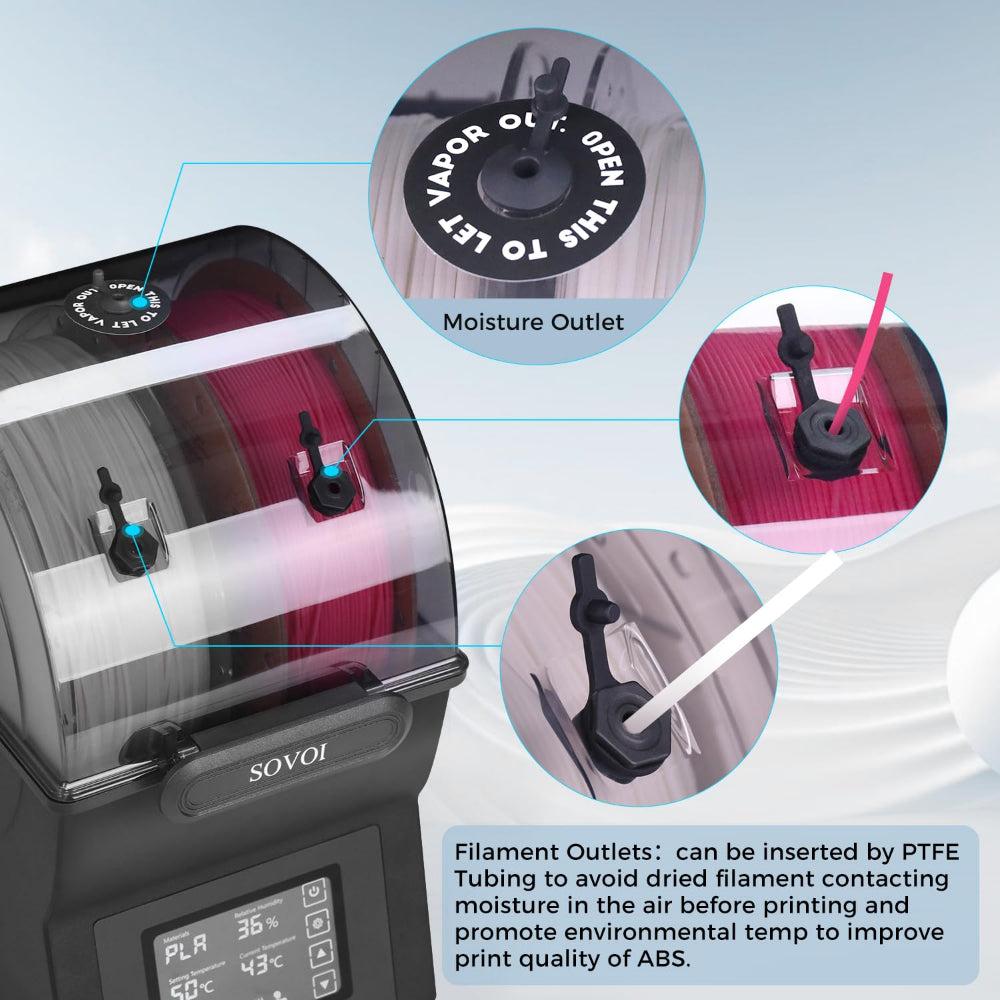
It is important to keep water out after drying. The Sovol SH02 dryer has a triple ring sealing system. This keeps humidity away and keeps filament dry inside. You do not have to worry about wet filament after drying. The triple ring seal works better than most other dryers. This gives you better results.
The LCD touch screen is easy to use. You can see the temperature and time right away. You can change settings with a tap. The screen shows you what is happening in real time. You always know your filament is safe. This design helps everyone dry filament without mistakes.
Tip: Keep your filament in the Sovol SH02 dryer with the seal closed. This keeps it dry between prints. You will not have moisture problems and you save time.
Safety and Dual-Spool Capacity
You want a safe dryer for daily use. The Sovol SH02 dryer has many safety features. It has a smart system that turns off heat if it gets too hot. The double-layer insulation keeps the outside cool. Fireproof materials make it even safer.
Here is a table of the Sovol SH02 dryer's safety features:
|
Safety Feature |
Description |
|---|---|
|
Intelligent protection system |
Automatically disconnects in case of over-temperature, restoring cooling. |
|
Two-level temperature control |
Allows for better management of heat levels. |
|
Double-layer heat insulation |
Keeps external touch temperature below 60℃ even when internal exceeds 100℃. |
|
Fireproof materials |
Ensures safety against fire hazards. |
The Sovol SH02 dryer can hold two spools at once. This is good if you have two printers or different filaments. You can dry two spools at the same time. This helps you get ready for your next project faster. It keeps your 3d printing work smooth.
Many people say the Sovol SH02 dryer makes old filament work like new. They have fewer failed prints and better quality. The Sovol SH02 dryer gives strong moisture protection, easy controls, and safe use. You can trust it to keep your filament dry for any project.
How to Dry Filament with the SH02
Step-by-Step Drying Guide
Drying your filament with the Sovol SH02 dryer is simple. You can follow these steps to get the best results:
- Plug in the dryer and turn it on.
- Place your filament spool inside the chamber.
- Use the LCD touchscreen to select the right temperature and time for your filament.
- Press start to begin drying.
- Watch the display. When the timer ends, your filament is ready for printing.
Tip: Always check the recommended drying temperature before you start. Monitor the filament during drying to avoid overheating.
Drying your filament this way removes moisture and helps you avoid stringing and bubbles. You will see better results in your prints.
Best Settings for Different Filaments
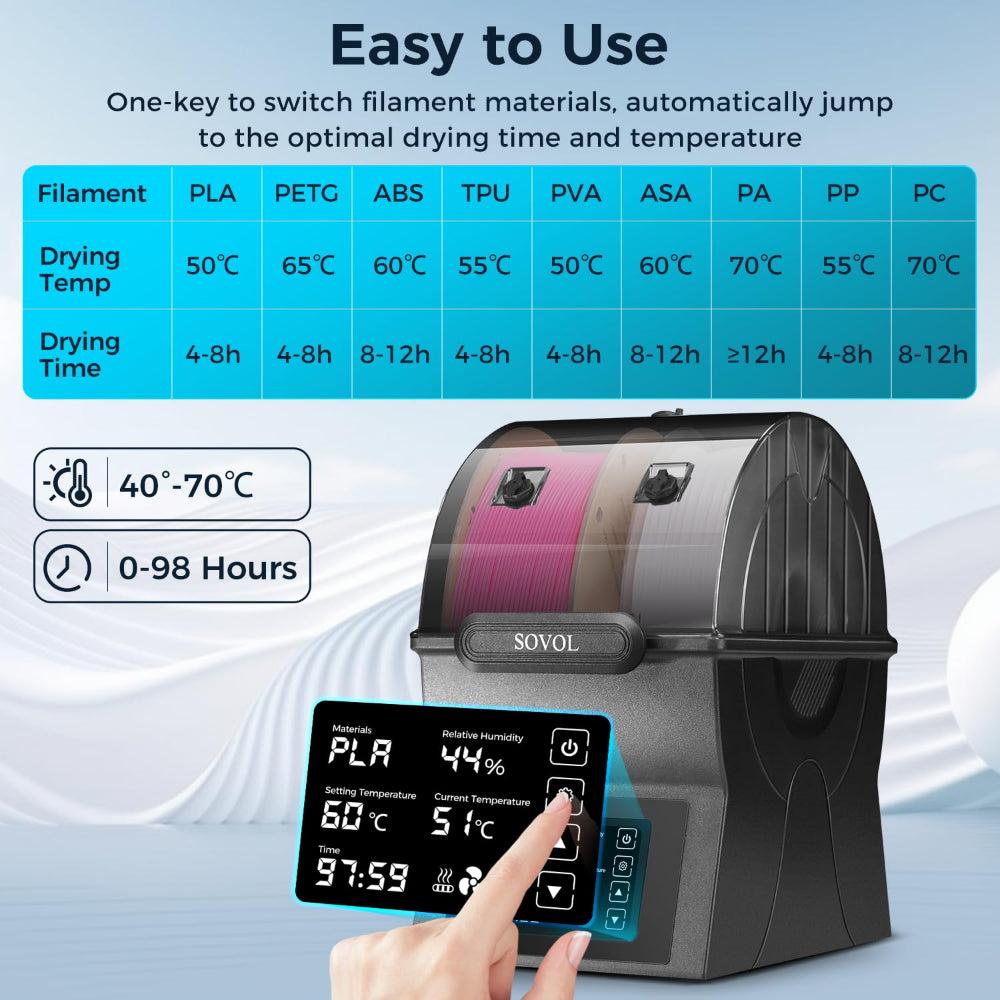
Choosing the right settings is important for drying filament. The Sovol SH02 dryer works with many types, including PLA, PETG, and ABS. Here are the best settings for popular filaments:
|
Filament |
Temperature (°C) |
Time (Hours) |
|---|---|---|
|
PLA |
50-65 |
4-8 |
|
PETG |
55-70 |
4-8 |
|
ABS |
75-90 |
4-8 |
PETG needs a bit more heat than PLA. Drying your filament at the right temperature gives you the best results. Always use the correct settings for each type to keep your filament safe and dry.
Printing Results: With vs. Without a Filament Dryer
You will notice big differences in print quality when you use the Sovol SH02 dryer. Drying your filament stops moisture from causing stringing and bubbles. Here is a quick look at the results:
|
Condition |
Print Quality Description |
|---|---|
|
Before Drying |
Prints show noticeable stringing and moisture retention. |
|
After Drying |
Smooth, string-free surfaces that enhance print quality. |
Drying filament with the SH02 dryer reduces stringing and gives you smoother surfaces. You get stronger parts and fewer failed prints. Drying your filament before printing leads to better results every time. If you dry wet filament, you will see fewer problems and more success in your 3d printing projects.
Maintaining Dry Filament After Printing
Proper Storage Solutions
You want to keep your filament dry after using the Sovol SH02 dryer. Good storage stops moisture from ruining your hard work. Here are some ways you can protect your filament:
- Place spools in airtight containers right after drying.
- Add desiccants, like silica gel packs, to absorb moisture inside the container.
- Try a DIY drying box with a small heat source and fans to keep air moving.
- Store containers in a cool, dry place away from sunlight.
Tip: Always close the lid tightly on your storage box. This helps with keeping filament dry for your next 3d printing project.
Checking Filament for Moisture
You should check your filament before every print. Testing for moisture helps you catch problems early. If you hear popping or see bubbles while printing, your filament may have absorbed moisture. You can also look for rough surfaces or weak layers in your prints. If you notice these signs, put the spool back in the Sovol SH02 dryer for another drying cycle.
Long-Term Filament Care Tips
You can make your filament last longer by following a few simple steps. These habits help with keeping filament dry and ready for use:
- Store filament in a dry environment.
- Keep your storage area clean to stop dust from sticking to spools.
- Avoid direct sunlight and UV light, which can damage filament.
- Use airtight containers with silica gel or activated alumina packs.
- Follow the manufacturer's storage advice.
- Keep filament away from heat sources and high humidity rooms.
Here is a table showing how long different filaments last when you store them properly:
|
Filament Type |
Average Shelf Life (Exposed to Air) |
Average Shelf Life (Sealed & Dry) |
|---|---|---|
|
PLA |
1–2 years |
2–3+ years |
|
ABS / PETG |
2–3 years |
4–5 years |
|
Nylon / Polycarbonate |
6–12 months |
1–2 years |
|
Exotics |
6–12 months |
1–2 years |
Note: Clean the inside of your Sovol SH02 dryer often. Check the seals to make sure the box stays airtight. This keeps your dryer working well and helps with keeping filament dry for every print.
By following these steps, you can stop moisture from causing problems and enjoy better results with your 3d printing projects.
You want your prints to look good every time you print. The Sovol SH02 Dryer keeps filament dry so you get better results. Dry filament helps stop stringing and rough spots on your prints. It also makes the layers stronger and less likely to break. When you use dry filament, your prints turn out smoother and stronger. Many people say their prints look better after drying filament. You waste less material and save time because you have fewer clogs. You do not have to throw away as many failed prints. If you want better prints and easier printing, try the Sovol SH02 Dryer.
FAQ
How long should I dry my filament with the Sovol SH02?
You should dry most filaments for 4 to 8 hours. For example, PLA works well at 50–65°C for 4–8 hours. Always check the filament type and use the preset settings for best results.
Can I dry two spools at once in the Sovol SH02?
Yes, you can dry two spools at the same time. The SH02 has space for two rolls. This helps you prepare more filament for big projects or different colors.
What signs show my filament needs drying?
You may hear popping or hissing during printing. Prints can look rough or have strings and bubbles. If you see these signs, your filament likely has moisture. Dry it before your next print.
Is the Sovol SH02 safe to use for long drying sessions?
The Sovol SH02 has smart safety features. It uses overheat protection and double insulation. You can run long drying sessions without worry. The dryer keeps your filament and workspace safe.
Which filaments work best with the Sovol SH02?
You can dry many types, like PLA, PETG, ABS, TPU, ASA, PC, PA, and PP. The adjustable temperature lets you match the right setting for each filament. This gives you better print quality every time.











