







You want your 3D printer to run quietly, especially if you use it at home. Loud machines can disrupt your peace and make relaxing or working nearby tough. Even the quietest models, like the Prusa MK3S, blend into the normal sounds of your house when enclosed. Most noise comes from fans, moving motors, and vibrations. Good news—simple 3D printer noise reduction steps can help you enjoy printing without the extra racket.
Key Takeaways
- Change loud fans to quiet ones. This helps your printer stay cool and makes less noise.
- Make sure belts are tight. Check if the frame is steady. This will help stop shaking and loud sounds.
- Put your printer on something heavy. You can also use mats that stop shaking. These things help soak up noise.
- Slow down the print speed. Lower the acceleration settings too. This makes the printer work smoother and quieter.
- You can build or buy a box that blocks sound. This will make your printer much quieter.
3D Printer Noise Sources
Fan Noise
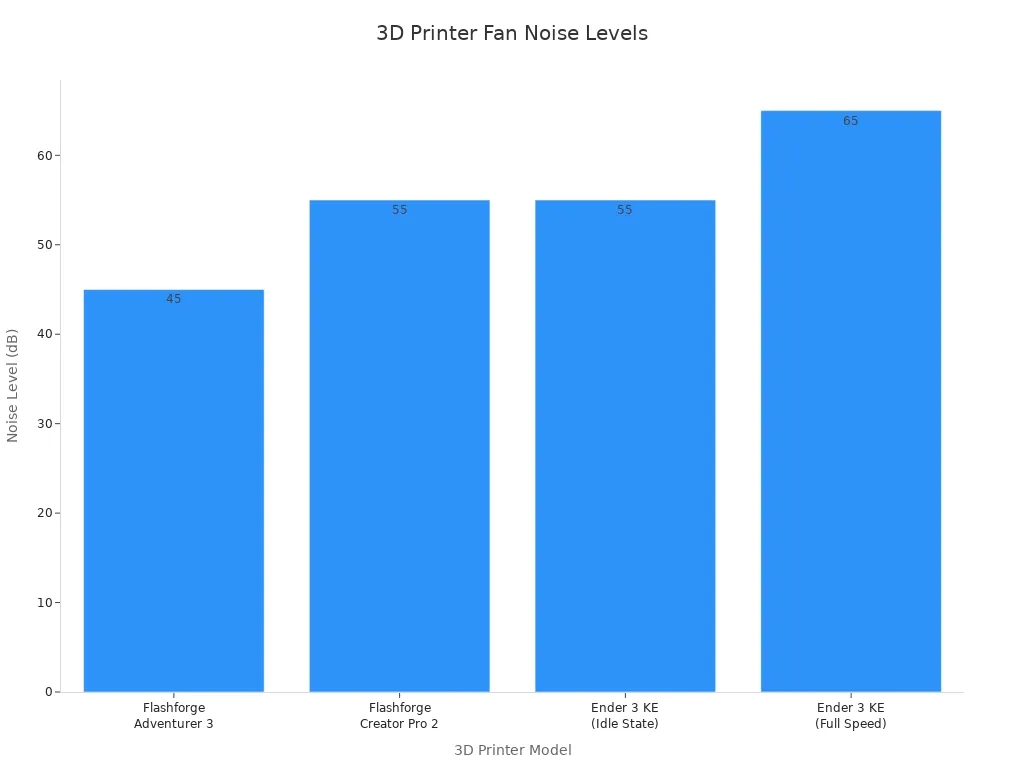
Fans keep your 3D printer cool, but they can get loud. You might notice the hum even when the printer sits idle. Some models run quieter than others. Here’s a quick look at how much noise fans make:
|
3D Printer Model |
Noise Level (dB) |
|---|---|
|
Flashforge Adventurer 3 |
45 |
|
Monoprice Voxel |
45-50 |
|
Flashforge Creator Pro 2 |
55 |
|
Ender 3 KE (Idle State) |
55 |
|
Ender 3 KE (Full Speed) |
65 |
Solution:
Swap out noisy fans for quieter ones. You can also lower fan speed in your printer’s settings. This reduces noise and helps you enjoy a calmer workspace. Just make sure your printer stays cool enough for safe operation.
Stepper Motors and Belts
Stepper motors move the printer’s parts. Belts help guide these movements. Both can create strong vibrations, especially the y-axis motor. These vibrations often make up a big part of 3d printer noise.
- The y-axis motor creates rotational vibrations.
- Loose belts add extra noise.
- Tightening belts can drop noise from 80db to 65db.
Solution:
Check your belts and tighten them if needed. This simple step cuts down on vibrations and makes your printer quieter. You don’t need special tools—just follow your printer’s manual.
Frame Vibrations
Your printer’s frame can shake and pass vibrations to nearby surfaces. If your printer sits on a desk, those vibrations can get louder through harmonic resonance. Metal frames tend to vibrate more than heavy or padded ones.
- Vibrations move from the printer to solid objects.
- Noise gets amplified by the desk or table.
- Heavy garden pavers and foam help block vibrations.
Solution:
Place your printer on a heavy base or foam pad. This absorbs vibrations and keeps them from spreading. You’ll notice less noise right away.
Table and Floor Amplification
Tables and floors can act like speakers for vibrations. If your printer sits on a hollow desk or thin table, the sound gets even louder. Sometimes, the floor below can carry vibrations to other rooms.
Solution:
Move your printer to a sturdy table or use anti-vibration mats. These mats soak up vibrations before they reach the floor. You can also try printing in an unused room to keep noise away from busy areas.
Tip: Small changes, like adding rubber feet or felt pads, make a big difference in reducing 3d printer noise.
Why Reduce 3D Printer Noise
Home Environment Impact
You want your home to feel peaceful. A noisy 3D printer can make that hard. Loud machines distract you when you try to read, watch TV, or work. If you print at night, the sound might even wake up your family. You may notice stress or fatigue after listening to the hum for hours. Sleep disruption is common if your printer runs in the evening.
Tip: Place your 3D printer in a spare room or use soundproofing materials to keep your living space quiet.
Here’s a quick look at how excessive 3D printer noise affects your daily life:
|
User Experience Issues |
Print Quality Concerns |
|---|---|
|
Distraction and Concentration |
Reduced Print Quality |
|
Fatigue and Stress |
Inconsistent Results |
|
Sleep Disruption |
|
A quiet printer helps you relax and focus. You can enjoy hobbies or work without constant background noise.
Printing Experience
Noise doesn’t just bother your ears. It can mess with your printing results. Vibrations from motors and fans may cause your prints to look uneven or have rough edges. You might see inconsistent layers or small defects. If you want high-quality prints, you need a stable and quiet machine.
- Quieter printers produce smoother surfaces.
- Less vibration means fewer failed prints.
- You get better results with less effort.
You don’t need expensive upgrades to start. Simple changes, like adding rubber feet or using a heavy base, can make a big difference. When you reduce 3D printer noise, you improve both your comfort and your print quality. Quiet printing lets you enjoy your projects and get the best results every time.
3D Printer Noise Reduction Methods
Lower Print Speed and Acceleration
You can make your printer quieter by lowering print speed and acceleration. Fast movements cause more shaking and noise. Slower speeds help your printer move smoothly. This means less rattling and shaking.
- Set the jerk to 5 mm/s.
- Set acceleration to 800 mm/s².
Many people notice a big drop in sound after these changes. For example, noise might go from 70 dB to 50 dB. You can check this with a free decibel meter app on your phone.
Pro Tip: Start with small changes and listen to your printer. If you want it even quieter, lower the speed a bit more.
Silent Mainboard or Drivers
Upgrading to a silent mainboard or stepper drivers is a great way to reduce noise. Standard boards make motors buzz and whine. Silent boards use special chips like TMC 2208 or TMC 2209. These chips help your printer run much more quietly.
- Swap your mainboard for a silent one.
- Look for stepper drivers called "silent" or "ultra-quiet."
You will hear the difference right away. Printers like the Ender 3 become almost silent except for the fans. You also get smoother prints and better accuracy.
Pro Tip: For the best 3d printer noise reduction, use a silent mainboard and quieter fans together.
Quieter Fans and Fan Settings
Fans cool your printer but can be very noisy. You can replace loud fans with quieter ones. Many brands sell "silent" or "low-noise" fans that fit most printers.
- Replace loud fans with quiet models.
- Lower the fan speed in your printer’s settings if you can.
Just make sure your printer stays cool enough. Try different speeds to find the best mix of cooling and quiet.
Pro Tip: Clean your fans often. Dusty fans get louder over time.
Rubber Feet, Felt Pads, and Squash Balls
Soft materials under your printer help with 3d printer noise reduction. They soak up vibrations before they reach your table or floor. You can use rubber feet, felt pads, or squash balls cut in half.
|
Method Used |
Effectiveness |
|---|---|
|
Granite chopping board with soft feet |
Makes a huge difference by keeping noise from the table |
|
Anti-vibration feet |
Good for many printers on one table, reduces outside vibrations |
|
Heavy surface (paver stone) |
Adds weight, helps stop vibrations |
|
Squash ball feet |
Almost stops noise from spreading, makes it very quiet |
Stick felt pads under each corner or swap the feet for rubber ones. Many people say squash balls work best for 3d printer noise reduction. They make the printer almost whisper quiet.
Pro Tip: Use rubber feet and a heavy base together for even better results.
Heavy Base or Concrete Paver
A heavy base or concrete paver under your printer adds weight and keeps it steady. This stops vibrations from moving into your table or floor. Put a concrete paver under your printer and add foam or rubber underneath for extra dampening.
- Use a 12"x12" concrete paver or granite tile.
- Add a thin foam mat or rubber sheet below the paver.
This lowers noise in your room and keeps sound from spreading. You will notice less rattling and a more solid feel.
Pro Tip: If you move your printer, always keep the heavy base with it for the best 3d printer noise reduction.
Anti-Vibration Mats and Damper Boards
Anti-vibration mats and damper boards keep your printer from shaking the surface below. Mats use soft stuff to soak up vibrations. Damper boards are heavy and stop shaking.
|
Evidence |
Anti-Vibration Mats |
Damper Boards |
|---|---|---|
|
Vibration Isolation |
Softer mats give better isolation |
Adding weight stops shaking |
|
Noise Reduction |
Less noise when printing |
Reduces vibrations in the surface |
|
Stability |
Mats may swing or rock a bit |
Extra weight keeps things steady |
You can buy anti-vibration mats online or use a thick yoga mat. Damper boards are heavy boards with soft feet. Both help with 3d printer noise reduction, but damper boards give more stability.
Pro Tip: Use both a mat and a damper board together for the best results.
Soundproof Enclosure
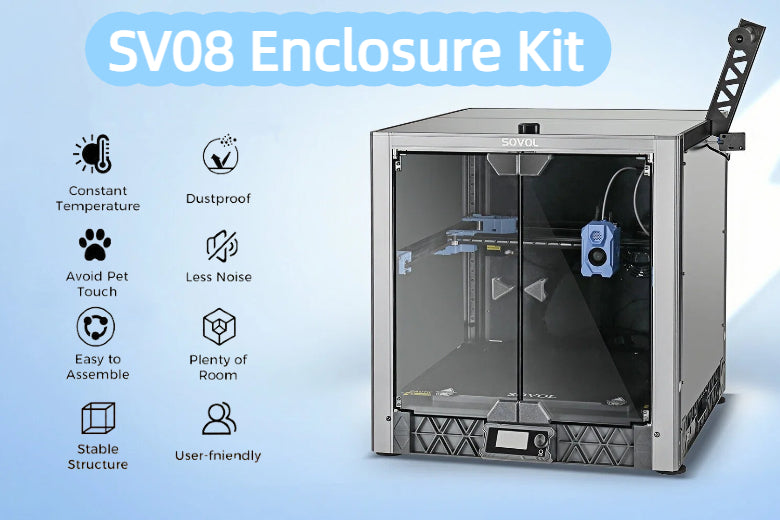
A soundproof enclosure goes around your printer and blocks noise. You can buy one or build it from wood and foam panels. Most enclosures cut noise by about 8 dB, which is a big change in a quiet room.
- Put your printer inside the enclosure.
- Make sure there is enough airflow to keep it cool.
You will notice a much quieter workspace, especially if you print at night or in a shared room.
Pro Tip: Add weatherstripping around the door for even better 3d printer noise reduction.
Lubrication and Maintenance
Keeping your printer clean and oiled helps with 3d printer noise reduction. Dry or dirty parts can squeak and grind. Regular care keeps everything running smoothly.
|
Evidence Description |
Impact on Noise Output |
|---|---|
|
Regular maintenance of the idler pulley can stop weird noises. |
Reduces noise by stopping resistance and wear. |
|
Regular oiling and cleaning lower wear and noise, and keep prints accurate. |
Lowers noise and helps your printer last longer. |
|
Proper oiling keeps the X-axis moving smoothly and quietly. |
Cuts down noise from moving parts. |
- Wipe rails and belts every few weeks.
- Add a drop of light oil to moving parts.
You will hear less squeaking and your printer will last longer.
Pro Tip: Set a reminder to clean and oil your printer once a month for the best results.
Frame and Belt Adjustments
Loose frames and belts make extra noise. Tightening them helps with 3d printer noise reduction and gives you better prints. Check the screws on your frame and the tension on your belts.
- Tighten any loose screws on the frame.
- Adjust the Y-axis belt so it feels snug but not too tight.
- Add a foam liner to the motor mount for extra dampening.
Many people find that fixing belt tension and adding foam can stop humming and rattling. You will notice smoother movement and less noise right away.
Pro Tip: Check your frame and belts every few months, especially after moving your printer.
By using these 3d printer noise reduction methods, you can enjoy a much quieter workspace. Try some of these tips today and see how much they help!
Advanced Noise Reduction
Linear Rails Upgrade
If you want to take 3D printer noise reduction to the next level, consider upgrading to precision linear rails. These rails replace the stock bearings on your printer. They let your printer move smoothly and quietly. You will notice less rattling and fewer squeaks during printing. Linear rails also stabilize your printer’s motion, which means better print quality—especially at higher speeds.
Before:
- Stock bearings make a grinding or rattling sound.
- Prints may show small lines or rough spots.
After:
- Linear rails glide with a soft, quiet motion.
- Prints look smoother and more professional.
Expert Tip: You can find linear rail kits for popular printers like the Ender 3. Most users say the upgrade is worth it for quiet 3D printing.
Ultra-Quiet Cooling Fans
Standard fans can get loud, especially during long prints. Ultra-quiet cooling fans use better bearings and blades to cut down on noise. You can swap out your old fans for these silent models. Look for fans labeled “silent” or “ultra-quiet.” They keep your printer cool without the annoying hum.
- Less fan noise means you can print at night or in shared spaces.
- Your workspace feels calmer and more comfortable.
Note: Clean your fans often. Dusty fans get louder over time.
Firmware Optimization
You can also reduce 3D printer noise with smart firmware tweaks. These changes help your printer run smoother and quieter. Here are some easy options:
- Set fans to turn off automatically 10 minutes after a print finishes.
- Use silent stepper drivers for smoother motor movement.
- Upgrade to boards with Trinamic drivers for less motor noise and better print quality.
- Tighten all screws and bolts to stop rattling.
- Add vibration dampers to motors and fans.
These steps help you enjoy quiet 3D printing without buying new hardware. Firmware changes often make a bigger difference than you expect!
Home-Friendly Tips for Quiet Printing
Apartment and Shared Space Solutions
Living in an apartment or sharing a workspace means you need extra care to keep your 3D printer quiet. You want to avoid disturbing neighbors or roommates. Try placing a thick yoga mat under your printer. This simple step absorbs vibrations and lowers the noise that travels through floors and walls. Many users stack rubber mats made for workbenches to create a strong barrier against sound.
You can also set your printer on a heavy concrete paver. One user found that this trick made their printer almost silent, even in other rooms. If you want more protection, add foam blocks beneath the paver to shield your tabletop. Always check that wires don’t rub against the concrete to prevent damage.
Quick Tips for Shared Spaces:
- Use a box or enclosure to trap sound. This can cut noise by up to 10 dB.
- Choose a sturdy table instead of a hollow desk.
- Print in a corner or near soft furnishings to absorb sound.
Nighttime Printing Tips
Printing at night can be tricky if you want to sleep or avoid waking others. You can activate Stealth mode on your printer for quieter operation. Lowering the print speed also helps reduce rattling and humming. Swap out your printer’s feet for ones that hold squash balls. This change dampens vibrations and keeps your printer whisper-quiet.
A paving slab with a foam mat underneath works much better than a wooden surface. The solid mass absorbs energy, so less noise escapes into your home. You can combine these tips for the best results.
Pro Tip: Always slow down your printer at night. You’ll notice a big drop in noise and fewer complaints from family or neighbors.
Minimizing Disturbance
You want to keep your home peaceful, especially during long prints. Place your printer on a heavy base to soak up vibrations. Use soft mats or foam pads to block sound from reaching the floor. If you print in a shared room, try moving the printer closer to soft furniture or curtains. These materials help absorb sound waves.
|
Method |
How It Helps |
|---|---|
|
Heavy base |
Reduces vibration |
|
Foam pads |
Blocks sound travel |
|
Traps printer noise |
You can mix and match these methods to fit your space. Quiet 3D printing is possible with a few smart changes. Your family and neighbors will thank you!
Quick Fixes for 3D Printer Noise
Five-Minute Actions
You don’t need fancy tools or hours of work to make your 3D printer quieter. Sometimes, quick fixes solve the problem fast. Here are some five-minute actions you can try right now:
-
Add rubber feet or felt pads:
Lift your printer and stick rubber feet or felt pads under each corner. These absorb vibrations and stop noise from traveling through your desk or table. -
Relocate your printer:
Move your printer to a sturdier table or a spot with soft surfaces nearby, like a carpet or curtain. This simple change can lower the noise level in your room. -
Place a squash ball under each foot:
Cut squash balls in half and put them under the printer’s feet. You’ll notice less rattling and a softer hum. -
Lower print speed:
Open your printer’s settings and reduce the print speed. Slower movements mean less shaking and quieter operation.
Tip: Quick fixes work best for sudden noise or minor annoyances. For long-term quiet, try deeper solutions like silent mainboards or soundproof enclosures.
Simple Noise Source Checks
If your printer suddenly gets loud, you can check a few common trouble spots. Here’s a quick checklist to help you find and fix the noise:
-
Loose nuts and bolts:
Grab a wrench and tighten any loose screws or bolts on the frame. -
Misaligned bed or rails:
Look at the bed and rails. Make sure they sit straight and don’t wobble. -
Irregular belt tension:
Press gently on the belts. They should feel snug, not floppy or too tight. -
Clogged nozzle:
Peek at the nozzle. If you see plastic stuck, clean it out with a needle. -
Debris in the cooling fan:
Shine a light into the fan. Remove dust or bits of filament with tweezers.
|
Quick Fix |
What It Does |
Time Needed |
|---|---|---|
|
Rubber feet |
Absorbs vibration |
2 minutes |
|
Tighten bolts |
Stops rattling |
3 minutes |
|
Clean fan |
Reduces humming |
4 minutes |
You can fix most noise problems in just a few minutes. These steps help you enjoy quiet 3D printing without waiting for upgrades or new parts. If the noise keeps coming back, try deeper solutions for lasting peace.
Summary and Recommendations
Most Effective Methods
You want your 3D printer to be quiet at home. There are three main ways to help with 3D printer noise reduction:
- Soundproof Enclosure: This box keeps noise and shaking inside. You can build one or buy it. Put foam inside to make it even quieter.
- Vibration-Dampening Feet: Use rubber feet, felt pads, or squash balls. These stop shaking from reaching your table or floor.
- Quieter Fans: Change loud fans for silent ones. Lower the fan speed in the settings. Clean the fans often so they stay quiet.
Expert Tip: Use all these ideas together for the best results. Your room will feel calmer and your prints will look better.
Beginner Noise Reduction Combos
If you are new to quiet 3D printing, try this easy plan:
- Put your printer on rubber feet or squash balls.
- Make a soundproof box with foam inside.
- Use a strong table and keep soft things close, like a yoga mat or blanket.
This plan works in apartments, bedrooms, or shared rooms. You do not need special tools. You can buy most things at a store or online.
Customizing for Your Home
Every house is different. You can pick the 3D printer noise reduction ideas that fit your space. Here is a table to help you choose:
|
Strategy |
Description |
|---|---|
|
Enclosures |
Use boxes to keep noise and shaking inside. |
|
Sound-dampening materials |
Put rubber mats or silicone pads under your printer. |
|
Acoustic curtains or blankets |
Hang these around the box for extra quiet. |
|
Door seals or soundproofing tape |
Stick these on doors to keep noise from getting out. |
- Use squash balls if your printer sits on a hard table.
- Try curtains if your printer is near a busy room.
- Seal doors with tape to stop noise from leaving.
Checklist:
- Are your printer’s feet soft and steady?
- Is your box lined with foam or panels?
- Did you clean and check your fans?
- Is your printer on a strong table or mat?
You can mix these ideas to fit your home. Quiet 3D printing is possible anywhere. Just use the tips that work best for you.
You can make your 3D printer much quieter with a few smart moves. Try these top tips:
- Add rubber feet or squash balls for quick noise reduction.
- Use a soundproof enclosure for long-term quiet.
- Swap loud fans for silent ones.
Ready for peaceful printing? Start with one fix today and enjoy quiet 3D printing at home!
FAQ
How can I quickly reduce 3D printer noise at home?
You can add rubber feet, squash balls, or felt pads under your printer. These absorb vibrations and make your printer much quieter. Try moving your printer to a sturdy table or use an anti-vibration mat for even better results.
Do soundproof enclosures really help with quiet 3D printing?
Yes! A soundproof enclosure blocks noise and keeps vibrations inside. You will notice a big drop in sound, especially if you print at night or in a shared space. Make sure your printer still gets enough airflow.
What is the best way to reduce fan noise on my 3D printer?
Swap out your stock fans for silent or ultra-quiet fans. Lower the fan speed in your printer’s settings if possible. Clean your fans often to keep them running quietly. These steps help with 3D printer noise reduction right away.
Will lowering print speed make my 3D printer quieter?
Yes, it will. Slower print speeds mean less shaking and rattling. You get quieter prints and better results. Try lowering the speed and see how much noise drops.
Can I use household items for 3D printer noise reduction?
Absolutely! You can use squash balls, yoga mats, or even a thick towel under your printer. These items soak up vibrations and help reduce 3D printer noise without spending much money.











