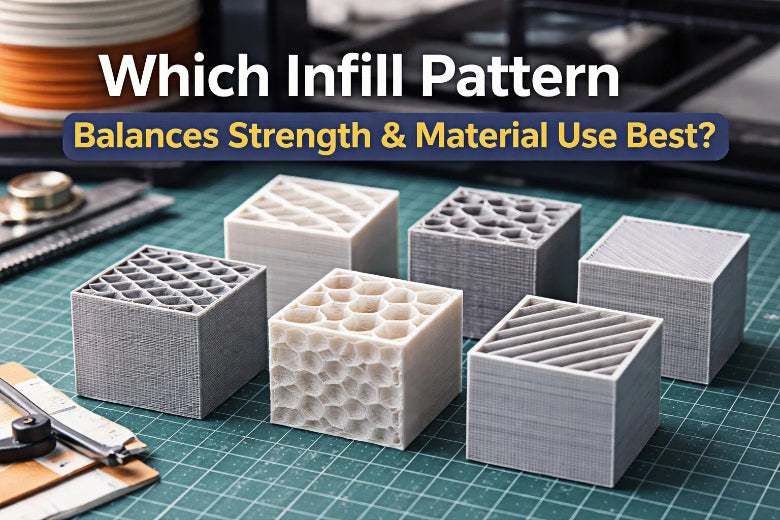
You want your 3d printing projects to be strong and use materials well. Recent test data shows gyroid infill patterns explained are the best choice. They are stronger than grid infill by more than 13N. They also give strength in almost every direction. Infill patterns explained are very important for print quality and speed. Picking the right infill saves material and makes prints better. Infill patterns explained also change how much filament you use and how fast you finish printing. Infill patterns explained help hobbyists and professionals make strong, good prints without wasting things.
Key Takeaways
- Gyroid infill patterns give strong parts and use less material. They are great for parts that need to work well.
- Picking the right infill density is very important. A density of 20% to 40% works well for most prints. It gives good strength and prints faster.
- For prints that are just for looks, use low-density infill patterns. Honeycomb or gyroid patterns help save material and time.
- Try different infill patterns and densities for your project. This helps you get the best strength and use less material.
- Do not make mistakes like using too much infill density. Use only what you need for the strength you want.
Infill Patterns Explained
What Is Infill In 3D Printing
When you use infill in 3d printing, you fill the inside with a pattern. This pattern is called infill. Infill helps your print stay strong and hold its shape. You cannot see the infill from the outside. It makes your 3d prints both stronger and lighter. You pick an infill pattern to decide how the inside will look. Some common infill patterns are concentric, grid, line, gyroid, octet, lightning, triangular, tri-hexagon, cubic, and cross.
- Concentric infill prints fast but does not add much strength.
- Grid infill is good for big flat areas but can block the nozzle.
- Line infill uses straight lines to make parts stronger.
- Gyroid infill has special features and takes more time to print.
- Octet infill makes pyramid shapes for a smoother surface.
- Lightning infill prints quickly but is not very strong.
- Triangular and tri-hexagon infill give strength but may block the nozzle.
- Cubic infill makes closed spaces for strong parts.
- Cross infill lets the part bend more.
You also need to know about infill density. Infill density is how much of the inside is filled. If you pick a high infill density, your print will be heavier and stronger. If you pick a low infill density, your print will be lighter and use less material.
Why Infill Matters For Strength And Efficiency
You want your infill 3d printing project to be strong and use material well. The infill pattern you choose changes how strong your print will be. Some patterns, like cubic or gyroid, make parts very tough. These patterns are best for parts that hold weight. Patterns like honeycomb let parts bend if they do not need to be strong.
Tip: The infill density you pick also changes strength. More infill density means more strength, but it uses more material and takes longer to print.
Infill patterns also change how much filament you use and how fast you finish printing. Grid and cross-over patterns stop bending and stretching better than line patterns. If you add extra support to your infill, your print can get even stronger. You should think about what you need before you pick an infill style. The right infill 3d printing choice helps you balance strength, speed, and how much material you use.
Common Infill Patterns In 3D Printing
Grid Infill Overview
You see grid infill in many 3d prints. This pattern uses a simple crisscross structure. It prints fast and is easy to set up. Grid infill works for models that do not need to be very strong. You can use this pattern for display pieces or quick test prints. The structure gives support but not the most strength. If you want speed and to save material, grid infill is a good pick.
Gyroid Infill Strength And Efficiency
Gyroid infill patterns are special because of their shape. They give strength in every direction. This pattern absorbs energy well and is very tough. You can use gyroid infill for parts that need to be strong and save material. The structure uses less material than some other patterns but still stays strong. Gyroid infill also spreads out stress evenly. This pattern is best for parts that twist or bend.
Cubic And Triangle Patterns
Cubic infill patterns make small cubes inside your print. They give good strength and last a long time. This pattern works for parts that need to hold weight. Triangle infill patterns use repeating triangles. They give medium strength and last well. Triangle infill prints faster than cubic infill. You can use these patterns for test prints or parts that need medium strength.
Honeycomb And Tri-Hexagon Patterns
Honeycomb infill patterns use hexagons. They give some strength and are flexible. This pattern saves material and prints fast. You can use honeycomb infill for parts that do not need to be very strong. Tri-hexagon infill patterns mix triangles and hexagons. They give the most strength and can handle a lot of force. This pattern is best for heavy-duty parts. You can use tri-hexagon infill when you need something very strong.
Note: The table below shows how each infill pattern compares for strength and durability.
|
Infill Pattern |
Strength Level |
Print Speed |
Material Use |
Best Use Case |
|---|---|---|---|---|
|
Grid |
Moderate |
Fast |
Low |
Prototypes, display models |
|
Gyroid |
High (all directions) |
Medium |
Low |
Functional, load-bearing |
|
Cubic |
High |
Medium |
Medium |
Weight-bearing, strong parts |
|
Triangle |
Moderate |
Fast |
Low |
Test prints, medium strength |
|
Honeycomb |
Moderate |
Fast |
Low |
Flexible, light parts |
|
Tri-hexagon |
Highest |
Slow |
High |
Heavy-duty, max durability |
You can see that each infill pattern gives different strength, durability, and material use. Pick the infill pattern that fits what you need for your print.
Strength Vs. Efficiency In Infill
How Infill Density Affects Strength
You want your 3d prints to be strong and last long. The infill density you pick matters a lot for strength. If you make infill density higher, the inside of your print gets more solid. This helps your part hold more weight and stress. Tests show that more infill density makes tensile and compressive strength go up. If you set infill density to 100%, your part will be very strong. But this does not always mean it will handle impacts better. Some tests found that 85% infill density gave the best impact strength. At 100% infill density, parts can get brittle and break fast under stress. Non-solid infill patterns, like hexagonal infill, often work better for yield stress and ultimate tensile stress. These patterns help your print handle stress and keep its shape.
- Tensile and compressive strength get better with more infill density.
- Impact strength is highest at about 85% infill density.
- Solid infill can make parts break easier and not absorb shock.
- Hexagonal infill patterns help parts stay strong and keep their shape.
Think about what kind of stress your part will face. If you need your print to hold a lot of weight, pick an infill pattern and density that fit your needs. Most projects do not need 100% infill density for good strength and shape.
Material Use And Print Time
If you make infill density higher, you use more material and printing takes longer. The change is not always even. If you double infill density, you might use more than twice the material and time. Most people find that 20% to 40% infill density works well. You get enough strength and do not waste filament or time. If you use high infill density, you will see material use and print time go up quickly. For big prints or fast tests, keep infill density low to save time and material.
|
Infill Percentage |
Strength Impact |
Material Use |
Notes |
|---|---|---|---|
|
0% |
None |
None |
No structure |
|
40% |
Rapid increase |
Moderate |
Good for most applications |
|
50%-100% |
Small increase |
Doubles use |
Not a linear relationship |
After 40% infill density, strength does not go up much, but material use keeps rising. For most prints, you do not need more than 60% infill density unless you want the most strength.
Best Patterns For Balanced Performance
Pick an infill pattern that gives both strength and saves material. Some patterns, like gyroid, triangle, and tri-hexagon, spread out stress well. These patterns help your print stay strong and light. Gyroid infill is a great choice for balance. It gives strength in all directions and keeps prints light. Triangle and tri-hexagon infill also give good strength and handle stress well.
Tests show that rectilinear infill patterns make a steady structure. This helps your print handle stress without weak spots. For most strong parts, 40% to 60% infill density works well. If your part will face a lot of stress, use 80% to 100% infill density for extra strength. For medium-stress parts, 30% to 40% infill density is enough.
Tip: You can make your print stronger by adding more walls instead of just raising infill density. This helps keep your print strong without using much more material.
When you pick an infill pattern, think about your project:
- For parts that must hold weight and stress, use gyroid or tri-hexagon infill with medium or high infill density.
- For decoration, use lower infill density and simple patterns like grid or honeycomb. This saves material and time.
- For quick test prints, keep infill density low and use fast patterns like grid.
- For big prints, use different infill density. Use more infill where you need strength and less where you do not.
Always match your infill pattern and density to what your print needs. This helps you get the best strength and save material. Good infill choices protect your print and help you finish faster.
Choosing The Right Infill For Your Print
Functional Parts: Strength Priorities
If you print a part that needs to be strong, focus on strength. Look at how the infill pattern helps your part handle stress. Gyroid and cubic infill patterns make parts strong in every direction. These patterns are good for parts that get pushed or pulled from different ways. Grid and triangular infill patterns are best when you know where the force will come from. If you line up the infill with the force, stress spreads out better. For things like gears, tools, or frames, use 60% or more infill density. This gives your part lots of support and makes it last longer. You can use 30-50% infill density for test prints before making the final part. Always pick the infill pattern that fits what your part will do.
Decorative Prints: Efficiency Priorities
Decorative prints do not need to be very strong. You can pick infill patterns that save material and print faster. Gyroid infill is good for big decorations because it looks nice and does not use much material. Concentric infill prints quickly and lets the part bend a little. For most decorative test prints, use 10-20% infill density. This keeps your prints light and saves material. You can see which infill patterns work best for decorations in the table below:
|
Infill Pattern |
Characteristics |
Best Use Case |
|---|---|---|
|
Gyroid |
Lightweight, strong, efficient |
Large decorative prints |
|
Concentric |
Fast, flexible, low material use |
Flexible decorative prints |
Practical Tips For Infill Selection
Always think about how strong your print needs to be, how it prints, and how much material you use. Think about what you want your print to do. If you are new to PLA, start with grid or gyroid infill patterns. Set infill density to 20% for most test prints. If you need more strength, use 40% infill density. For very strong test prints, use 60% or more. Honeycomb infill works well at medium density but can break easily if you use too much. Rectilinear infill gives steady strength at any density. Concentric infill gives the most tensile strength at 100% density, but you do not need this for most test prints. Always try small test prints before making big parts. Change the infill pattern and density if you need to. This helps you get the right mix of strength and saving material for every 3d print.
Tip: Most hobby prints do not need more than 40% infill density. You can save material and time by picking the right infill pattern for your test prints.
Infill Comparison Table
Quick Reference For Patterns, Strength, And Efficiency
You need to pick the best infill for your 3d prints. Looking at numbers can help you choose quickly. The table below shows how each infill pattern does for strength, speed, and material use. You can use this table to find the best match for your project.
|
Infill Pattern |
Strength Rating |
Print Speed Rating |
Material Usage Rating |
Recommended Use |
|---|---|---|---|---|
|
Grid |
⭐⭐⭐ |
⭐⭐⭐⭐ |
⭐⭐⭐⭐ |
Fast prototypes, non-load-bearing parts |
|
Gyroid |
⭐⭐⭐⭐⭐ |
⭐⭐⭐ |
⭐⭐⭐⭐ |
High-strength functional parts |
|
Cubic |
⭐⭐⭐⭐ |
⭐⭐⭐ |
⭐⭐⭐ |
Isotropic, aesthetic, strong parts |
|
Cubic Sub-Division |
⭐⭐ |
⭐⭐⭐⭐⭐ |
⭐⭐⭐⭐⭐ |
Flexible hinges, snap-fit toys |
Tip: Use this table to compare infill patterns before you print.
The next table shows real test results for each infill pattern. You can see how strong each pattern is and how much it bends. The table also shows print time and how much energy each pattern can take.
|
Infill Pattern |
Impact Energy (J) |
Print Time (min) @ 20% |
Flexibility (° deflection at 10 N) |
Recommended Use |
|
|---|---|---|---|---|---|
|
Grid |
32.4 |
1.8 |
45 |
1.2° |
Fast prototypes, non-load-bearing parts |
|
Gyroid |
38.9 |
2.4 |
58 |
1.0° |
High-strength functional parts |
|
Cubic |
36.1 |
2.0 |
52 |
1.1° |
Isotropic, aesthetic, strong parts |
|
Cubic Sub-Division |
28.7 |
1.5 |
38 |
2.8° |
Flexible hinges, snap-fit toys |
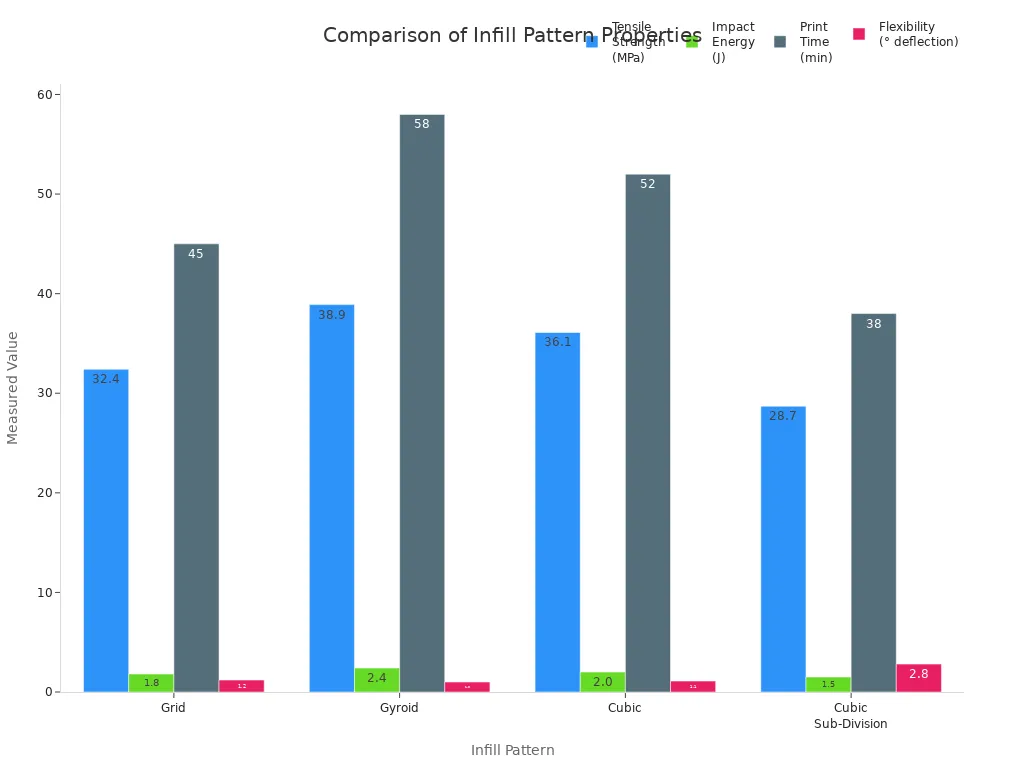
You can use these numbers to help you pick the right infill. If you want the strongest part, gyroid infill is the best. If you want a fast print and less material, grid or cubic sub-division infill is good. For parts that need to bend, cubic sub-division infill works best.
Note: Always pick the infill pattern that fits what your part needs to do. This helps you get the best print every time.
Recommendations And Best Practices
Top Picks For Most Users
You want your 3d prints to turn out great. Most people use a few infill patterns for many projects. Experts say honeycomb, gyroid, and triangle infill are good choices. These patterns give you both strength and save material. Honeycomb is strong and light. It works well for most shapes. Gyroid is strong in every direction. It handles stress even at low density. Triangle infill is very strong and uses less material.
Here is a quick look at the top picks:
|
Infill Pattern |
Why Choose It? |
When to Use |
|---|---|---|
|
Honeycomb |
Strong and light, good efficiency |
Everyday prints, models |
|
Gyroid |
Strong in all directions, resilient |
Functional, load-bearing parts |
|
Triangle |
High strength, low material use |
Mechanical parts, test prints |
Tip: Start with 20% infill density for most prints. Only use more if you need extra strength.
When To Use Each Pattern
Pick the infill pattern that fits your project. For light or decorative parts, use honeycomb or gyroid with low density. For strong parts, use triangle or grid infill with higher density. If you want fast prints, use rectilinear or grid infill. These save time but might use more material.
People sometimes make mistakes with infill. They use too much infill, pick hard patterns, or forget about print time. You can avoid these mistakes. Test different settings and think about what your part needs to do.
|
Mistake |
How to Avoid It |
|---|---|
|
Too high infill density |
Only use as much as you need for strength |
|
Unnecessary complex patterns |
Pick simple patterns for quick or light prints |
|
Ignoring print time |
Check how long printing will take before you start |
Note: Always test small prints first. This helps you find the right mix of infill, strength, and saving material.
You can get better results by matching the infill pattern and density to your print’s job. This saves material, cuts print time, and gives you strong parts.
Gyroid infill is the best for strength and saving material in most 3d prints. You should pick infill patterns that fit your project. Try new patterns to see what works best. New ideas like adaptive infill and variable density help you save time and material. The table below shows how some infill patterns make prints stronger:
|
Infill Pattern |
Optimal Density |
|
|---|---|---|
|
Grid |
20% |
56% |
|
Honeycomb |
50% |
64% |
Test different infill settings and check new research to get the best results.
FAQ
What is the best infill pattern for strong 3d prints?
You get the best strength with gyroid infill. This pattern spreads force in all directions. It works well for most functional parts. You can trust gyroid infill for projects that need to last.
How does infill density affect print time?
Higher infill density makes your print take longer. You use more material and your printer works harder. For most projects, 20% to 40% infill gives a good balance between speed and strength.
Can I use low infill for decorative prints?
Yes, you can use low infill for decorations. Low infill saves material and prints faster. Your print will stay light. You do not need high infill for models that do not hold weight.
Which infill pattern saves the most material?
Grid infill uses less material and prints quickly. You can choose this pattern for test prints or display models. It gives enough support without wasting filament.
Do different infill patterns change how a part bends?
Yes, infill patterns change how your part bends or flexes. Patterns like honeycomb and cubic sub-division let parts bend more. Gyroid and triangle infill make parts stiffer and stronger.
Tip: Always match your infill pattern to your project’s needs for the best results.